Yes it looks cut off…
Hello,
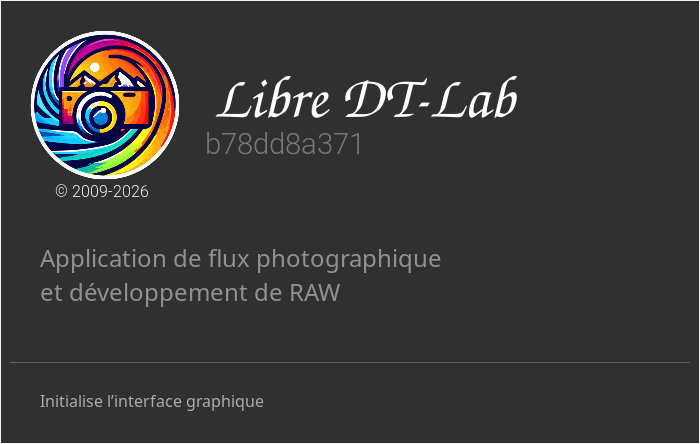
It is indeed a minor bug in the Windows version; I haven’t had a chance to work on it yet—it’s not really a priority 
Here’s a screenshot of the Linux version.
Greeting from the Luberon,

Christian
Oh that looks nice and yes I said cosmetic…aka low priority 
1 Like
Hi Andreas
Yes, it’s in the works; I’m currently writing it, but I still need to run a few tests. I think I can finalize the module, but like you, I’ve noticed that I can improve the handling of highlights.
Yes, you’re right; it’s an estimate calculated based on the histogram derived from the JPEG embedded in the RAW file (which has already been processed by the camera’s picture style).
For now, I’m running a series of tests to improve the results in the highlights by accentuating them before processing in the tone mapper in order to preserve more detail.
Thank you for your comment; it helps me reflect on and improve the module.
Greetings from the Luberon,
Christian
I would be happy with three or four buttons in the graph with each aiming at something a little different. The buttons can be ignored anyway.
Cool … honestly i cannot imagine how much time and effort you are putting into this project !!!
Sorry if i am sounding too critical at times , is not my goal … just want to share my thoughts .
I really really hope you get the modules into the master !!!
I found two issues on my machines which i do not understand …
Both machines are M1 macs … both latest Tahoe , Mac Studio and MBP . Same specs in terms of memory .
On Mac Studio … there is the in image color picker ( color equalizer ) missing .
On MBP … there is the GPU acceleration not available
Any idea why that is ?
OK … so it works as i thought it does .So i can influence it by chosing a different " picture Style " in Canon terms ?!
The " issue " with the highlights is mostly prominent when the scene is already high contrast by nature … when the scene is mid or low contrast by nature the " issue " is less present ?!
Just to let you know … since you have started your " own DT project " , i use it almost exclusive for my editing . Not just as playground !!!
As you have added really cool features that i love to use !!!
Regards Andreas
Hello,
No problem, that’s how I see it too, and it’s the only way to improve and understand what we’re doing. I also hope I’ll be able to incorporate it into the official version.
Unfortunately, I don’t have any experience with macOS; I don’t think Mac handles the mouse wheel the same way. Maybe we could replace it with a keyboard shortcut?
Only the histogram will have an effect; the colors won’t affect the curve at all.
In “cinematic crt” mode, I don’t recommend using this curve for high-contrast images, as it tends to flatten highlights and local contrast.
Have a nice day,
Christian
THX for your reply … much appreciated
1 Like
Hello,
Just a heads-up: I’ve posted a new update.
I’ve cleaned up the code, and for the scene-referenced mode, the curve calculated based on the thumbnail embedded in the RAW file no longer uses three nodes, so it’s smoother and corrections are easier to make.
Greetings from the Luberon,
Christian
2 Likes
Hi Christian …
maybe I am missing something , but I can´t see any difference in behavior of the module … nor in the curve layout ?!
Maybe you could shed some more detailed light into it ?
Regards Andreas
Hello,
I’ve found the cause of this minor bug: the text in the SVG wasn’t being converted to a path.
That’s possible; I haven’t changed the mathematical formula, I’ve just reduced the number of nodes on the curve. This makes it easier to make adjustments by selecting a node and moving it precisely using the two sliders.
The other changes I’ve made to the module are:
- Code clean-up: merging of
process_lutandprocess_fusion. - Bug fix: the purity boost slider now depends on ‘compression smoothness’
- Gamut protection in cinematic CRT mode; pre-gain modulation based on colour purity.
purity_gate = 1.0 - 0.5 × purity. A proportional adjustment to keep all saturated colours within the gamut after tone mapping.
I think I can consider this module finalised. I’ll try to find time to write a tutorial and make a video.
The latest version is available on GitHub
Greetings from the Luberon,
Christian
This would be super useful indeed! 
Thanks a lot.
1 Like
Hi Christian … thanx for the latest changes .
I personally think the curve is indeed improved !!!
The nodes can be now moved without creating too drastic changes in the tones and colors … before one was risking some kind of posterization or flattening of details , at least from my POV .
Working with a DNG is still very different … as the two curve presets do not work with DNG created by i.e. DXO Pure Raw , as the error message is saying no thumbnail in that file .
One thing came to my mind … maybe too late by now as the module seems to be nearly finished . How about adding a color picker to the module, to select a tonal range in the image to manually created the curve !!!
I did find a bug … just this morning , as on my system the " purity boost slider " has no effect at all .
A last thing I recognized on my system is a change in the color rendition of the module … my images do look more on the blue/ magenta side , very slightly . Not sure if you have changed something on that front … ?
REgards Andreas
Hello Andreas,
This was done deliberately, perhaps wrongly…
The purpose of this slider is to restore purity after gamut processing, so it makes sense to me that it follows the same logic and responds to the ‘compression smoothness’ slider (0% = off, 0.1–99.9% = blend, and 100% = on).
In ‘cinematic DRT’ mode, gamut processing is already built-in, as mentioned in the tooltip.
For more in-depth processing, I also use PureRaw, and in this case, I prefer to set the exposure correctly and use the tone equaliser with this preset.
toneequal_Masque _ Basecurve.dtpreset (1.2 KB)
Before the purity_gate, for example, saturated red underwent an expansion (V_new > V_norm) that pushed it out of gamut, resulting in an artificial warm cast in the image.
After the purity_gate, each colour remains within the gamut. Red remains a true red, blue remains blue, and the natural colour balance is preserved without this artificial warming. I agree that for some images, this can be an advantage; in such cases, I would choose a warmer ‘look’ or adjust the white balance.
Greetings from the Luberon,
Christian
THX Christian for your reply and detailed info … much appreciated !!!
I was just surprised about the different " purity slider " behavior , as before one could push the colors quite nicely .
1 Like
I can easily put it back, but I’d remove it from the collapsible section and rename it, for example, ‘output purity’.
Did you get better results than with the ‘saturation boost ucs’ slider?
What do you think?
Many thanks,
Christian
Honestly … I have not noticed any big differences , and I never went above 10% with the purity slider .
I am working quite conservative within DT itself … as it is only the raw converter for me .
So i will leave that entirely up to you …
1 Like
Just to let you know … if I use the new " Raw Denoise " within DT Neural and edit the resulting DNG with your Base Curve module … no warning does come up . Meaning I can use the two curve presets … very interesting , this means the issue is coming with the DXO dng and not the dng format in general ?!
1 Like
Hello,
It’s never too late to do things properly, so I’ve added it, and to make adjustments easier in low-light conditions, I’ve also made the ‘scale for graph’ slider visible in all modes.
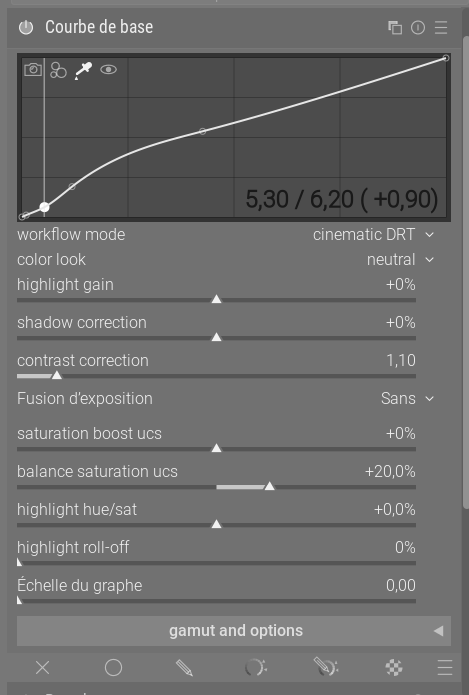
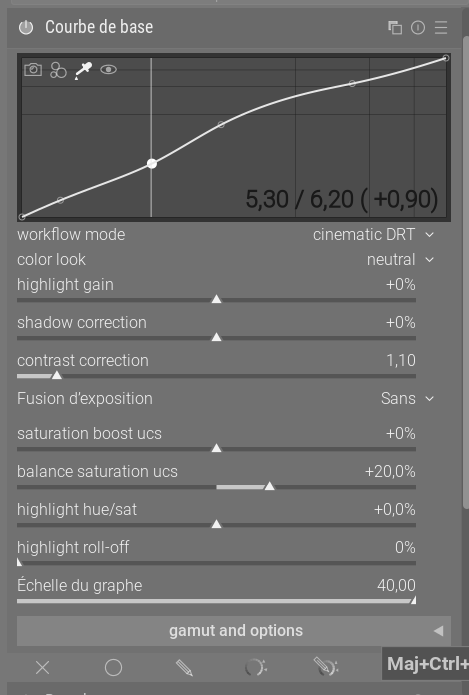
The latest version is available on GitHub
Greetings from the Luberon,
Christian
2 Likes