Thanks for the feedback. I actually wanted to make it more user-friendly and less technical by removing x and y, plus the word linear. 
3 Likes
Hello,
The auto gamma function works perfectly.
Agx is evolving really well within Darktable. It had been a while since I had tried it, and the progress of this project is remarkable.
Well done again, and congratulations to the whole community that is helping you with this project.
Greetings from Luberon,
Christian
7 Likes
4 Likes
I just built DT from latest sources in the master branch. I don’t see AgX nor Capture Sharpening modules. I thought they were merged?
1 Like
Capture Sharpening is merged, I have tested it and it works great. It’s not a new module so that’s why you must be confused, you can find it inside the demosaic module. Agx is still WIP.
10 Likes
hi
…after a long time i have now installed the agx version (5.3.0+169…) of darktable again. the problem is that the exif is not recognized when importing from my Nikon z6 in the agx version. the values such as iso, aperture, shutter speed, etc. are always zero.
as soon as i install the darktable version without agx (5.3.0+148…) and import images from the z6, the exif is recognized without any problems.
i had already described the problem in a separate post. at least a complete uninstallation of darktable had solved the problem. but it is noticeable that i install the new agx version and the data of the z6 cannot be read out again and if i install the version without agx there is no problem in this regard.
I’m afraid I cannot help with that. I always include all changes from master and always update the separately maintained submodules before building the AppImage. Are you on Linux?
I’m going on vacation, but I’m still working today and packing stuff in the evening. I’ll be back in 3 weeks.
3 Likes
I work with Windows 11.
The problem is that this occurs on three different computers and therefore has something to do with the AGX version. The images from my Z50II, Fuji X-E2, and X-Pro 1… are recognized without any problems during import, but only the RAW files from the Z6 (even after converting them to DNG) seem to have this problem.
Perhaps someone else here is experiencing the same problem.
This is independent of Agx, it is due to the build being done without proper support for z6. Maybe a different libraw version being used.
2 Likes
hmmm…if i have followed this correctly, the agx version should come from the same “master version”, there should be no difference.
the z6 is an “old camera” and is fully supported in darktable. ?
Your problem seems to be how dt was compiled (aka what features were picked/available) when the executable was created. I think @priort create the windows files and he needs to check the libraw settings/version.
The agx PR will get merged at some point (maybe September). I suggest you wait for it.
I have to go for medical appointments this morning but I can check into it on my end…I am just building from kofa’s agx branch I think…can you pm me a file so I can confirm on my end that it wont work…I can update my build enviroment…everything has been working nicely so I haven’t for sometime…
Libraw is an external dependency (you can check this here: darktable/src/external at master · darktable-org/darktable · GitHub)
@priort : please do a git submodule update --init before build, if it’s not already part of your build process.
1 Like
I do that every time…
1 Like
Maybe @Suki2019 can post a problematic raw file, and you can try to replicate the problem.
I haven’t looked into it, but sometimes in the docker build environment I get an error on the 1st such command, so, just to make sure, I run it a few times and check that no errors are shown. But I guess you do that, too. In that case, I have no idea, I’m afraid.
I start my build with git clean -fdx to surely eliminate all local changes, and then do the git pull and git submodule update --init.
1 Like
This is how I build (it’s a docker environment in Linux):
root@4f5d6945212e:/darktable# lensfun-update-data ; git fetch; git fetch --tags ; git checkout origin/agx ; git config submodule.src/tests/integration.update none ; git clean -dfx ; git submodule update --init --recursive ; (for d in /darktable/src/external/* ; do echo git config --global --add safe.directory $d ; done|bash)
Reading http://lensfun.sourceforge.net/db/versions.json …
Reading http://wilson.bronger.org/lensfun-db/versions.json …
Successfully updated the database in /var/lib/lensfun-updates/version_1.
remote: Enumerating objects: 85, done.
remote: Counting objects: 100% (60/60), done.
remote: Total 85 (delta 59), reused 59 (delta 59), pack-reused 25 (from 1)
Unpacking objects: 100% (85/85), 11.50 KiB | 250.00 KiB/s, done.
From https://github.com/kofa73/darktable
 + 06f0b0b576...1bfb368296 agx                     -> origin/agx  (forced update)
 * [new tag]               agx-2025-07-27-13-00-00 -> agx-2025-07-27-13-00-00
Previous HEAD position was 06f0b0b576 agx: Scale contrast according to gamma to maintain midtone contrast around the pivot. Fixed security_factor scaling bug introduced during percentage -> fractional conversion.
HEAD is now at 1bfb368296 agx: Use N_ with DT_IOP_SECTION_FOR_PARAMS
Removing AppDir/
Removing build/
Skipping submodule 'src/tests/integration'
fatal: detected dubious ownership in repository at '/darktable/src/external/LibRaw'
To add an exception for this directory, call:

        git config --global --add safe.directory /darktable/src/external/LibRaw
fatal: Unable to find current revision in submodule path 'src/external/LibRaw'
root@4f5d6945212e:/darktable# lensfun-update-data ; git fetch; git fetch --tags ; git checkout origin/agx ; git config submodule.src/tests/integration.update none ; git clean -dfx ; git submodule update --init --recursive ; (for d in /darktable/src/external/* ; do echo git config --global --add safe.directory $d ; done|bash)
Reading http://lensfun.sourceforge.net/db/versions.json …
Reading http://wilson.bronger.org/lensfun-db/versions.json …
Info: No newer database was found for last installed Lensfun.
HEAD is now at 1bfb368296 agx: Use N_ with DT_IOP_SECTION_FOR_PARAMS
Skipping submodule 'src/tests/integration'
root@4f5d6945212e:/darktable# ./tools/appimage-build-script.sh
darktable build script

Building directory:  ./build/
There is an error at first (because of file ownership, with the docker user being root):
fatal: detected dubious ownership in repository at '/darktable/src/external/LibRaw'
Then it goes away on the 2nd command.
This is the complete command-line for the update itself that I repeat:
lensfun-update-data ; git fetch; git fetch --tags ; git checkout origin/agx ; git config submodule.src/tests/integration.update none ; git clean -dfx ; git submodule update --init --recursive ; (for d in /darktable/src/external/* ; do echo git config --global --add safe.directory $d ; done|bash)
And then to build:
./tools/appimage-build-script.sh
I just updated my build environment and lensfun…
During compile…I have always just used the defaults in the build script…
I see this for libraw…
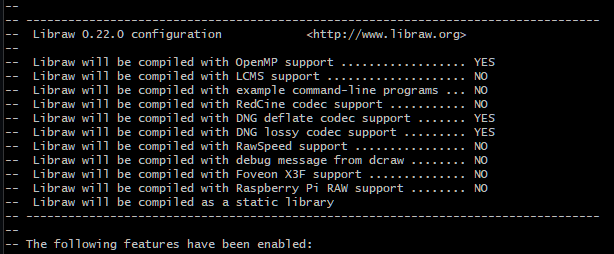
No idea if that sheds any light… I will repost this new build shortly…
EDIT: I just searched the forum for playraw Nikon Z6…found an image and it opens fine on the version that I posted earlier…I will still post this updated one but for me and I run WIn11 the file opens fine…
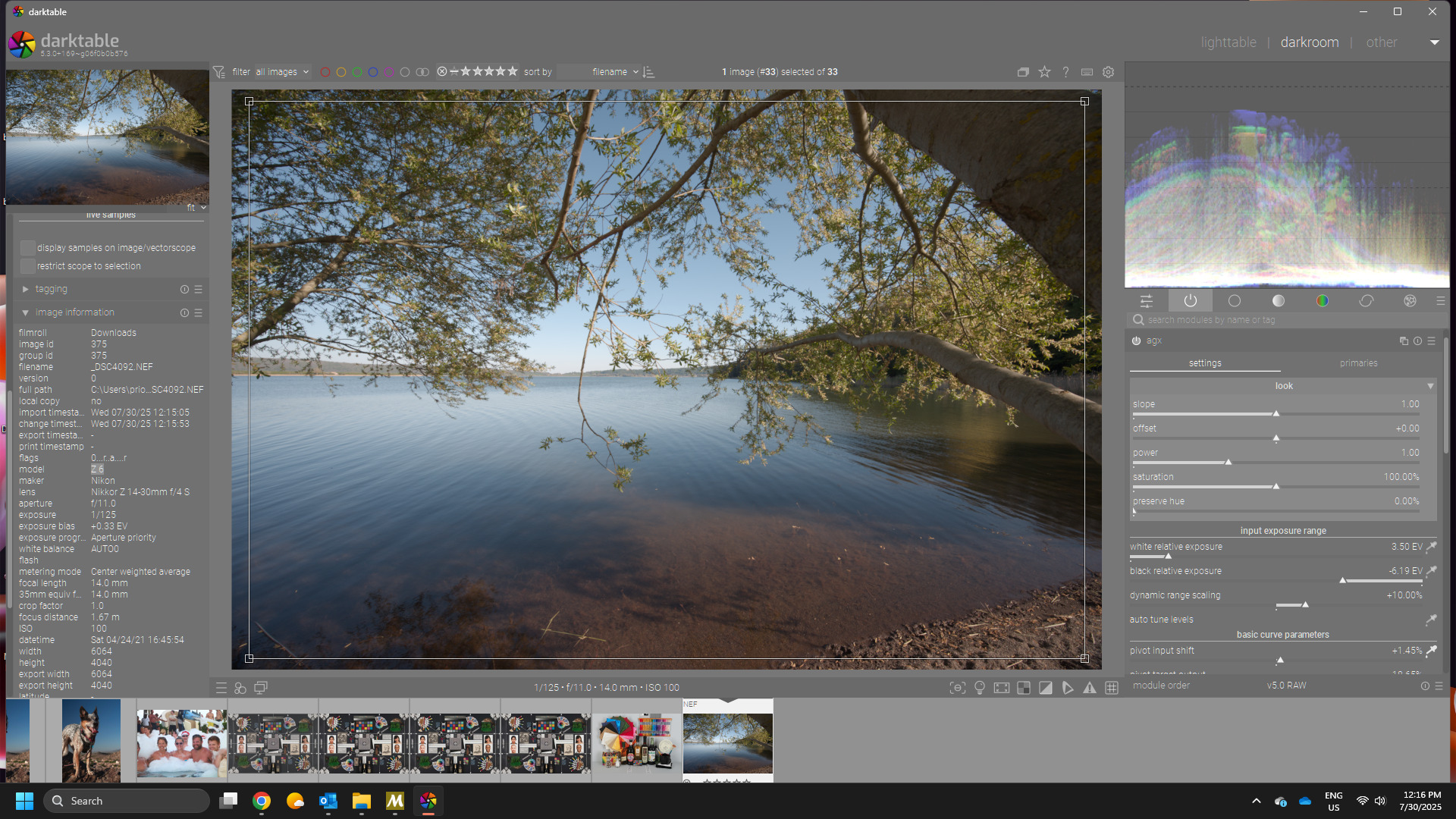
Here: updated…seems a little newer…+172 vs 169 but as I said the first one worked fine for me… is it maybe the compressed nikon file issues or maybe thats not an issue for this camera…
3 Likes
It’s the same as what I get:
-- LibRaw string version: 0.22.0
-- LibRaw ID version:     0x0220
-- LibRaw SO version:     24.0.0
--
-- ----------------------------------------------------------------------------------
--  Libraw 0.22.0 configuration            <http://www.libraw.org>
--
--  Libraw will be compiled with OpenMP support .................. YES
--  Libraw will be compiled with LCMS support .................... NO
--  Libraw will be compiled with example command-line programs ... NO
--  Libraw will be compiled with RedCine codec support ........... NO
--  Libraw will be compiled with DNG deflate codec support ....... YES
--  Libraw will be compiled with DNG lossy codec support ......... YES
--  Libraw will be compiled with RawSpeed support ................ NO
--  Libraw will be compiled with debug message from dcraw ........ NO
--  Libraw will be compiled with Foveon X3F support .............. NO
--  Libraw will be compiled with Raspberry Pi RAW support ........ NO
--  Libraw will be compiled as a static library
-- ----------------------------------------------------------------------------------
1 Like
i am now confused to the max…
version …169 shows zero in the exif data for all newly imported Z6 images.
i uninstall this version and install version …172. i reimport the images of the Z6 (i always delete the *.xmp from the folders first) and all exif are displayed correctly. however, version 172 runs incredibly slow for me (like some kind of weird delay).
i reinstall version 169 and reimport the images from the Z6 and the exif are displayed correctly. this works here on my laptop (intel+MX350) and my PC (AMD+4030).
(it’s a good thing I’m not a programmer…LOL)
here are two files of the z6. there are no copyright restrictions
NZ6_9443.NEF (27.0 MB)
NZ6_9443.NEF.xmp (9.9 KB)
NZ6_5535.NEF (33.3 MB)
NZ6_5535.NEF.xmp (10.5 KB)