@MStraeten Thank you for your latest built. Am I correct that yours is not same as the latest Kofa’s latest 5.3.0+476~g95327b15ea?
This build is based on darktable master (like nightly builds) + additional not yet merged R5 support.
Thank you. I was just informed by Kofa too.
You are now the only lifeline for latest DT for osx_86.
Tried to build from the source. Every time tried brew fails halfway.
recently my Xcode also failed from 26.0.0 to 26.0.1.
I guess Apple seems to want to force all users to new M1/M2 machines.
for my x86_64 builds i created a virtual machine using utm (UTM · GitHub) and run Sonoma with Xcode15 commandline tools and also rosetta to be able to build x86_64 stuff using macports https://www.macports.org
macports supports building for different deployment targets or architectures (homebrew just can build for the current system)
maybe try this aproach - the description in darktable/packaging/macosx/BUILD.txt at master · darktable-org/darktable · GitHub is up to date
thank you for the link I will try that.
BTW, are you aware the blank window issue with preferances, styles and possibly other windows. Last downloadable nightly as well as your are suffering from it.
I was just about to download your previous build with Agx. I report on the result.
update report:
your last build 5.3.0+280 and +333 are running fine. It is to identiable early on by the splash screen.
i can’t see that behaviour on my m1 build - so it’s hard to find the root cause by bisecting.
yeh I think it is intel issue only.
I already reported it. Hope there will be fix soon.
btw, should keep 333 or 280? 280 posted after 333 release.
I went thru this steps for build by macport. Unfortunately, failed at cmake. Here the error received:
– Building LibRaw from intree copy
CMake Error at /usr/local/share/cmake/Modules/FindPackageHandleStandardArgs.cmake:227 (message):
Could NOT find LensFun (missing: LensFun_INCLUDE_DIR)
Call Stack (most recent call first):
/usr/local/share/cmake/Modules/FindPackageHandleStandardArgs.cmake:591 (_FPHSA_FAILURE_MESSAGE)
cmake/modules/FindLensFun.cmake:35 (find_package_handle_standard_args)
src/CMakeLists.txt:426 (find_package)
Blank preferences & styles bugfix build: darktable-5.3.0+487~gf24fe403f5_x86_64.dmg
2 Likes
Great, thank you!! I did follow the discussion and work on GitHub that you guys did. Amazing, thank to you all
1 Like
Fantastic work. Very impressive work
Thank you.
current master 5.3.0 build + Canon R1 and R5mII support by Adding new camera support in darktable / LibRaw / ExifTool – Pandas Welt + a couple of RF lensfun data from: Kameratrollet
darktable-5.3.0+495~gb4d8fd80f1_arm64.dmg (macOS >= 11.3)
darktable-5.3.0+495~g04d4b524d6_x86_64.dmg (macOS >= 10.14)
you might run it with an in-memory library via terminal:
/Volumes/darktable/darktable.app/Contents/MacOS/darktable --library :memory:
or use a separate config directory:
/Volumes/darktable/darktable.app/Contents/MacOS/darktable --configdir ~/.config/darktable_test
also keep in mind that if you don’t disable writing sidecar files these can be messed up
both packages are unsigned, you might need to allow execution via terminal: " xattr -c <path/to/application.app> "
Release notes for 5.3.0 release: darktable/RELEASE_NOTES.md at master · darktable-org/darktable · GitHub
difference to released 5.2.1 see: Comparing release-5.2.1…master · darktable-org/darktable · GitHub
1 Like
There is an issue with x86_64. The Tone Equalizer masking.
The previous 487 does not have this problem. see attached screenshot.
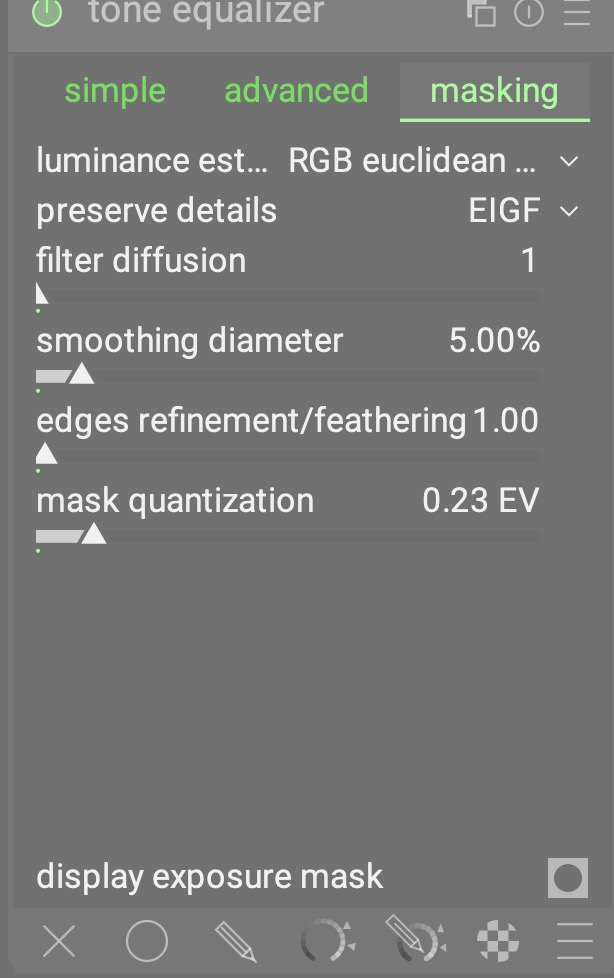
mask compensation slider are not shown and blank.
It is not an issue. It is a new feature: toneEQ: move exposure/contrast compensation sliders to advanced tab by MStraeten · Pull Request #18682 · darktable-org/darktable · GitHub
Thanks. Now I see it. I guess. Then not having the mask post processing bar is normal. Not seeing the bar throw me off. Actually, I like this new location and behavior. More direct interaction of compensation and histogram. curve above it. I should go to bed earlier. 
It is a feature I wanted for a while. The clicking back and forth was not ideal in my opinion. The bar graph was not useful either.
1 Like
As you may know earlier we had an issue with blank preference and style dialog which was fixed brilliantly by fantastic contributors. Initially, I thought this is of the same kind of problem. I was so excited with the new addition of the Agx module that I totally forgot all about the discussion and improvement of the Tone Equalizer development.
I am also pleased with its improvement. No more back and forth between the tabs.
Quick question before updating the OS on iMac intel. As I understand from a contribution of @zisoft in github, the latest build is working fine on OS26 (intel). Am I right?
If you are referring to Preference and style dialogs, yes they are working on my os26.1(intel). However, I did not fully tested DT for any potenial bugs the maybe their. Word of caution, most probably, your computer wants to update its X11,Macport and brew and that will take a long time. In my case X11 failed to fully upgrade and few days later did!
Enjoy it while you can. Apple once again abandoned its users. This time x86 users. Most probably, it will be the last upgrade for us.
i’m using it on macOS 26 (but on m1) …