darktable 5.4.0 released

The problem had two causes:

  • by mistake, the Italian translation contained the tooltip instead of the label text for the ‘reset primaries’ label
  • I used a simple label component, not the custom one from darktable, which can handle too long strings by truncating them and adding ellipses (“…”).

Should be fine once the new translation arrives; I’ll ship the code fix a bit later, along with other minor changes (revised tooltips, code clean-up).

1 Like

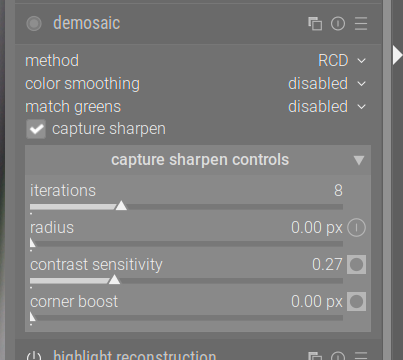
I installed Darktable 5.4.0 and I don’t see the Capture Sharpening module.

it is in the demoasic module.

It’s part of the demosaic module

Aaaaaa, thank you for the tip. I see that this option is disabled by default.

If you want it auto applied set the radius to zero and save it as an autopreset…it will then activate and do a fresh calculation for the radius for new images…

2 Likes

Note: If you do that it is probably smart to do some testing with higher ISO photos before creating the auto applied preset for your camera. At least for my A7iii the defaults will also sharpen higher noise a lot.

As with many settings some tweaking would likely be needed between cameras and shooting conditons… it may be that you could tweak the contrast threshold or some other setting to allow for a better result …not sure if that would stay with preset or if that helps but after some testing as you note an iso range could be added to the preset criteria to avoid it

1 Like

A mostly well working generic preset would be with radius and threshold set to zero. Both will then be calculated automatically.

5 Likes

darktable 5.5.0~git7.e4a126ed-1+13522.1
Source: OBS.
Linux Mint Mate 22.2
Module Colour Balance RGB

When I ctrl-click on the module header to name it, I get this in the name field:

Project-Id-Version:
Report-Msgid-Bugs-To:
PO-Revision-Date: 2025-11-23 22:06+0200
Last-Translator: Victor Forsiuk <vvforce@gm

In one line. Which came as a shock, first time, because the right panel gets widened to include the line!

Easy workaround. Overwrite it and it’s gone. But it’s a bug.

Is this post enough? I could make my first Github bug report. but that won’t happen for a few days.

threshold? but i don’t see threshold in the options?.. have I missed something?

EDIT I understand this has been later renamed to “contrast sensitivity”, so in this case ignore my question.

2 Likes

On the page install | darktable under OBS (Open Build Service), there’s a link called https://software.opensuse.org/download.html?project=graphics:darktable&package=darktable,
but clicking it displays a 503 error: “503 Service Unavailable, No server is available to handle this request.”
However, in my Linux version, “Linux Mint 22.2 Cinnamon,” I was able to automatically update to darktable 5.4 via the package repositories.
Is there perhaps a newer link?
“503” is a temporary error, perhaps just too many requests for the server to handle. So perhaps try again in a while (may need a few retries)

Thank you, yes… patience is a virtue

if you had the repository registered from the first time you used software.o.o … it will just update yes

This is great news! Thanks to all devs and testers for the good work! :vulcan_salute:

1 Like

And AppImages and Flatpaks are a blessing :smile:

1 Like

It looks like that download page link is broken.

You should be able to get to download via this path.

edit: software.opensuse.org is down

Thanks for that link, I’ll keep an eye on what happens with that previously mentioned link…