Hi Guys
I shoot with a Nikon Z6III and use DT 5.0.0. I’ve been using DT for many years.
But for the last two years, unfortunately, I’ve only been using JPG, as DT doesn’t display a natural ‘starting point’ when I import RAW files.
The ‘starting point’ with RAW is flat, dark and less saturated, and as I edit more than 6,000 insect photos a year, it’s not possible to try and recreate the correct colours etc. for every single image, which is why I’ve been using JPEG, as it works in DT.
All I want is to ‘start’ with an image that is approx. like the JPG image that comes from the camera (when I save in JPG), so that I can start with a ‘JPG look’ and then optimise my image from this starting point.
Has this become possible in a version later than 5.0.0, or am I forced to buy Adobe to get that option?
You won’t really get a jpeg-like rendition without creating a specific style for it, as in-camera jpegs tend to have things like split toning, LUTs and other corrections built-in.
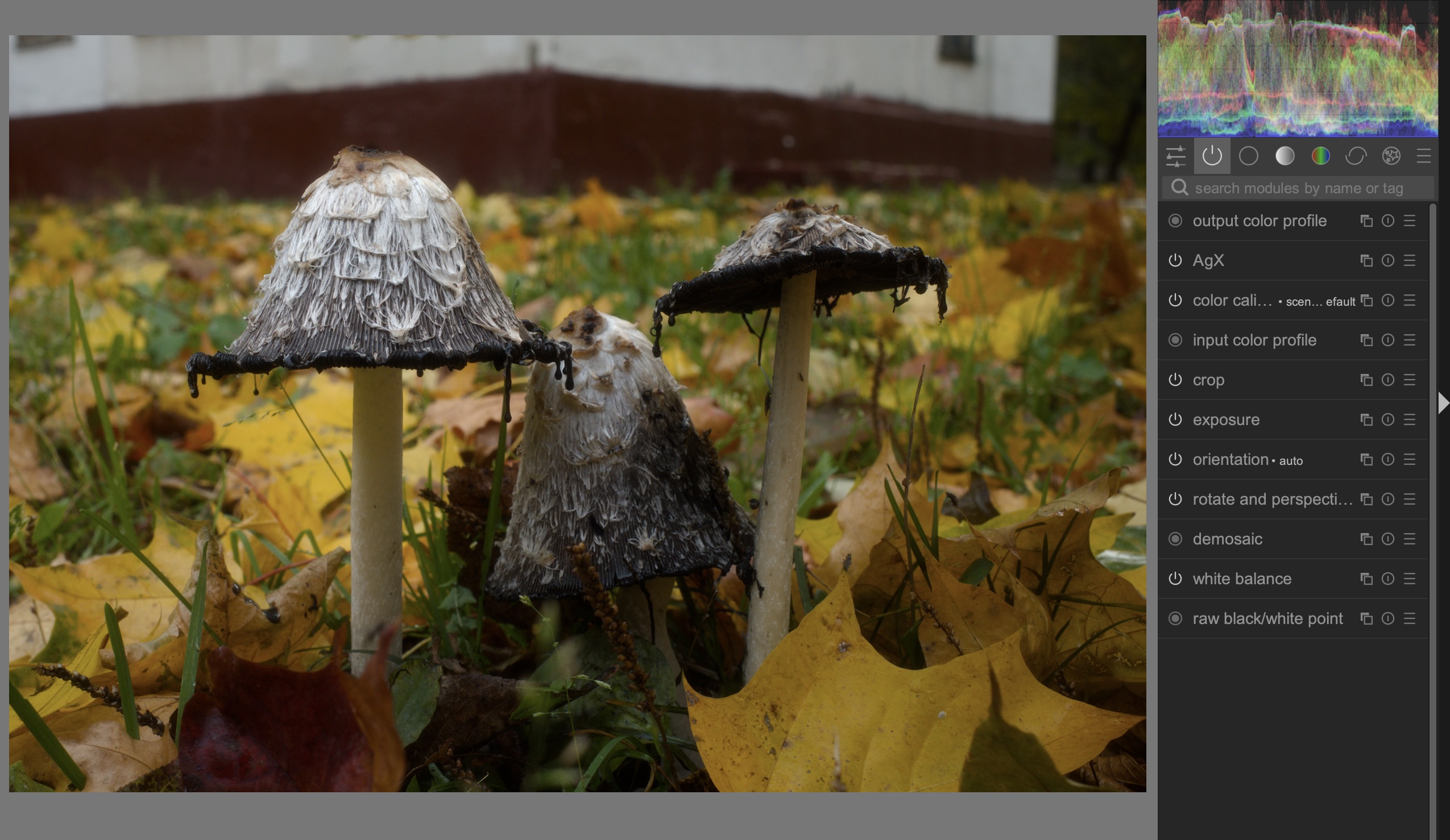
That said, the starting point of the current 5.6 darktable with the AgX workflow is fantastic. Other than adjusting the exposure, the white balance and a couple of sliders/pickers in the AgX itself, the image should come out very nicely processed as-is.
Here for example what the current standard import looks like, with just the AgX enabled and no other modules (other than crop/straighten). In AgX I’ve only set the contrast to 3.20 and that was all
I don’t know that there are answers, only opinions on what constitutes a good starting point!
I started with Rawtherapee. It has a button to apply curves to emulate camera jpegs: it didn’t work for me. I moved to darktable, because I found its starting point to be much “better.”
I would recommend that you upgrade to the current version of dt, and stay up-to-date.
Someone(s) has done a lot of work providing presets in dt to give starting points for many different cameras. I personally don’t use it.
I would say the same of 5.6 with sigmoid. I like the simplicity!
Which Tonemapper did you use before? It sounds a bit like it might have been filmic RGB. With Sigmoid (and AgX) you get a much better starting point. Furthermore you can dial in a starting point you like and auto-apply that to every image you import from that camera.
If you want to go that route I recommend letting that “jpeg look” go though - as long as you try to keep chasing what the camera offers SOOC you will probably have a hard time.
Why don’t you post one of your photos as RAW and JPEG in the playraw category and challenge guys to match the jpeg. Then you’ll learn different approaches which could ultimately lead to some good baseline presets?
Hi Bøje,
There are many possibilities to make your life easier.
In your case I might probably try something like this:
- update to latest version
- use a couple of automatically applied presets for sharpness, local contrast, color balance rgb protecting highlights and shadows for a starting point
- see for it that as much as possible is done by dt (lens correction, denoise)
- would try to cull away as many pictures as possible as early in the process as you can do
- add a frame and a watermark with copyright
It takes some reading to find your way.
You should be able to create a style that is similar to the jpg and should have more detail and sharpness than the JPG. I would update to the latest DT version as well when doing this. But if the JPG style is your real aim point then you might needed to use Nikons supplied software for your camera.
The new AgX tone mapper in DT is very good. and takes care of the dull look that a raw file opens as. I could suggest supplying a SOOC jpg and RAW file as a playraw to see what others can do but I have been told off about suggesting more playraws in the past. So if you want to send me a SOOC Jpg and the raw file as a private message I would at least try to see what I could do in DT5.6
I do not know about that and was on the verge to suggest it too, adding the question which modules one may use as a preset or add to a style. That would possibly help Bøje a great deal further. Giving a fair chance to evaluate and make a articulated choice for the future.
I think I remember which exchange you might be referring to which was a mix of me jesting and g-man reacting to my post taking it more seriously. If it came across as such: It was not my intention to tell you off.
You’re teetering on the edge of the rabbit hole. Your camera JPEGs look nice, but you’re finding that the darktable starting point isn’t satisfying. They both start with the same data, so, one might ask, what’s different?
The essential difference between the two is the tone curve. It may look like colors are different, but they’re only materially different in brightness terms, and that’s what the tone curve does. You’re simply missing that in your darktable starting point, as the camera has already applied it to make the JPEG.
And, the darktable starting point is closer to the original camera measurements, really, a better starting point. If you start with a tone curve already applied as you do with JPEG, some part of your subsequent modification is about backing that out, kinda like pressing the gas pedal after starting the car and finding out the front wheels are pointed other than straight-ahead.
Filmic, sigmoid, AgX, they’re all tone curves, some more convoluted than others. If you have any sort of math chops, tone curves are just transfer functions, which in plain language are functions that take an input value and turn it into another value. Learn the tone curve, and your post-processing will start to make much more sense.
I actually cringe (really) when I have to edit a JPG. I am so limited in what I can change or improve on a JPG because I only have 256 shades maximum of RGB while a raw can have a a lot of data beyond what the JPG records as 0% or 100% brightness. I can also do bigger color corrections with a raw than the limited fixes in the JPG. I would therefore never ever edit a JPG if a RAW was available.
But may one in a few thousand images I like the JPG rendition more than the rendition that I get from the raw so I just accept the JPG, but that is so rare and occurrence. I usually shoot in JPG and RAW but delete the JPGs once the raw is edited.
I have a few suggestions if you are willing to look beyond Darktable and JPEGs:
-
Rawtherapee and ART have AutoMatched curve that produces RAW rendition close to the embedded JPEG in the RAW. They also support Adobe DCP profiles which are alternative to AutoMatched curve, sometimes with better colors.
-
There is a new kid on the block Greycard which in my experience gives a pretty nice results from RAW with minimal efforts. The UI is pretty close to Abobe’s Lightroom.
-
And if you really like to edit JPEGS then I’d suggest to try instead HEIF format which your Nikon fully supports. HEIF has 10 bit per channel compared to just 8 for JPEG. This gives more room for editing. And file size is about 2 - 3 times smaller. For handling HEIF I recommend Darktable which has a great support built in.
I recommend also giving the manufacturer’s raw editor (NX Studio? I don’t have a Nikon) a try first. It will at least help you understand what the camera’s built-in styles are doing (in most cases the curves are further editable in their raw editor, etc.)
Once you figure out what it is that they do that you like, you can try to replicate that in darktable or RT. If you still can’t figure it out, perhaps you can post some test shots in this site’s Processing category and get some ideas.
Darktable won’t. It’s a feature, not a bug.
I made a basic style that was inspired by a lot of Boris Hajdukovic’s videos. I apply it immediately after importing. It gives almost usable photos without doing further editing.
I have auto-apply workflow defaults set to sigmoid. explanation below.
Here are the modules in my “basic edit” style.
- denoise (profiled)
- lens correction
- color balance RGB - basic colorfulness - vibrant colors preset
- diffuse or sharpen - local contrast preset
- diffuse or sharpen - lens deblur: hard preset
I shoot a lot outdoors and underexpose a lot to protect the highlights (avoid raw overexposure). sigmoid is the only tone-mapper with auto-ranging inputs. This was the easiest way for me to start editing. It’s helpful that exposure corrects for the exposure compensation in the photo EXIF. But that also screws with the default input range for the other tone mappers. I got tired of chasing these around while I’m doing other edits. sigmoid gives one less thing to have to mange. When I’m close to finished I may try filmic RGB or AgX instead of sigmoid to see how they look.