I recommend one of the first thing a new user should do is setup the preferences. Mainly, OpenCL enabled and scene refered (AGX). I could not find a page around those settings.
5 Likes
This is fantastic for colour photography!
I would very much welcome an addition for genuine monochrome RAW or DNG files from black-and-white sensors, as many modules apparently rely on colour information that is not available in these files, or modules want to apply corrections for interference that does not exist in this case.
2 Likes
Thank you, that’s a very important point.
I already worked on a Lua script this week that essentially does the following with a single click:
-
Insert a custom theme.
-
Load module presets.
-
Import styles.
However, this turned out to be more difficult than expected and was abandoned.
The alternative will be a page that explains how to configure these settings manually.
So your suggestion is important and makes perfect sense.
1 Like
Hi @Moo-Crumpus , do you own such a camera? If so then it would be nice to co-operate on writing such a theme. Would you like to do so?
If not so - is there anybody here willing to co-operate on this piece of information?
Kind regards, Jetze
1 Like
Hello Chris,Thank you very much for the project and all the work that went into it.
I switched from DXO to darktable (4.2) at some point and was initially lost in the confusing mix of modules.
The white balance and working with highlights (which module and why for which purpose) particularly frustrated me at first.
It was only after I bought Moltenbrey’s book and watched a few English-language videos that things improved.
Creating a module with the workflow steps from all this information allows me to edit images at least as quickly as I used to in DXO.
I’ll probably have to start tinkering again after 5.4 is released 
In the next few days, I’ll create a module based on your descriptions and start working with it.
I need a good approach for highlights for my Norway photos, even though I mainly use the ETTR method when taking pictures.
Have a great pre-Christmas season, everyone!
Guenter
1 Like
Thank you for your feedback and interest.
We have a page with our “recommended” modules. You’ll also find instructions on how to download and install them there.
If anything is unclear, please ask.
1 Like
Great…many thanks.
I’ve just took a look around and found Darktable Themes Übersicht – Darktable.info – Alles für Darktable Anleitungen, Themes & Shortcut
For a beginner I would suggest to explain how to go back to standard if the result of a theme doesn’t fit.
And for the explanation of the moduls like Belichtung (Exposure) – Darktable.info – Alles für Darktable Anleitungen, Themes & Shortcut I have a request…
When you print something like this, as I do, the dark design isn’t so great. Even when working on the screen, the chosen colour combination is a bit tiring…even if that seems to be state of the art at the moment. 
1 Like
To better understand your needs, where do you feel the contrast is lacking? Here’s a screenshot of what my print preview looks like.
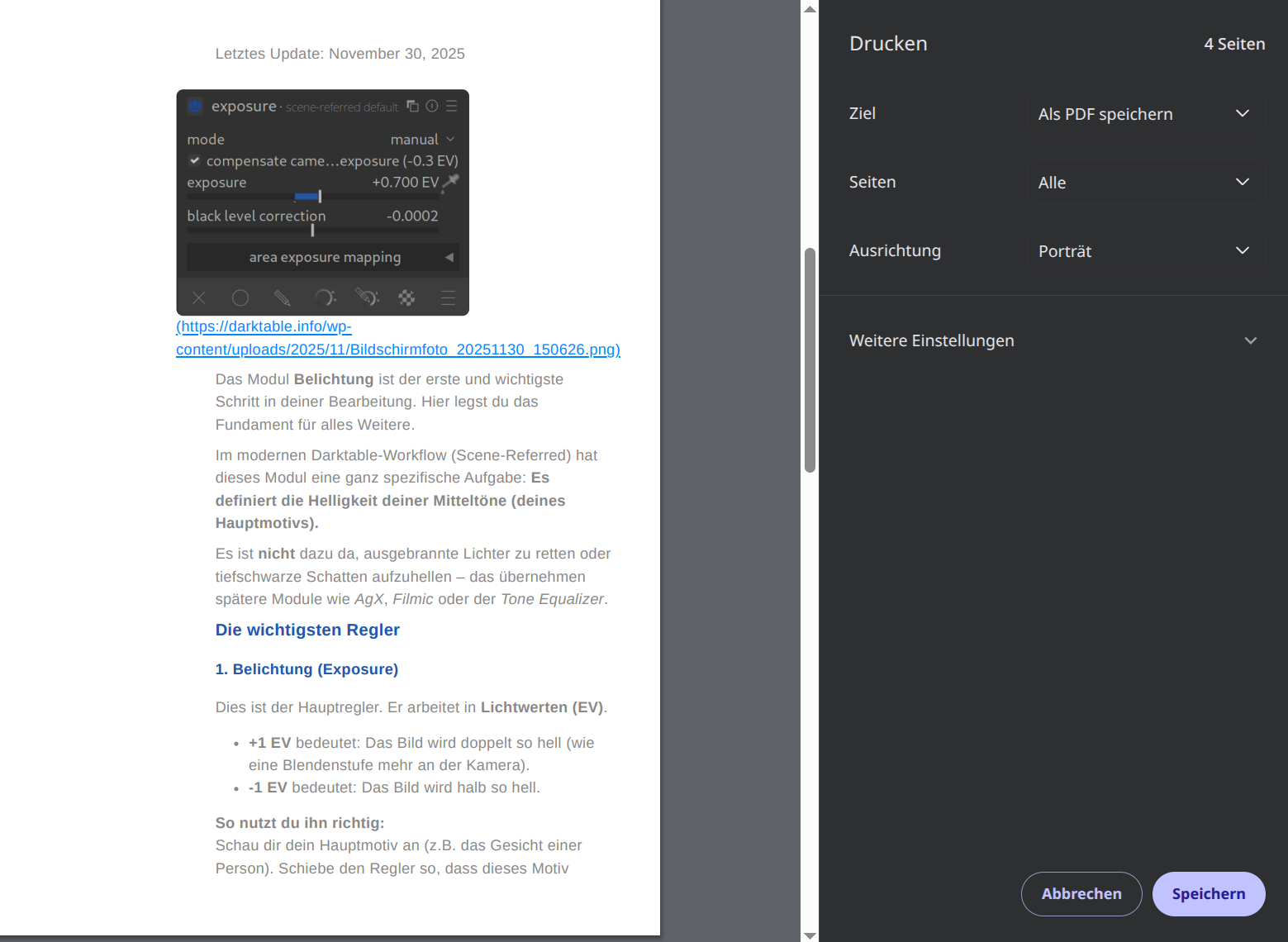
Very good point! thx
Thanks for the fast response.
That’s the point…the black elements needs a lot of ink…I think 
Another question of a friend of mine.
Why are 2 possibilities to set a white balance and get the failure message?
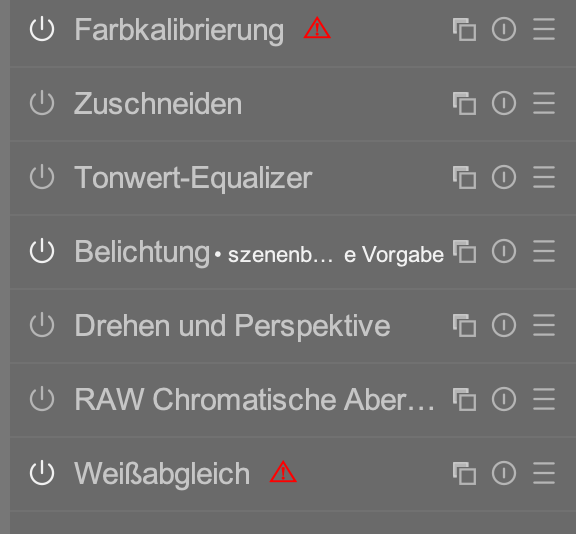
He know that he must reset the “Weißabgleich” but which of the two modules are the correct one?
1 Like
It’s mentioned here, perhaps not sufficiently? But since it’s an important problem, I’m adding it to the to-do list for the FAQ.
https://darktable.info/weissabgleich/
https://darktable.info/module/farbkalibrierung-color-calibration/
Incidentally, it’s one of the Darktable puzzles that almost everyone stumbles across.
2 Likes
I own one and would be happy to help write such a theme. As a lost Monochrome user, I may be able to offer some assistance.
1 Like
That’s great, as I do not have such a camera - would love to though - I have not yet put any energy in how to work in darktable with such files.
I guess that if you have some files - no need for anything special at first - for me to work with, we would be able to describe a decent workflow in dt.
Would that be a good idea for you?
@Qor This is a great project, thank you for taking the initiative!
I assume that the English version is an actual English version separate from the German version, and not just some on-the-fly German to English translation?
If it is a separate English version, I have quite a few suggestions. What is the best way to get corrected versions to you? (PM me if you’d like in-depth but short-term help with the English version—I’m a native English speaker and taught writing for 32 years.)
4 Likes
Currently, it’s a German-to-English “auto” translation.
We’re currently preparing a better translation tool. This will allow use to customize the translated version, which isn’t possible at the moment.
Help is always welcome, but it might take another day or two before we have it ready.
3 Likes

1 Like
Until now I couldn’t find 
1 Like
Hey,
of course. Some dng files will be sent to you, soon - if their size matches with my mail service contraints.
Wait, isn’t there a way to send original images via discuss.pixls.us?
---
Viele Grüße

Moo-Crumpus
1 Like
https://discuss.pixls.us/uploads/short-url/9A8VYiiPcU04DYSvnmQSsSikZOs.dng
https://discuss.pixls.us/uploads/short-url/4Vwzc6YsaWrR5JD52i48Ri2BkPV.dng
https://discuss.pixls.us/uploads/short-url/fjY6xsV1m2K5ljPVHlEnxgewrk3.dng
1 Like
https://discuss.pixls.us/uploads/short-url/9A8VYiiPcU04DYSvnmQSsSikZOs.dng
https://discuss.pixls.us/uploads/short-url/4Vwzc6YsaWrR5JD52i48Ri2BkPV.dng
https://discuss.pixls.us/uploads/short-url/fjY6xsV1m2K5ljPVHlEnxgewrk3.dng
---
Viele Grüße

Moo-Crumpus
1 Like
20251204_0277.DNG (84.7 MB)
20251204_0286.DNG (81.2 MB)
20251204_0281.DNG (83.3 MB)