The histogram in the camera differs from the histogram in Darktable when opened in the darkroom. The image is a RAW file, and I’m working with Darktable 5.4. Is this normal, or am I using an incorrect setting in Darktable?
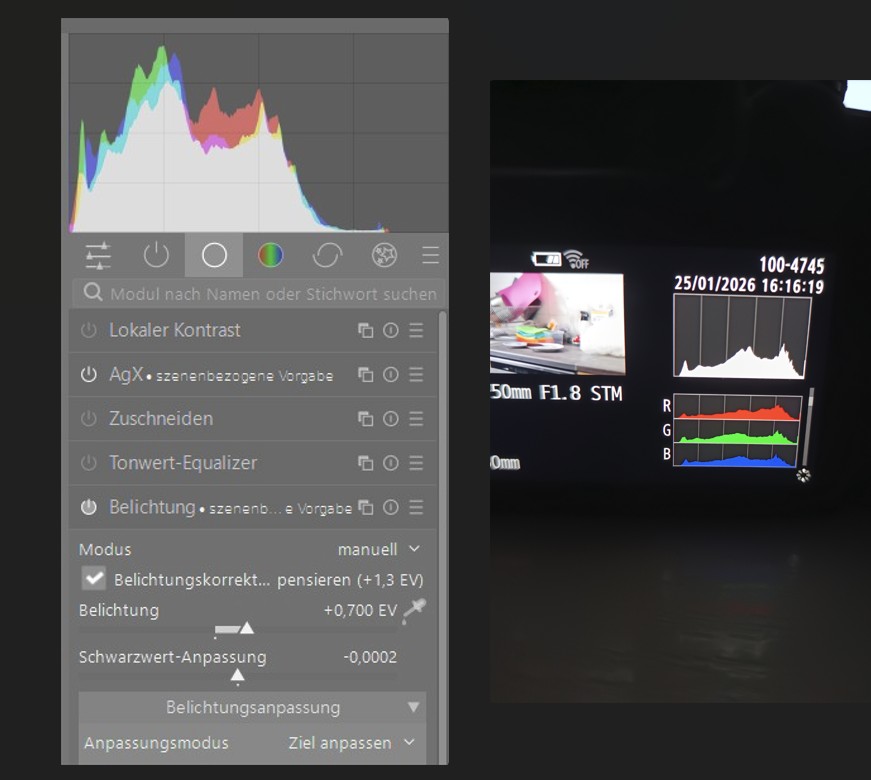
The camera histogram is in general based on the in camera processed jpeg. darktable uses a minimally processed raw file.
To rephrase/integrate, the histogram is not a property of the raw file, which only contains raw data. The histogram is an analysis of the distribution of colors and lightness in the processed image, i.e., according to one very specific interpretation of the raw data.
In-camera JPGs (and RAW file previews) are processed based on certain camera settings (e.g., picture style, contrast, sharpness, highlight recovery etc.) using proprietary algorithms.
[clarification following @paperdigits remarks below: These settings do not affect the raw data, meaning that you don’t get more saturation or contrast in the raw file based on their values, however they may affect your exposure. And they affect the histogram of the jpg preview stored in the raw file, which is what this topic is about.]
This is why it is generally recommended to keep the JPG settings in the camera as close to neutral as possible if you want to shoot RAW, so that what you see in the preview is as good an approximation of the actual RAW data as you can get. However, some interpretation of the data must happen, otherwise there would be no image to display (i.e., you just cannot display a RAW file without processing it at least a bit), and there is no guarantee that different RAW processing engines would make the same choices.
By default, darktable auto applies only a very small set of modules and leaves you in charge of processing the file to your liking.
1 Like
Histograms between different raw processing programs will always differ some - but the the answer you are looking for is the checkbox in the exposure module (“Belichtungskorrektur kompensieren”).
These setting effect the camera’s metering and thus effect the raw data. That’s why you set a flat, neutral profile.
I didn’t mean settings such as aperture, shutter speed, iso and exposure comp. I meant the settings that I listed and which are purely cosmetic (contrast, sharpness, picture style etc.) and which can still influence the shape of the histogram, even though they do not affect exposure (and hence raw data).
I clarified it in my previous post, thanks!
It’s also dependent on the histogram display profile which can be set by right clicking on the gamut checking button (bottom right of darkroom image display)
I once wrote a short python script which generates roughly the same histogram as Canon does. Give it a RAW file as first argument and compare it to the histogram in the camera:
#!/usr/bin/env python3
import sys
from subprocess import run, PIPE
from PIL import Image
import io
import numpy as np
import matplotlib.pyplot as plt
import os


MAX_CHANNEL = 255
MAX_RGB_NORM = MAX_CHANNEL * np.sqrt(3)

colors = ['red', 'green', 'blue']


def _hist(data, color, bins=MAX_CHANNEL+1):
    plt.hist(data, range=(0, MAX_CHANNEL), bins=bins, color=color)
    plt.xticks([])
    plt.yticks([])
    plt.xlim(0, MAX_CHANNEL)
    plt.gca().set_facecolor('gray')

    for x in np.arange(0.2, 1.0, 0.2):
        plt.axvline(x=x * MAX_CHANNEL, color='white', linewidth=0.5, zorder=-3)


if __name__ == "__main__":
    filename = sys.argv[1]

    p = run(['exiftool', '-b', '-PreviewImage', filename], stdout=PIPE)
    img = Image.open(io.BytesIO(p.stdout))
    arr = np.asarray(img)

    # RGB Norm is not what is shown in Canon's lumincance histogram...
    norm = (np.linalg.norm(arr, axis=2) / np.sqrt(3)).flatten().astype(int)

    # Luminance according to https://en.wikipedia.org/wiki/Relative_luminance
    luminance = np.sum(np.array([0.2126, 0.7152, 0.0722]) * (arr), axis=2).flatten().round()
    # luminance = np.sum(np.array([0.299, 0.587, 0.114]) * arr, axis=2).flatten().round()
    # luminance = np.sqrt(np.sum(np.array([0.2126, 0.7152, 0.0722]) * (arr / MAX_CHANNEL)**2, axis=2).flatten())

    brightness = np.floor(np.sum(arr, axis=2).flatten() / 3)

    size = arr.shape[0] * arr.shape[1]
    print(f"Pixel: {size} {arr.shape}")

    plt.subplot(2, 1, 1)
    # _hist(norm, color='white')
    # _hist(brightness, color='white')
    _hist(luminance, color='white')
    print(f"rgb norm clipped: {np.sum(np.isclose(norm, 1.0))}")

    for i in range(3):
        plt.subplot(6, 1, 4 + i)
        data = arr[:, :, i].flatten()
        _hist(data, color=colors[i])
        print(f"{colors[i]} clipped: {np.sum(data == MAX_CHANNEL)}")

    plt.show()
The luminance coefficients may be incorrect - back then I tried a few.
When I read my notes correctly, one issue I wasn’t abe to solve is, that I believe the camera will use integer arithmetics and thus you see those “spikes” appear in the histogram. I tried serveral methods I could find, but none of them created those histogram artifacts…
I didn’t either. I meant the settings you’re actually talking about.
If the settings effect the in camera histogram, they’ll effect the over all exposure and will effect the raw data. You (or your camera if using some auto settings) set the over all exposure from the in-camera histogram, then the picture style or film sim, contrast, etc etc will effect exposure. Over all exposure effects raw data.
You could extract the embedded jpg preview and then look at that…it should be a closer match. Still the profile setting in your camera will need to match the one set in the DT histogram profile as noted by Bill… Some people will shoot with their jpg set to output to adobergb not srgb so then in DT you would need that change when looking at the jpg and it should then be close to the camera…This is just for your own piece of mind to check if its not making sense to what you are seeing… The raw will be differerent and DT also uses by default linear rec2020 as the profile so that would look different from what you see on your camera.
I am perhaps biased but I would get to know the waveform and the DT profile settings and start to use that over using the histogram scope view. It offers a much better overview of the data in your image. It might take a while but in the context of a visual guide for scene-referred editing I find it a much better reference tool than the histogram to locate where peak or crushed areas are and what color channels are involved…
This view and the vectorscope view are great refence tools as you manipulate color with the various tools in DT…
1 Like
Ok, I see that we are talking about two different things. You are talking about the effect of these settings while shooting. Style settings do affect the histogram, so if you shoot based on that and let it influence how you expose, then yes, the settings can affect how you expose.
What I am saying is that the same scene captured with the same aperture, shutter speed and iso will yield the same raw file, regardless of your picture style, contrast, saturation and sharpness settings in the camera. The settings will affect the histogram of the rendered jpg, even if they have no effect on the raw data.
1 Like
Short of using an external light meter… what else does one do?
The question was about matching the histo in camera with the histo in DT. The photo is taken already. At this point, the style settings do not have any effect on the raw data, but they still affect the histogram that you see in camera.
I did not say that they have no effect while shooting 
Anyways, I further clarified my previous post, in which I clearly did not communicate precisely.
That said, I would be curious to know how strong the effect of the preview settings can be at exposure time. It’s a genuine question, all my settings are as neutral as possible and I generally get the exposure that I expect. If one does not crank exposure or contrast all the way, can one really get more than 1/3 stop shift in exposure or get significantly difference exposures?
Da mein Post etwas untergegangen ist und die Diskussion nun ziemlich ins Detail ging nochmal ausführlicher für dich @Peter2 :-).
Der absolute Bärenanteil im Unterschied zwischen den Histogrammen liegt am Haken bei “Belichtungskorrektur kompensieren”. Du hast scheinbar mit eingestellter Belichtungskorrektur von +1,3 EV fotografiert. Standardmäßig ist eine automatische Korrektur dessen aktiv - so zieht zieht Darktable diese 1,3 EV im Belichtungsmodul ab. Die Idee dahinter ist, daß wenn man “Expose to the right” macht und dafür die Belichtung anpasst darktable dies automatisch korrigiert.
Thank you for the many replies. My Canon camera is in AV mode and the style is set to Neutral.
One setting is adjusted: Tone Priority: D+
I know that it’s only a JPEG histogram and that the adjusted values don’t affect a RAW file. Nevertheless, I was surprised by the relative differences, as a good distribution of brightness values in the histogram is always important to me.
That’s why I didn’t use the Wave histogram; I also have to admit that I’m still having some difficulty using Wave.
Does it matter for the pixel pipeline whether exposure compensation is enabled? Attached is the histogram with exposure compensation disabled.
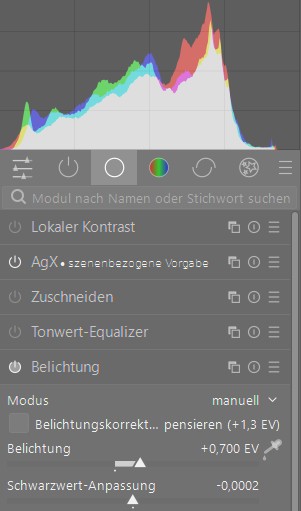
See my post one above yours (which I might have posted the second you did) :-). Yes it makes a huge difference because in this case it decreases the exposure by -1,3 EV because that’s what’s baked into the exif by your camera. Possibly not because you dialed that in but resulting from the chosen exposure mode.
The exposure compensation is set manually.
I think the last Histogram is pretty compatible with the cameras histogram. With its current scene-referred-default AgX produces rather muted highlights.
If you apply the picker for setting the white relative exposure within AgX or apply one of the proposed sigmoid-matched presets or switch to sigmoid it will probably get even closer.
Yes, especially if you’re concerned with trying to ETTR as I am. You say picture controls so I assume you’re shooting a Nikon. Metering mode on the Nikon will also have a large effect.
On Fuji, their film simulations change things wildly, and so does any setting having to do with live view.
1 Like
Many years ago I became disappointed to realise the cameras histogram was not representative of the raw file. It is based on some process of interpretation linked to the JPG. Still I have to depend upon it to some degree when deciding on my exposures and clipping while using the camera, but I don’t expect any software to have a matching histogram. Also in DT once the raw is opened the histogram is altered because some modules have to be auto applied. So I guess DT never really shows me the true raw histogram, I wonder if that even exists because a RAW file needs to be processed into an image.