@priort I appreciate the information. I have watched some of those videos and I just reread the manual entry for DorS. I also played with the module some more and have adjusted my suggestions to be more accurate.
NOTES:
I have found that 1st and 2nd order speed controls show little to no difference. Same with the 3rd/4th order controls. This might upset people, but for my suggestions, I am going to call them the same thing, because they exhibit the same effect. The only reason to have both, in my opinion, is that they have separate direction sliders, so I will suggest pairing them up to make that use clear. I have also added suggestions for tooltips, where I think necessary.
V2
Global
Iterations (can stay, relatively understandable)
Effect Scale (previously central radius): Defines the size of details to be diffused/sharpened.
Effect Radius (previously radius span): Defines the range of diffusion/sharpening
Sharpening (moved from edge management): Simple, global sharpening. Use carefully, as halos are possible.
Structure
Structure (Sharpen ↔ Diffuse) (previously 1st order speed)
Structure Edge Behavior (Accent ↔ Avoid) (1st order anisotropy)
Structure 2 (Sharpen ↔ Diffuse) (previously 2nd order speed)
Texture Edge Behavior (Accent ↔ Avoid) (3rd order anisotropy)
Texture 2 (Sharpen ↔ Diffuse) (4th order speed)
Texture Edge Behavior 2 (Accent ↔ Avoid) (4th order anisotropy)
Effect Corrections
Edge Fidelity (previously “edge sensitivity”): Increase to soften the module’s effect. Useful for reducing halos and fringing on edges.
Surface Fidelity (previously “edge threshold”): Increase to reduce effect on surfaces. Decrease to increase effect on surfaces.
Inpainting
Threshold (previously “luminence masking threshold” under “diffusion spatiality”): Set to 0 to disable inpainting. Values greater than 0 will replace pixels brighter than the threshold with Gaussian noise. Paired with diffusion, this allows for inpainting clipped highlights.
I think this is a much more accurate portrayal of what the controls do, and organizes them in a more logical way. Also I think using “Structure”/“Texture” to refer to large/small scale diffusion/sharpening is a better way of conveying the scale levels that just large/small.
I have only skimmed the thread. I would like to note that the challenge of determining labels for modules is that the modules may behave differently based on prior steps, image properties and potential design, compile or bug issues. This is particularly true for complex filters such as this one. Labels must be technical, precise and user friendly-at the same time. As for the controls themselves, as a small-time G’MIC script developer, I know they often require more tweaking and reinterpretation than the labels. If “nothing happens”, it means that either the user is misunderstanding something and the manual or documentation is not helping, or the control is designed, mapped, scaled or threshold in a manner that is not intuitive and may have to be refined.
My one thought about sharpening is that this position would seem to elevate the role of the slider and given the name induce many new users to include it maybe more often than it is intended… I think in a few cases Aurelien mentioned that it was there primarily to use when blurring as a fine tuning adjustment to just maybe bring a little sharper look back into the blur. I think its also global and not using the wavelets?? That I would have to check but including it with wavelets selection might also give that impression …again here only if I recall correctly.
As this was the main comment for the slider again going from memory, ie as a global sharpening , then maybe it should be named that and have a tool tip suggesting its use to fine tune the look of blurring and diffusion??
If I have I time I will go back and read to see if this is accurate and edit this comment as needed…
As for the names and positions, I have muscle memory and naming memory from using DT for so long that even a good name or slider change might seem a little weird to me
This is true, but to be clear, my goal is not to make DorS simple to use. I want to make it easier to explore and it’s behavior more discoverable.
Currently
The control names are almost entirely uninterpretable by an average user. In order to gain enough understanding to use the module controls users need to read the manual, watch tutorials, and use the module quite extensively.
My Suggestion
My goal is to provide slightly better names for the controls that are more understandable (higher abstractions), but still accurate in their effect on the module’s behavior. These are abstractions that would be relatively easy to extract after reading the manual, watching tutorials, and fiddling with the module for a while, but the goal is to do some of that leg-work for the user already, so they can more easily jump into exploring the module on their own.
I think you are right… I do think the sharpening slider is wholly unaffected by any other controls in the module… so naming it global sharpening or auxiliary sharpening might be better, along with an updated tooltip…
While I understand it’s original intent was to be used as a fine tuning step, it does generally work well and it not super harsh.
I get that. I feel a little disgust myself when I think of changing control placement, but I feel like with how much confusion DorS causes, it might be better for mankind to make some slight adjustments
I always have a laugh at myself when I go to help someone. Computer OS are so highly configurable wrt the look now …you sit down at a PC and you are fully aware of how to use the OS even to the level of something ubiquitous like a Windows version but you look at the desktop and for a bit it can almost seem foreign and you stumble around until you get oriented…the muscle memory thing is so evident you find yourself mousing around, looking and searching in the areas that you “know” things should be found but…nope some recon required…
yes that’s true - but it won’t give any better understanding of the module if the sliders are labeld in an inappropriate way. And it’s inappropriate if these labels tries to use “known” terms with expectations for a function doing something different.
there’s a reason why there are so any presets - to get ome starting point for a long long journey to learn how to use these sliders to improve the output
I agree with this, but can you point any innappropriate control names in my suggestion?
Again, please let me know which of my suggested control names are not aligned with their modification of the resulting effect, and I will gladly change them.
I know this is why the presets exist, and I think they should continue existing. I just want control names that help guide and improve the user’s understanding of how controls will affect the module’s final effect.
Whether we name the controls nicely or not, people will build their own mental model of what each control does and therefore perform their own “renaming”. I have no idea how a volume knob on an amp works, but after using the knob enough, I will build a mental model to help me interact with that interface and in my head I will have some identifier for that knob, “thingy that makes the sound loud”.
It is better UI/UX design to do part of this abstraction work before handing a UI to the end-user. Darktable actually does this in most of the ui for most modules. But DorS is a notable exception. It’s like the designer of the module forgot to rename his control parameter to be understandable.
Again, it is a great module, just missing the final steps of development: presentation.
Or, understanding what they do exactly, he couldn’t find a name that accurately conveyed that and he didn’t want to use a term that was “almost” correct.
EDIT: Another issue also would be how well do these terms translate?
This could be true, but if we blindly assume that, then we prevent ourselves from improving these kinds of things.
I am a native english speaker and “1st order speed” doesn’t provide any meaning for me. I think “Structure (Sharpen<->Diffuse)”, or “Large Forms (Sharpen<->Diffuse)” are more translatable in that they are built with relevant terms. “1st order” is a wholly unrelated term regarding general photo editing terms. And “speed”, while it might make sense in regards to the physical modeling behind the scenes, is not a common term in relation to blur/bloom/sharpening/denoising/etc.
Personally, I don’t think we should necessarily shy away from using terms that are more descriptive than technically correct. There are already examples of this in the industry, with the ubiquitous “tint” being used for white balance, “vibrance” for a specific type of saturation, “clarity/texture” used for local contrast, maybe you could even argue “ISO” in the digital sensor era…
All of these labels have been made up to give the user an idea of the effect rather than the underlying process. I think this approach can be applied to DorS too, if we can agree on finding labels that don’t mislead.
The tooltips are also a crucial piece of the puzzle. A single label on its own is not always sufficient to describe the effect. So the goal should be to find a slider label that gets us 80-90% there, and then the tooltip to clarify exactly what will happen (if possible).
This is useless logic for this situation. If it is up to me to be the sole arbiter of whether or not my suggestions are valid, then I will go ahead and claim that my proposals are valid. I am willing to be wrong, but until someone can provide usable feedback, what other option do I have but to continue thinking my suggestions are valid? @priort already made some suggestions and I modified my proposal. Isn’t this how things should work? Proposal, feedback, revision, feedback, revision, feedback…
By the way, I am not asking anyone to make these changes. I will make every attempt to do the work myself, but I present this proposal for the sole reason of getting useful feedback.
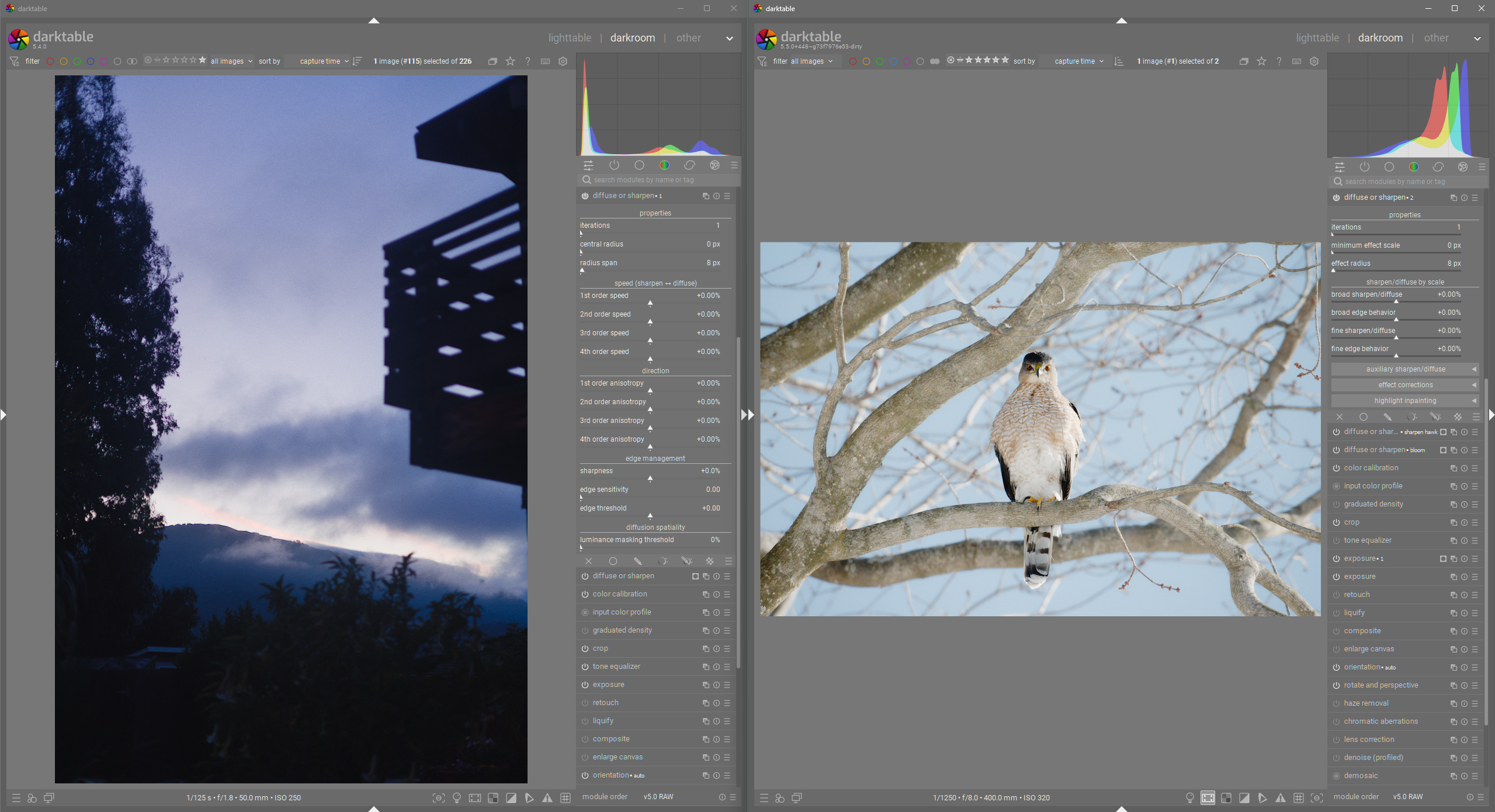
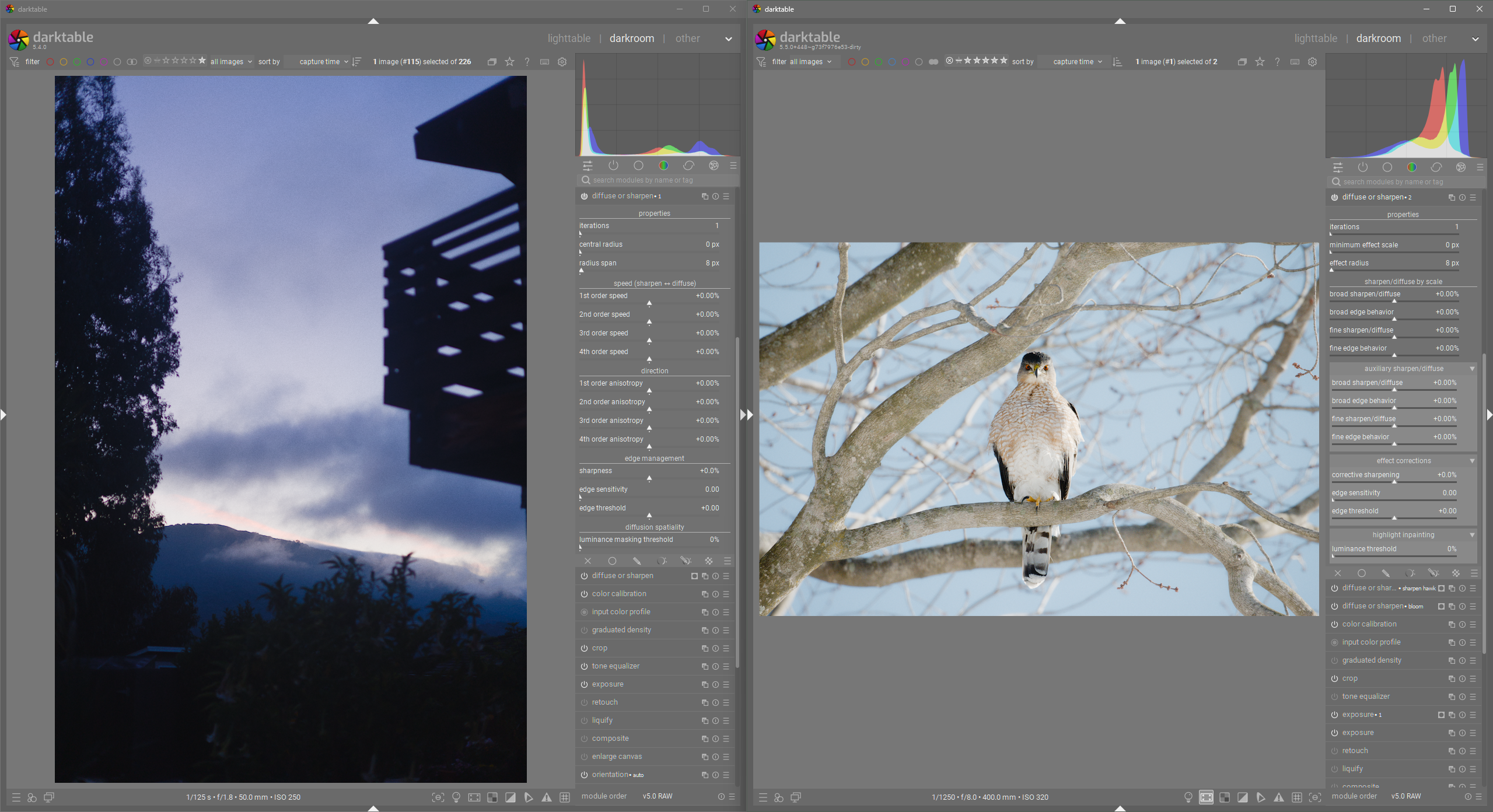
And here it is all expanded (note that you almost never need every panel expanded, but if you do, it is almost the same size still).
Left: Current darktable, Right: my branch with modifications to DorS
I renamed most controls. The new names are as accurate as they need to be IMO and convey way more information than the old names.
I moved a bunch of controls into collapsible boxes to improve space efficiency and narrow the number of sliders a user needs to look at when first opening DorS. Currently, the user is presented with 15 sliders… with my changes it is only 7 sliders.
I moved the 2nd and 4th order speed/anisotropy controls to “auxiliary sharpen/diffuse” since there is little/no discernible difference in using those rather than the 1st and 3rd order speed/anisotropy controls. Now, the primary sharpen and diffuse controls are the 1st and 3rd speed/anisotropy sliders.
I moved the edge management controls into an “effect corrections” collapsible box to make their purpose more clear, and to now correctly identify the sharpening control as a corrective measure.
I moved the luminance threshold control into its own collapsible box “highlight inpainting”. Honestly this control feels quite random. I know it is specifically meant for enabling better highligh inpainting, but the current way it is presented is terrible and this is the best I could think of.
Seriously, doesn’t this look way better?
NOTE: I have all custom CSS turned off. No AI used. No behavior was changed. No controls were removed.
@Pascal_Obry
I know you have a lot of important work, but my latest proposal above seems like a great UI improvement to one of the most foundational and powerful modules. If you have the time, I would love to get your opinion.
I think your proposal terms are not accurate or clear. D&S is based on a model of dispersion (if I recall correctly) that uses second order differential equations. Since it is a complex subject, simple terms tend not to work or be remotely accurate.
Please tell me which terms are not accurate or clear. I have tested DorS manually, watched tutorials, and read the manual entry.
Thankfully, we are not trying to describe differential equations. We are trying to describe the way parameters within DorS affect the module’s output. If abstraction were impossible, the module name would be “Multi Order Differential Equations”. But abstraction is possible, and this is why the name of the module makes sense, and there are a bunch of great presets that also make sense.
Unfortunately, someone decided to stop short on properly abstracting the control names. That doesn’t mean it can’t be done.
I have had several people just make blanket statements about how the control names are inaccurate, or DorS is too complex to be simplified, but very few people have been able to point to an actual example in my proposal.