I am only surfacing some of the challenges. There are certainly many lost-in-translation and character moments that make AP’s work and communication rather inscrutable. Good luck in your pursuit. Focus on reading between the lines of what comes across as blanket or vague feedback. In the end, everyone here cares a lot about dt.
3 Likes
Thank you. I’m sorry if I came across grumpy.
2 Likes
Most? All of it?
eg.
Pointing out the complexity of the math does not negate the validity of the abstractions.
Please tell me which controls do not behave in a way that is consistent with the name I have chosen. Please be specific so that I can try and reproduce the failure.
I don’t care about the math, I care about the effect.
The math explains the effect. I don’t support your simplification since it is fundamentally wrong.
No. The math accomplishes the effect. Explaining the effect is the purpose of the UI. If math explained the effect, every module would be named the literal, full-length math formulas.
5 Likes
Empirically and from the videos, anisotropy could be called “gradient avoidance”. Negative values operate across gradients and edges more strongly, while positive values operate along them less strongly. 0 means the effect’s influence in a direction does not depend on the edginess in that direction.
“Edge protection” is the term I came up with instead of sensitivity. It causes the algorithm to do less around edges, regardless of whether it is blurring or sharpening.
1st and 2nd order speed really do seem to cancel each other out, but they can be used with different gradient avoidance so they operate differently, as though you cloned the first operation and modified its parameters.
And unfortunately, the type of anisotropy is different (as I wrote above, the other post says they are different functions)–1st order speed -100 with 1st order anisotropy -1000 gives a slightly different result than 2nd order speed -100 with 2nd order anisotropy -1000.
And it looks like 3rd order anisotropy differs from 4th order in the same way as 1st differs from 2nd.
This is starting to make sense. You have two types of diffusion and two types of anisotropy (sensitivity to directional characteristics such as gradients). When you combine these operations, you get 4. Though I have no more time to play with this for now.
2 Likes
I tend to agree with you @thumper . I the main goal is technical accuracy a lot of sliders in dt would need to be renamed to the basic formulae.
It seems that your @g-man position is that there is no issue at all. I disagree with this stance. DorS slider namings are inscrutable if one is not familiar with the underlying math. This is not the case with lots of other modules.
I am not super happy with the proposed name-changes in themselves. But I have to tip my hat to @thumper for trying and don’t have any better ideas for alternate naming myself.
If the maintainers come to the conclusion that no change should be made I am fine with that. But “technical precision” is a weak argument for naming things in a photograpy app in my opinion.
7 Likes
I never said that. The issue is that it is a complex subject and the OP doesn’t understand it, yet he is trying to simplify the description. The simplification is incorrect.
I’m out of this conversation since it is not productive to me.
Just because I want to come up with a good abstraction and interface for something, doesn’t mean I don’t understand it.
Show me where my abstractions are wrong. Linking to the math doesn’t prove that my abstractions are invalid. All abstractions break down at some point, because they are metaphors. I have really tried to think about the abstractions I am picking. They are not just my first impressions.
I actually care about improving the UX in darktable. I genuinely want to help darktable improve and be an awesome experience for new and seasoned users. I am not whining. I went through the trouble of doing the work myself. I am simply asking for useful feedback. Why does that receive such negative criticism?
This seems like the crux of the matter. You only engage when it is productive to you. I am trying to make darktable better.
7 Likes
I can empathize with how it feels, and I just want to encourage you to be patient and not get too frustrated. It’s clear you are trying to improve things, so that shouldn’t be questioned.
There are always strong opinions with these kinds of proposals, and sometimes people get quite short and snippy. I have seen lots of occasions where this has led to the contributor leaving and thinking their work isn’t appreciated. As usual, it’s really just a communication issue because almost everyone on this forum cares deeply about the software and wants it to thrive.
I have noticed a real uptick in the number of contributions and proposals over the last few weeks. I think there might be some fear from veteran users that things are moving too much too quickly. It’s just a feeling I have and I don’t have any real proof of that, other than perhaps the other post on LLM coding (which isn’t related to this thread but still contributes to the “feeling”).
So, I just wanted to say that I think your efforts to improve this module are commendable and welcome. But finding quick consensus might not be achievable, so it might take longer than you and some of us want…
As for your proposed changes, I want to take a closer look later today, and hopefully I can provide some feedback. I don’t really understand the maths though, so it will just be from a user’s point of view. It will be interesting to hear the thoughts from some of the devs.
5 Likes
Here is a poorly made video of me going through some of my rationale for the changes. It about 6 minutes long.
6 Likes
I do not know how the new wording will end but your video explaining diffuse or sharpen clarified a lot for me 
Thank you!
3 Likes
Thanks. I know the quality is terrible. I was trying to keep it short (note the fast rambling), and the quality compressed, but I am glad it did something 
1 Like
Here is a video of me trying to explain why I chose to name the “nth order anisotropy” sliders “broad edge/surface bias” and “fine edge/surface bias”. It is not a great video, but I think it showcases the behavior of the sliders and where my head is on this.
1 Like
I had referred earlier to @nwinspeare video on the module. He had been in some converstations with Aurelien and I think it was a nice breakdown of what the module does…
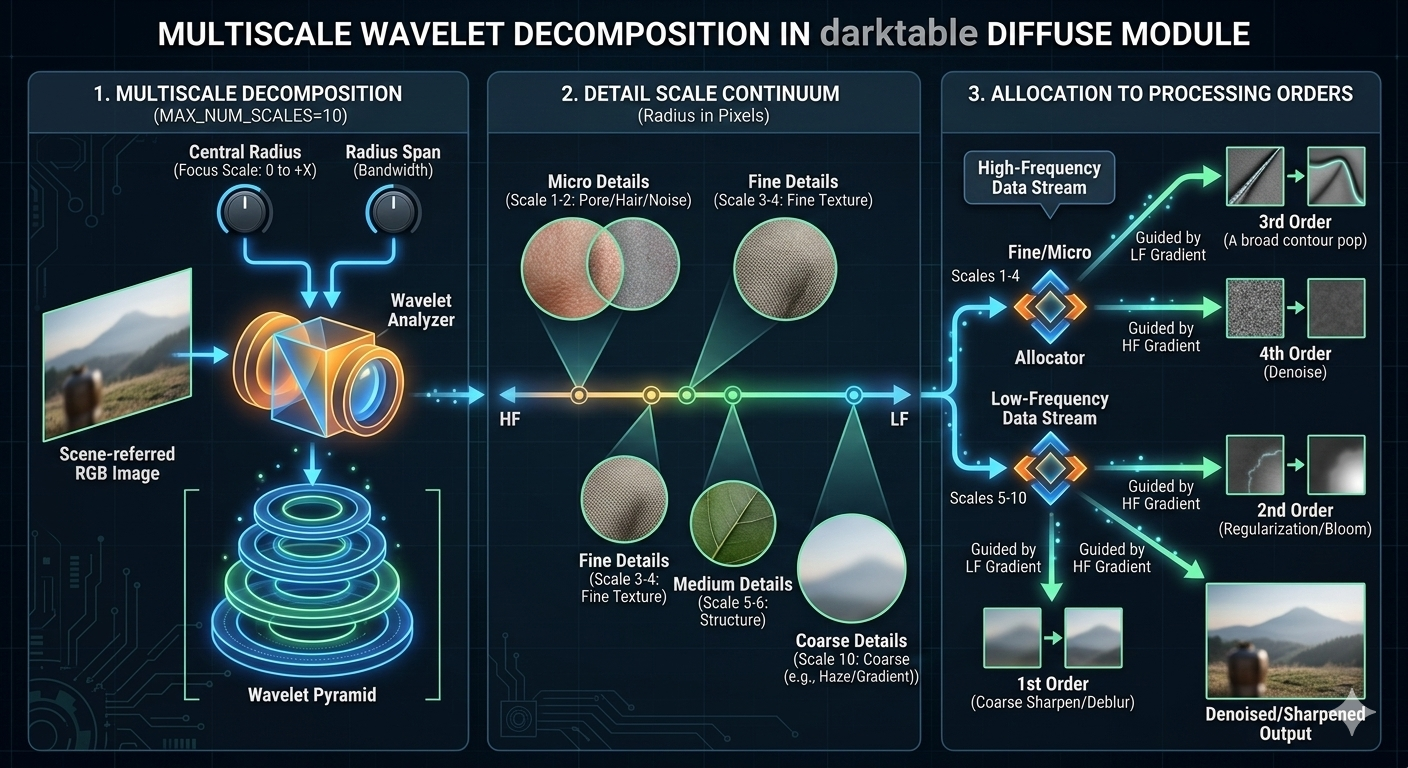
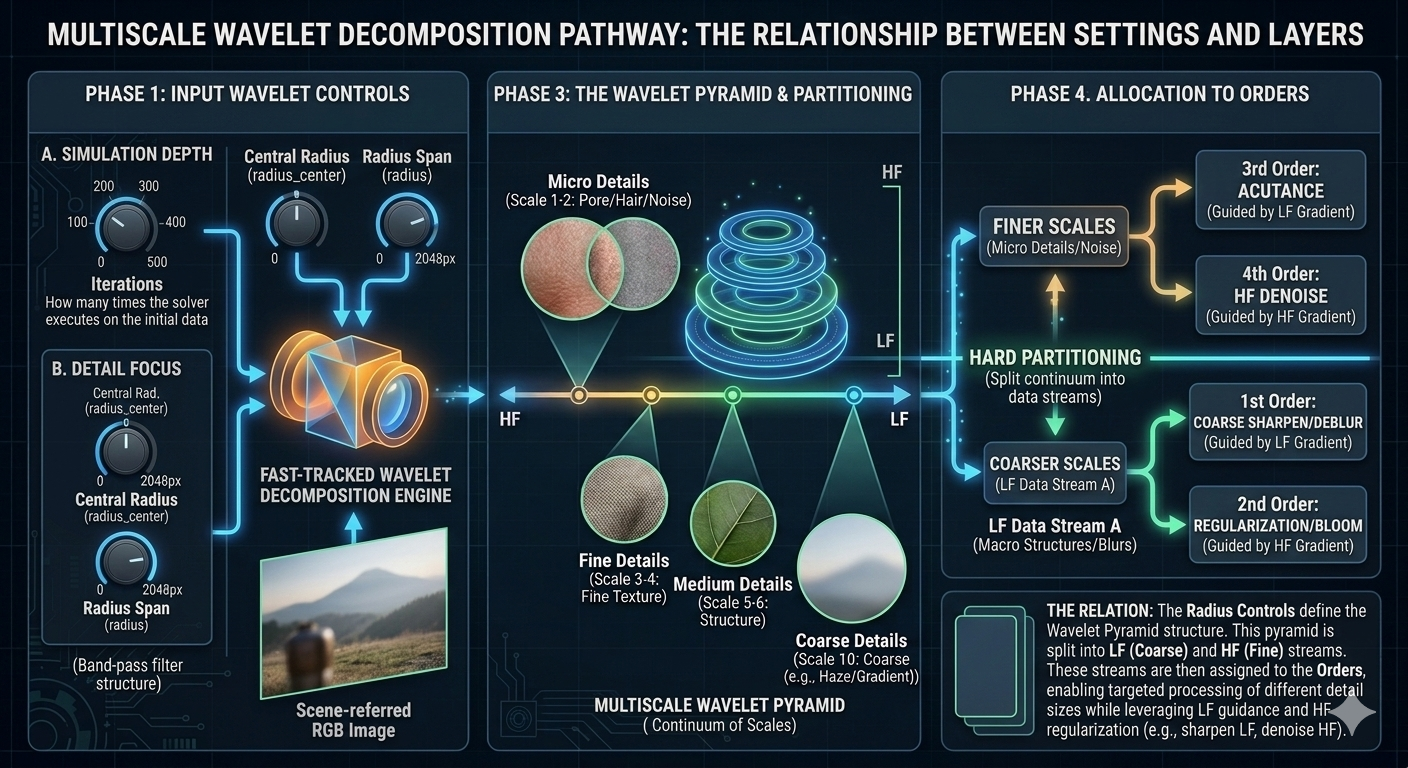
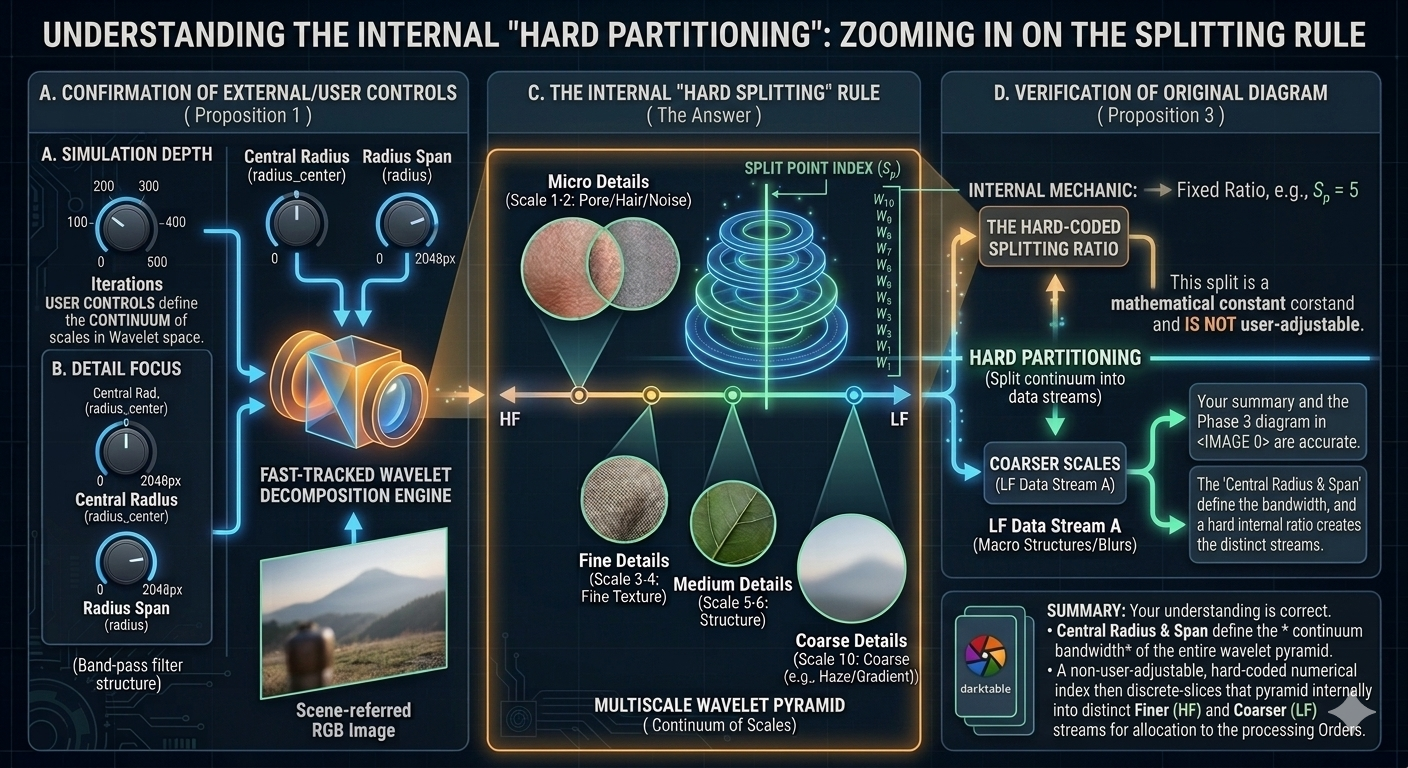
I rewatched that again and because I can’t draw or create mock-ups to save my soul I did use google to create a few infographics based on what I asked it to summarize…
I think for the most part they are accurate and in one of the exchanges it was noted that the code was designed with a push pull idea behind the set of controls… Very simply the impact of 1st order on the LF layer and the the impact of 3rd order on the HF layer during application of diffusion or sharpening are likely to create artifacts or need fine tuning. This is where the 2nd and 4th orders come in to play acting on the same layer but as they are guided by the HF gradient imparting finer control on those respective layers.
The directions will dictate for example some edge awareness and preservation if you denoise or blur and do so along the isophotes which is a term maybe foreign to new users but the graphic makes it pretty clear.
Similarly the gradient direction becomes obvious…speed slower and the gradient steep at edges and speed faster and the gradient is flatter oversurfaces…
The central radius and span create the wavelet pyramind and there is apparently a hard wired determination of how that is split …perhaps that is the part tied in with the laplacian settings…
Anyway I have to run now and I will look at these later and follow up for accuracy but these may potentially help with a visual representation of what is going on and help better to come up with any replacement names if any… perhaps once verified some sort of “accurate” graphics along the lines of these ones could be included in the manual…
I’m just throwing this out there in hopes of focussing the naming in line with what is acutally going on…

2 Likes
Thank you for the info @priort.
Here is the latest proposal with the current updates I have made today. Note that next to each name change I am adding my rationale for the renaming.
V3
properties
- Iterations (no change)
- base scale (previously “central radius”): This aligns better with the tooltip which refers to it as the “main scale” of diffusion.
- effect radius (previously “radius span”): This makes it more obvious that this modifies the radius of the effect. “Span” does not convey much meaning if “radius” is already being used.
sharpen/diffuse by scale
- broad sharpen/diffuse (previously “1st order speed”): This is affects low frequency wavelet diffusion/sharpening. “broad” is meant to convey “large, wide, etc.” The challenge is to convey low frequency scale diffusion without having to say all those words.
- broad edge/surface bias (previously “1st order anisotropy”): This control affects the direction of diffusion based on the gradient. Meaning that when negative, the sharpening/diffusion will effectively “target” edges more. When positive, the sharpening/diffusion will effectively “target” surfaces between edges more. I posted a short youtube video showing this above.
- fine sharpen/diffuse (previously “3rd order speed”): same as “broad sharpen/…” except it operates on high frequency wavelet layers
- fine edge/surface bias (previously “3rd order anisotropy”): same as “broad edge/…” except it affects the edge/surface bias of the fine sharpening/diffusion.
auxiliary sharpen/diffuse (collapsible box)
same as the primary “sharpen/diffuse by scale” section. I think it is well accepted at this point that 2nd and 4th order operations are used for fine tuning the operations of 1st and 3rd order operations. In the first video I posted above, I show how they can be used along with their bias controls to diffuse surfaces while sharpening edges.
effect corrections (collapsible box)
- corrective sharpening (previously “sharpness”): I changed the name to make it clear that this is designed to be used to correct issues in image sharpness, not for general sharpening purposes.
- effect softening (previously “edge sensitivity”): This changes the threshold of what edges are included in the sharpening/diffusion, but effectively it can be used to soften the overall effect.
- surface protection (previously “edge threshold”): This can be used to reduce the change how much the effect targets surfaces. negative values increase general surface effect boost. positive values decrease the amount that surfaces are affected. This can be used to dial back sharpening if it is creating noise.
highlight inpainting (collapsible box)
- luminance threshold (previously “luminence masking threshold” under “diffusion spatiality”): This control is used to select the luminance threshold at which gaussian noise is added to the image. This is used for adding texture into clipped highlight areas for further diffusion.
Overall this reduces the visible sliders from 15 to 7, makes it clear what the main controls are, and modifies control names to convey more information and aid in module use.
4 Likes
- I like the addition of dropdown menus to hide controls less frequently used.
- I like the repositioning of the edge behaviour sliders to be underneath the old “order speed” sliders. I just think this is much more user-friendly.
As for slider labels, here are some thoughts:
broad sharpen/diffuse
broad edge behavior
fine sharpen/diffuse
fine edge behavior
As an English editor, I’m always on the lookout for ambiguity, and I think there is room for ambiguity in the current names. For example, for the second slider, is it the behaviour of the broad edge we are controlling? No, it’s the edge behavior of broad details. So I would prefer a separation like this:
Sharpen/diffuse - coarse structure
Edge behavior - coarse structure
Sharpen/diffuse - fine details
Edge behavior - fine details
I used “coarse” because it’s terminology already used in other modules as well as in wavelet decomposition in general (e.g. in Todd’s images above).
As for the “effect corrections” section, those slider labels still don’t speak to me. I don’t get any immediate idea of what they do. I will think of those ones more and get back to you.
4 Likes
Sorry, I think you might be looking at an older version of the proposal. The latest proposal for the direction sliders is like this:
I like your proposed names, but I think there are a couple of challenges. Firstly, the names need to be kept as short as possible, otherwise readability goes down. Secondly, your proposed names for the direction sliders make it sound like they modify the behavior of the edges themselves, rather than the behavior of the diffusion in relation to edges. I think “…edge/surface bias” actually describes the behavior properly, since positive anisotropy makes the diffusion/sharpening avoid edges, and negative anisotropy cause the effect to adher to edges more. Maybe we could combine our names:
coarse sharpen/diffuse
coarse edge/surface bias
fine sharpen/diffuse
fine edge/surface bias
Here is a screenshot of the current layout, fully expanded. Like I said, I think I agree with puting your suggestion, “coarse” in place of my “broad”. “coarse” is better.