I just did a review with Copilot, which essentially suggests typos…
Of course now, new execuatbles, but no differences for users.
A few explanations:
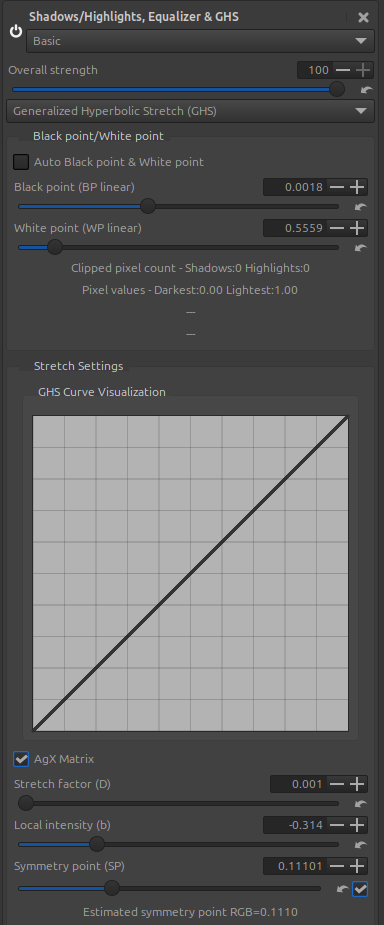
- The transformation with the [AgX] matrix is simple. We start with the original matrix, then transpose it, meaning we invert the rows and columns [Agx_T]. The diagonal remains unchanged. We calculate its inverse matrix [Inv_Agx-T] such that [Agx_T][Inv_Agx_T] represents an identity matrix.
Before the GHS processing, the data is multiplied by [Agx_T]; at the end, the data is multiplied by [Inv_Agx_T].
This transformation slightly lowers the ‘White Point linear’ and very slightly increases - almost nothing - the ‘Black point linear’ and ensures a subtle color conversion. It’s also change a little the ‘Symmetry Point (SP)’.
I’ll briefly remind you what ‘GHS’ does, which has little to do with other ‘Tone mapper’ type algorithms.
From the ‘WP linear’ and ‘BP linear’ (note the importance of the word - linear) - the entire dataset is placed in the interval [0 1], which here corresponds to the Rec2020 limits (while respecting the colors, of course…).
The reference data is, for the white point, the highest of the three RGB values, and for the black point, the lowest of the three RGB values. All three channels are assigned the same conversion. Therefore, the same ratio is maintained between each RGB channel.
Depending on the case, if, for example, the GHS data was [0.1, 0.5], the resulting image will show increased contrast and saturation. If the data was [0.0, 4.0], the image, including Rec2020 data (for example, a sunset), will become dark and have low contrast. And very importantly, we will find the peak of the histogram in Rec2020 linear, which will be used for the two essential sliders to adjust the image by fully exploiting Rec2020, the Symmetry point (SP) which has virtually no connection with Middlegrey.
The two fundamental sliders are Stretch Factor (D), which is a simple logarithmic conversion, and Local Intensity (b), which uses a different hyperbolic function depending on the specific stretch factor (SP) and the value of (b). Of course, you need to adjust these values if you select ‘AgX Matrix’.
GHS isn’t meant to be a jack-of-all-trades; I could have chosen that option. I preferred to do the bare minimum and fine-tune the images with Abstract Profile and CIECAM, which also has a conversion matrix and its inverse, but a much more complex one, to account for physiological aspects and the viewing environment.
Note: Would you prefer Agx to be the default value? Is that just a variable to change?
Note 2: I changed the default value to true (enabled), because it slightly lowers the value of ‘WP linear’ … A choice must be made. 
Jacques