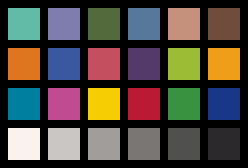
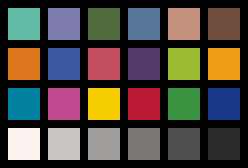
Geting started with color profiling for printing and color checkers

Help me get started with color profiling (for printing).

TL;DR
I want to print a color checker to compare it (print quality) to a store-bought color checker.

So, over a few corners, have access to a transfer printing service. I don’t know much about printing and color profiling.
I don’t want this to sound like an insult, but I assume the printer service provider doesn’t either.
At least they don’t know seam to know about ICC profiles and color spaces (or I don’t know the right lingo to communicate it properly).
They just told me that color comes out differently depending on what I print on.

But they are helpful and want to give me a sample.

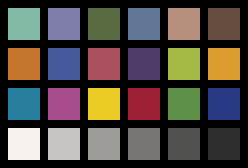
So my first idea was I will just print the “Datacolor Spyder Checkr 24” and compare it to the real “reference” I have.
(I also find the idea of a color checker on a mug or phone case funny.)

But this opens a whole can of worms. What are these reference colors on the color checker actually?
It seems like the “24 patches” color chackers are all more or less the same? But the color calibration module from Darktable requires me to choose which exact model of color checker I use… even the date of mnaufactuing
So I assume they are not the same!

I searched the Datacolor site to get data on what their reference colors are, but I did not find it. (But Darktable internally must have this data!? From where?)

I have a “Datacolor Spyder Checkr 24” as a physical reference card, an “X-Rite i1 Pro Rev A” spectrometer, and a “Datacolor Spyder 5 Express.”

I don’t know how accurate any of these instruments or artifacts are, so I think about cleverly comparing them to each other, or I don’t care for now and just assume the instruments and my reference card are fine.

But I assume even if the spectrometer is not calibrated properly, I can still make some somewhat good quantitative comparison between two colors that are supposedly the same (the printed color chart and the Datacolor one).
And if this fails, I can make a visual comparison (under the right light, D50?).

Ideally, I could make this process iterative:
Print a color chart, measure the “offset,” somehow apply the inverse to the file before printing, and get a print that looks (measures) the same on a given instrument
in this case, the “X-Rite i1 Pro Rev A” (at least under some specific lighting conditions).

TL;DR
How to print a color checker,
and of course, without using proprietary or non-open software.

They just told me that color comes out differently depending on what I print on.

True. See Having fun (?) with printing profiles -- paper/gamut comparisons...

Here are a two useful links:

http://www.brucelindbloom.com/

Have fun!
Claes in Lund, Sweden

The patches are arranged differently on the spyder…

They usually come with a sheet that has the data…

SpyderCheckr_Color_Data_V2.pdf (1.1 MB)

1 Like

Oops, @priort ,
Evidently I missed the SpyderCheckr-bit. Thanks for sending a better link :slight_smile:

Thanks Its the Datacolor Spyder Checkr 24
Do you think/say i can assume the Right halve of the 48 patch version is the same as the 24 patch version?

Since you mention transfer printing and mugs/phone cases, can I assume you are trying to figure out if the product is color accurate (and how to create a profile to assist in editing)?

Something like this, yeah.
Normally, they print not very color-sensitive graphics on various kinds of commercial giveaways like company logos on mugs or USB drives.

I helped them with another project, and in return they offered to let me use their new printer… if they have some free time.

But they’re not graphic designers or “nerds.” They know what to press to turn the machine on, how to import a file, and how to scale it. For 98% of their work, that’s absolutely sufficient.

Since I’m a bit of a curious nerd, though, I’d like to know if and how I can profile their process
without being too much of a pain for them.

Gotcha. If this was inkjet photo paper based, I would say check out Keith Cooper’s (northlight images) webpage. IIRC he provides the test charts he uses to create paper profiles. 24 samples seems pretty small (to my naive mind) to create a good profile for paper.

I wouldn’t know where to start researching given the type of printing you are talking about.

If you find a way to get good results, I would love to get an update!

I have Confirmed with datacolor support that values from the Spyder 48 and 24 are identical.

So i Asked Claud to export the values from the PDF and vibe code a pattern generator in sRGB and AdobeRGB

files.zip (8.3 KB)

So i think i will as if they uses s or AdobeRGB and if they don’t know i will send them the sRGB version and see what i get

[“1A”,“Low Sat. Red”,61.35,34.81,18.38,210,121,117,189,121,117],
[“2A”,“Low Sat. Yellow”,75.5,5.84,50.42,216,179,90,205,178,96],
[“3A”,“Low Sat. Green”,66.82,-25.06,23.47,127,175,120,141,174,122],
[“4A”,“Low Sat. Cyan”,60.53,-22.62,-20.4,66,157,179,103,156,177],
[“5A”,“Low Sat. Blue”,59.66,-2.03,-28.46,116,147,194,125,146,191],
[“6A”,“Low Sat. Magenta”,59.15,30.83,-5.72,190,121,154,172,120,151],
[“1B”,“10% Red Tint”,82.68,5.03,3.02,218,203,201,213,202,200],
[“2B”,“10% Green Tint”,82.25,-2.42,3.78,203,205,196,202,204,195],
[“3B”,“10% Blue Tint”,82.29,2.2,-2.04,206,203,208,204,201,206],
[“4B”,“90% Red Tone”,24.89,4.43,0.78,66,57,58,66,60,60],
[“5B”,“90% Green Tone”,25.16,-3.88,2.13,54,61,56,59,63,59],
[“6B”,“90% Blue Tone”,26.13,2.61,-5.03,63,60,69,65,63,71],
[“1C”,“Lightest Skin”,85.42,9.41,14.49,237,206,186,225,202,183],
[“2C”,“Lighter Skin”,74.28,9.05,27.21,211,175,133,200,174,134],
[“3C”,“Moderate Skin”,64.57,12.39,37.24,193,149,91,180,148,95],
[“4C”,“Medium Skin”,44.49,17.23,26.24,139,93,61,127,93,65],
[“5C”,“Deep Skin”,25.29,7.95,8.87,74,55,46,71,58,50],
[“6C”,“95% Gray”,22.67,2.11,-1.1,57,54,56,59,57,59],
[“1D”,“5% Gray”,92.72,1.89,2.76,241,233,229,238,233,229],
[“2D”,“10% gray”,88.85,1.59,2.27,229,222,220,226,221,219],
[“3D”,“30% Gray”,73.42,0.99,1.89,182,178,176,180,177,174],
[“4D”,“50% Gray”,57.15,0.57,1.19,139,136,135,137,135,134],
[“5D”,“70% Gray”,41.57,0.24,1.45,100,99,97,99,99,98],
[“6D”,“90% Gray”,25.65,1.24,0.05,63,61,62,65,63,64],
[“1E”,“Card White”,96.04,2.16,2.6,249,242,238,247,242,237],
[“2E”,“20% Gray”,80.44,1.17,2.05,202,198,195,199,196,193],
[“3E”,“40% Gray”,65.52,0.69,1.86,161,157,154,158,156,153],
[“4E”,“60% Gray”,49.62,0.58,1.56,122,118,116,120,118,115],
[“5E”,“80% Gray”,33.55,0.35,1.4,80,80,78,81,81,79],
[“6E”,“Card Black”,16.91,1.43,-0.81,43,41,43,46,46,47],
[“1F”,“Primary Cyan”,47.12,-32.52,-28.75,0,127,159,39,126,157],
[“2F”,“Primary Magenta”,50.49,53.45,-13.55,192,75,145,167,76,141],
[“3F”,“Primary Yellow”,83.61,3.36,87.02,245,205,0,234,204,37],
[“4F”,“Primary Red”,41.05,60.75,31.17,186,26,51,159,32,53],
[“5F”,“Primary Green”,54.14,-40.76,34.75,57,146,64,94,145,71],
[“6F”,“Primary Blue”,24.75,13.78,-49.48,25,55,135,41,58,132],
[“1G”,“Primary Orange”,60.94,38.21,61.31,222,118,32,198,117,44],
[“2G”,“Blueprint”,37.8,7.3,-43.04,58,88,159,70,89,156],
[“3G”,“Pink”,49.81,48.5,15.76,195,79,95,170,80,94],
[“4G”,“Violet”,28.88,19.36,-24.48,83,58,106,78,61,104],
[“5G”,“Apple Green”,72.45,-23.57,60.47,157,188,54,165,186,69],
[“6G”,“Sunflower”,71.65,23.74,72.28,238,158,25,218,157,46],
[“1H”,“Aqua”,70.19,-31.85,1.98,98,187,166,130,186,166],
[“2H”,“Lavender”,54.38,8.84,-25.71,126,125,174,125,124,171],
[“3H”,“Evergreen”,42.03,-15.78,22.93,82,106,60,90,106,65],
[“4H”,“Steel Blue”,48.82,-5.11,-23.08,87,120,155,98,119,152],
[“5H”,“Classic Light Skin”,65.1,18.14,18.68,197,145,125,183,144,125],
[“6H”,“Classic Dark Skin”,36.13,14.15,15.78,112,76,60,103,77,63],

spydercheckr_color_data-html.txt (5.5 KB)

I am curious: How are you planning on scanning a mug?

I have a eye one pro i1 X-Rite i1 Pro
It works with https://www.argyllcms.com/ and the function Spot read.

so i can compare a reading from what ever with my physical reference color checker

I meant physically. Are you planning on holding the device on the mug by hand?

basically yes

I look forward to hearing how things work out!

1 Like

I let Ai Vibe code a Color checker comperison tool for me:
https://claude.ai/public/artifacts/caa6d3f8-2659-4f45-9ae8-f390eb33bf21

it uses the data from

the interesting Findings with this tool:

This data Matches exactly with the data from colorchecker.h for Spyder24 and Spyder48 After 2018

Second finding is the befor 2018 Spyder24 and Spyder48 is alsmost the same.
there is only a ΔE*ab of .050

So no reason to worry about Pre/post 2018 Version