thanks, finally it’s in rawpy now  Looking forward to xtrans support to also play with my fuji files
1 Like
Just tried, thank you for the program! I have tried with a DNG from a Canon Powershot and it worked fine, also with a PEF (pentax raw) files and it seems unsupported, or better, renaming to DNG seems to work.
I mainly use Fujifilm xtrans… i hope to try also with them when they will be supported. Btw, if you want samples at various iso or so, let me know!
Here a PEF raw from raw.pixls.us (edit: the link seems disappeared, but you can search PEF in raw.pixls.us, i have used the k20 one)
Tya.

I am new to RawRefinery.
I created and installed it under Debian 13 with
sudo dpkg -i rawrefinery_1.3.0_amd64.deb
It is also installed correctly.
Now, how do I start it?
Thank you for your support.
have a look at GitHub - rymuelle/RawRefinery - it’s explained there.
2 Likes
Sorry for the slow reply, but I actually have an x-trans model already trained. The only hold up has been that I haven’t had time to actually push it, but I hope to this week!
However, I do want additional x-trans samples, so I might reach out in a sec.
I’ve heard of a few people having issues with Pentax, I’ll look into it.
2 Likes
Did you get it working?
I can upload some later if you still need more
1 Like
Hi,
I thought I’d post my experience of installing RawRefinery on Manjaro Linux Cinnamon edition (an Archlinux derived distribution).
My test machine is a 2015-vintage Toshiba Satellite Laptop with Optimus graphics (Intel/NVidia GTX930M).
Using the pipx install method the installation failed late into the Cuda modules build. The error reported was an OS device full which I assume was my 4GB /tmp allocation.
I then tried a pip install which went fine except my NVidia driver was reported as being too old. I’m not too bothered by this because I know that NVidia has dropped support for my graphics card and I have to be selective about which drivers I install on the host OS anyway.
So, cpu version of PyTorch it is then and the pip install went without issues although on starting rawrefinery I did notice a warnin from ColorScience to the effect that there was no matplotlib module available. Installing that with pip silenced that warning.
I’ll test the application on some of my ISO 6400 images and report back on that.
ATB,
Neil
1 Like
I am hoping to move away from PyTorch for deployment to help some of those issues, but I am interested to hear how this version works for you. In general, the light and super light versions are MUCH faster on CPU, so I recommend trying those.
The matplotlib warning is expected as well.
Hallo Ryan,
leider noch nicht.
ich bekomme bei dem Befehl:
(.venv) root@JST-PC:/# pip install -e .
diesen Fehler.
Obtaining file:///
ERROR: file:/// does not appear to be a Python project: neither ‘setup.py’ nor ‘pyproject.toml’ found.
(.venv) root@JST-PC:/# pip install -e .
Obtaining file:///
ERROR: file:/// does not appear to be a Python project: neither ‘setup.py’ nor ‘pyproject.toml’ found.
Was kann ich tun?
I can understand German, but I’m not great writing it, so I hope English is ok. It looks to me like the project was not properly cloned. Can you share your clone step? Or run
ls in the directory you are pip installing in?
So, I got it working. I forgot to install “PyTorch.”
I’m now testing it. What I’ve noticed is that exporting to “CFA DNG” takes forever. I can also only select “CPU” as the device.
Is it possible or useful to install “OpenCL”?
Great, try the superlight model if on cpu. I can be many, many times faster.
Unfortunately, I don’t support openCL at the moment, do you have a GPU? What system do you have (e.g. windows, Mac, linux)
Or should i use CUDA for NVIDIA?
I use Debian 13 on a laptop with an Nvidia GTX 1060.
Wie verwende ich “superlight model”?
Yes, and you need to match CUDA with the GPU, and torch with CUDA haha. You can see why I want to change this aspect. Not the easiest to deal with.
I think I have some notes on how to do this in the readme, but I can help here as well.
You should see a drop down dialog box that lists the model being used under the preview windows. In it, there will be several options for denoising, one of which will be the super light one.
If you don’t see the drop down, then you might have an older version.
I’m using Linux Mint 22.3 Cinnamon with an Nvidia GTX 1050 Ti.
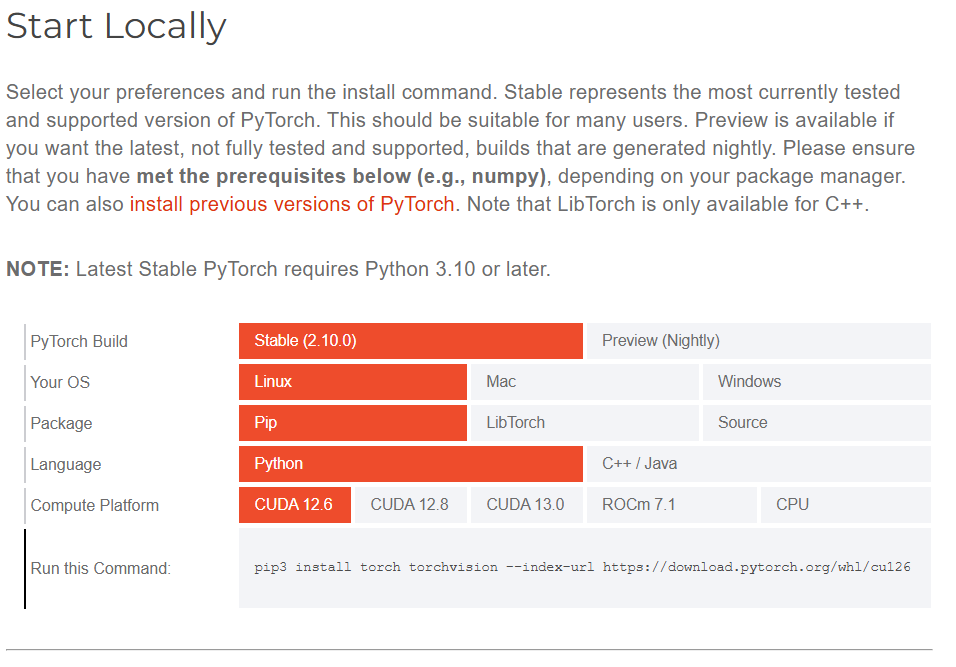
I got the gpu working with this instruction from the RawRefinery Github:
pip install torch==2.6.0 --index-url https://download.pytorch.org/whl/test/cu126
1 Like
Unfortunately, that doesn’t work for me.
I only have CPU to choose from.
Any other ideas?