Ah, sorry, I should have read on. RAF is not yet supported in the DMG, I’m not sure the issue with the NEF, can you tell me what camera made the file?
I’d love to have it in DT, but that’s beyond my control. I do use a version of Libra as @piratenpanda indicates, but some cameras are not supported.
Overall, I’d love to have greater support, so I’m open to other options as well.
It would be interesting to see joint demosaicing and denoising nind model added to this comparison.
I have the setup to do this, but to my eye the results were a bit worse. However, I do want to revisit it, but it’s a lower priority as compared to getting the program is a more stable state.
I am seeing some missing packages. e.g. RawHandler, rawpy. I think the environment may be an issue.
Do you have any information on how you installed it?
At this point I can’t remember how I installed it, but I know I followed instructions somewhere in this conversation (but I can’t find them). It would be helpful if you posted updated installation instructions that cover any adjustments that have been made based on feedback. I see a few links to outside references so it seems the installation process has been refined/clarified and needs to be updated in a single installation instructions.
1 Like
Hi Ryan,
The camera I’m using is the Nikon ZF. I will check what kind of RAW I’m using (compressed or uncompressed).
Did anyone get the xtrans stuff working? Still can’t figure out what I have to do
I’ll get some better instructions up!
4 Likes
I have at some time installed RawRefinery. How do I update to the newest version? Are there plans for a more convenient installation maybe an appimage?
2 Likes
@RawRefinery it would be great, if you may add Nikon’s NRW to the list of supported RAW formats. It works fine from the bash using rawforge, but is grayed-out when using rawrefinery. It’s such an awesome, powerful tool, really loving it 
2 Likes
Hi! Some questions:
- Can this be used with an AMD GPU like the 6700 XT? The GitHub readme mentions thinkgs like “e.g. For a 10XX GPU with CUDA 12.6, you may want”. Nothing about AMD.
- Has anybody installed it with
uv? If so, how? Can’t search this thread asuvis too short of a search term. - Is there any hope of a simple to install AppImage (or Flatpak)? I don’t know if that’s technically impossible with these PyTorch based softwares. It seems it always comes with python package managers (dependencies) and the command line.
Hi,
I installed it with uv, and there was no problem.
AMD works, I used it with a RTX 7800 XT. Search in this thread, there are couple of hints how to check if pytorch gives you the correct device.
Thanks. How?
Not special.
First, make a directory named ~/scripts/RawRefinery .
Second, change the current directory to the directory.
Third, make a virtual environment with the command below.
$ uv venv .venv
Fourth, activate the virtual environment with the command below.
$ source .venv/bin/activate
Fifth, install RawRefinery with the commands below.
(.venv)$ uv pip install torch==2.6.0 --index-url https://download.pytorch.org/whl/test/cu126
(or $ uv pip install torch~=2.8)
(.venv)$ uv pip install rawrefinery
And at last, you can run RawRefinery with
(.venv)$ rawrefinery
However, I don’t know AMD GPU is usable. Upper instruction is for running RawRefinery with NVIDIA GPU or no GPU.
Thanks @yasuo!
uv pip install torch==2.6.0 --index-url https://download.pytorch.org/whl/test/cu126
Oh wait, are we running pip inside uv now? Contemporary Python has apparently become worse than that aging but nightmare inducing xkcd. 
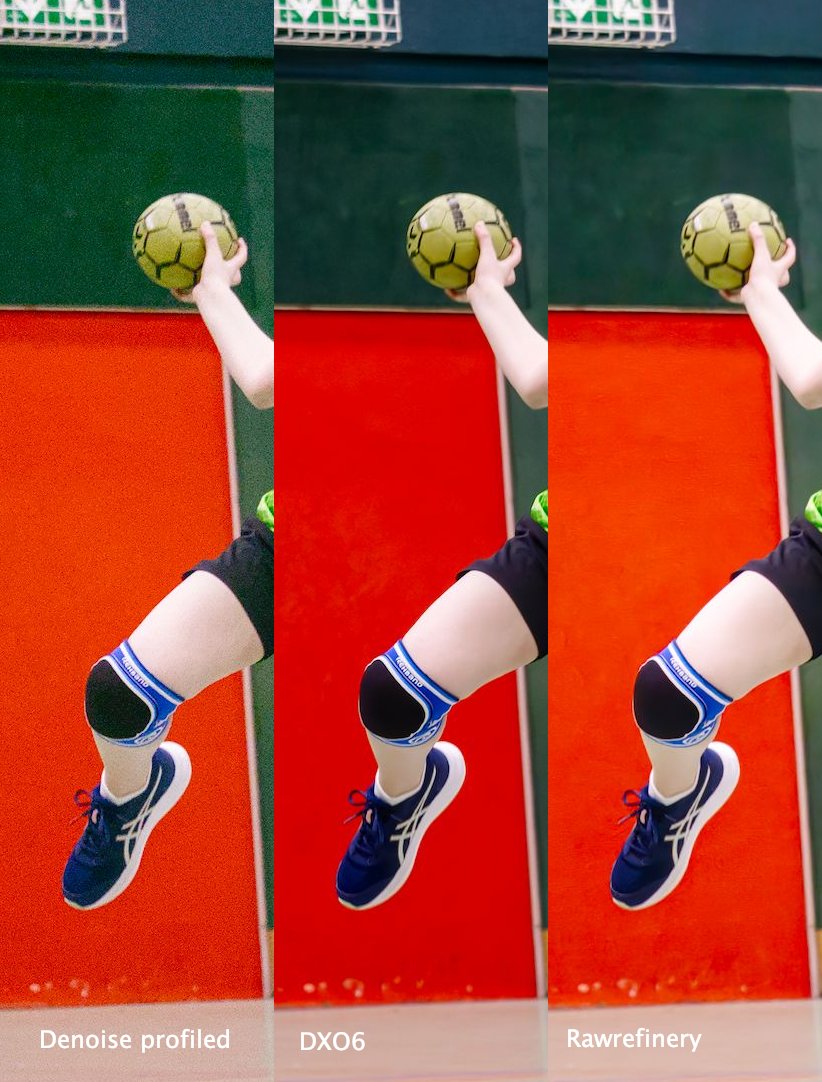
The results are really impressive! Yesterday, I took some photos at my daughter’s handball match. The relatively slow aperture of my EF-S 55-250mm f/4-5.6 actually helped autofocus :), but on the downside I needed ISO 6400 to get to 1/800 s. I then compared Darktable’s denoise profiled module (left), a test version of DxO PureRAW 6 (centre), and Rawrefinery (right). Although DxO applies stronger sharpening after denoising, the actual denoising quality is almost on the same level. Great job!
It has already been reported on GitHub that the ISO value in CR3 files is not recognized, and that lens and camera metadata are not passed on to the exported DNG file. For many images, this makes lens correction quite time-consuming.
Does anyone know whether it is possible to transfer this information from the CR3 file, or from the corresponding XML, to the DNG afterwards using Exiv2 or ExifTool?
BR, Till
1 Like
I’m on macOS 26.0, the app doesn’t start after running it.
I use this to copy EXIF data from NEF raws (-S.NEF) in the directory one level up (-l..) to the extracted JPG previews (the JPGs are extracted with dcraw -e):
exiv2 insert -l.. -S.NEF *.jpg
  in | insert   Insert metadata from .exv, .xmp, thumbnail or .icc file.
                Use option -S to change the suffix of the input files and
                -l to change the location
A search will show you how you can copy with exiftool, too.
Thanks for your response … turns out, that with CR3 files, exiftool works actually better … LLM provided a working batch processing solution after some iterations:
exiftool -overwrite_original_in_place \
	  -TagsFromFile "$cr3" \
	  '-IFD0:Make<IFD0:Make' \
	  '-IFD0:Model<IFD0:Model' \
	  '-XMP-tiff:Make<IFD0:Make' \
	  '-XMP-tiff:Model<IFD0:Model' \
	  '-ExifIFD:LensMake<IFD0:Make' \
	  '-XMP-exifEX:LensMake<IFD0:Make' \
	  '-ExifIFD:LensModel<ExifIFD:LensModel' \
	  '-XMP-exifEX:LensModel<ExifIFD:LensModel' \
	  '-ExifIFD:LensInfo<ExifIFD:LensInfo' \
	  '-ExifIFD:LensSerialNumber<ExifIFD:LensSerialNumber' \
	  '-FocalLength<ExifIFD:FocalLength' \
	  '-ISO<ExifIFD:ISO' \
	  '-FNumber<ExifIFD:FNumber' \
	  '-ApertureValue<ExifIFD:ApertureValue' \
	  '-ExposureTime<ExifIFD:ExposureTime' \
	  '-DateTimeOriginal<ExifIFD:DateTimeOriginal' \
	  '-CreateDate<ExifIFD:CreateDate' \
	  '-OffsetTimeOriginal<ExifIFD:OffsetTimeOriginal' \
	  '-OffsetTimeDigitized<ExifIFD:OffsetTimeDigitized' \
	  '-SubSecTimeOriginal<ExifIFD:SubSecTimeOriginal' \
	  '-SubSecTimeDigitized<ExifIFD:SubSecTimeDigitized' \
	  "$dng"
1 Like