Can anyone with windows test this version of PiDNG to see if it installs? PiDNG generally seemed like it worked better than tifffile, but not installing on windows was an issue.
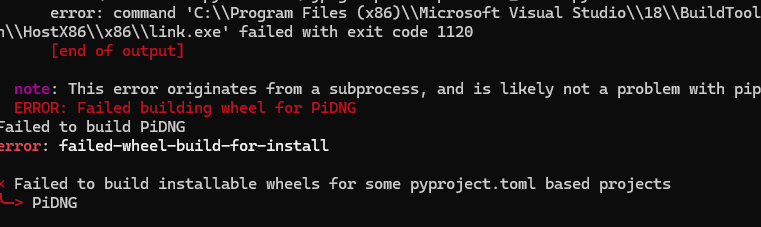
Thanks! That’s unfortunate, but it’s good to know.
1 Like
There is still a known issue with a “singular matrix” error. It usually shows up just before the traceback. Unfortunately, your error message starts with the word “Traceback”, i.e., one line too late for us to see if this is indeed the root cause.
This issue currently has no known solution.
I can make the code have more explainable errors, sorry about that, the current structure is a bit vestigial from integration in PySide6.
There will be structural improvements with the upcoming onnx backend version.
Incidentally, I do think the “singular matrix” error should not present in the xtrans models (which work on bayer images as well), but I haven’t fully tested or reported on it.
1 Like
The error is not present with xtrans models. After 4 hours, I got my image denoised, but the colorimetry information is not saved at all in the resulting DNG file, making it effectively unusable.
Let me explain what I mean.
I started with a file, DSCN0052.NRW, produced by my Nikon Coolpix P1100 camera. I ran the denoiser as follows:
rawforge --device cpu TreeNetDenoiseXTrans DSCN0052.NRW DSCN0052_denoised.dng
As you probably know, NRW files produced by Nikon do not contain any colorimetry information. The color conversion matrix must come from the application, and, for example, in RawTherapee or ART, it comes from camconst.json or maybe from LibRAW itself.
More context: the ./rawpy.libs/libraw_r-dfbdac63.so.24.0.0 file that comes with rawpy contains the string Nikon Coolpix P1000, but not Nikon Coolpix P1100. This makes my camera effectively unsupported, even though it is optically identical to the supported P1000.
On the contrary, DNG files are expected to self-describe their colorimetry.
The problem is, in my case, rawforge has no source of knowledge required to write the matrix to the denoised DNG, so it defaults to an all-zero matrix, which produces dull colors.
The proper fix would be for rawforge to require the user to supply a camconst.json file or the matrix coefficients manually when the RAW file format is supported, but the color matrix cannot be determined by LibRAW because the camera is “too new”.
And indeed, after hacking the NRW file with sed to say P1000 instead of P1100, even old non-Xtrans models like TreeNetDenoiseSuperLight start working—as in, a denoised image is successfully produced, with a nonzero color matrix.
2 Likes
Thanks for the report!
4 hours? I guess you are on CPU? I can make a smaller cpu model for xtrans.
This is not a case I thought about for sure.
The proper fix would be for
rawforgeto require the user to supply acamconst.jsonfile or the matrix coefficients manually.
Is there a proper source for the matrix coefficients? I’ll do some research, but if you have any specific recommendations I’ll keep those in mind.
I could also provide an option to supply a ccm manually if that is desirable.
2 Likes
Yes, CPU.
Yes - Adobe Camera RAW. That’s where all those color matrices have been copy-pasted from.
2 Likes
Another thought.
For tiny-sensor cameras (mine has a crop factor of approximately 5.6), the automatic model conditioning based on the ISO does not work. My ISO 1600 is equivalent, in terms of noise, to full-frame ISO 8960. EDIT: I need to double-check the math. Is it squared?
I suggest that RawForge should extract from EXIF both the “real” and “equivalent” focal lengths. For my camera, Exiv2 can extract both:
Exif.Photo.FocalLength                       Rational    1  395.0 mm
Exif.Photo.FocalLengthIn35mmFilm             Short       1  2200.0 mm
Divide FocalLengthIn35mmFilm by FocalLength and use that as an adjustment factor for the ISO. EDIT: --conditioning 10000,0 did not work, but --conditioning 50000,0 did. Should that factor be squared?
I guess I have to share the file in PlayRAW, after all…
2 Likes
Thanks for doing this. I’ve been using it since March and it has been awesome to see the improvement in the quality of my images.
I’m on Windows with a version dated March 17. I’d like to update to a newer version to try the new models but I’m not sure how to do that. I tried “pip install rawforge” but it just said “Requirement already satisfied” a bunch of times and didn’t appear to update anything. When I type “rawforge -h” it doesn’t show a version number.
1 Like
Noted! Those are good ideas. I’d love to incorporate smaller sensors into the training data as well.
1 Like
I’m glad you like the results!
Fair warning on the new models, they might have strange artifacts. I haven’t looked into it much yet since I’ve been working on the ONNX runtime (and other work). I recommend the RestormerXTrans model. Let me know if there are any weird color casts. XFormerXTrans should be higher performing, but it tends to create these weird color splotches?
Eventually I’ll get around to fixing those lol, but they’re still fun to try out.
Otherwise, upgrading with pip just requires an additional flag:
pip install --upgrade rawforge
Hi all, an ONNX version is live! All models are available, and it’s been tested on an M4 Mac and linux CUDA environment. Right now it is separated out from the main app. Install instructions:
What to expect:
It should function just the same as before, but with a slightly different command “rawforgeonnx”. There are a few new features, but I’ll go into them more later (e.g. running multiple models on the same image for post deblurring sharpening, 8-bit tiff output).
Otherwise, the models are reasonably performant, but still slower. I might end up allowing users to choose which backend they want in a combined app eventually. Do you want speed? Or the flexibility of ONNX?
Installing:
NVIDIA: For cuda (tested, must have CUDA installed):
pip install rawforgeonnx[cuda]
AMD and NVIDIA on Windows (DirectX 12+):
pip install rawforgeonnx[directml]
All others, including M1+ Macs (CoreML)
pip install rawforgeonnx[cpu]
For web (I guess if you want it):
pip install rawforgeonnx[web]
Useage is the same, but use the CLI “rawforgeonnx”.
rawforgeonnx TreeNetDenoiseHeavy test.CR2 test_heavy.dng --cfa
Please, let me know if it works!
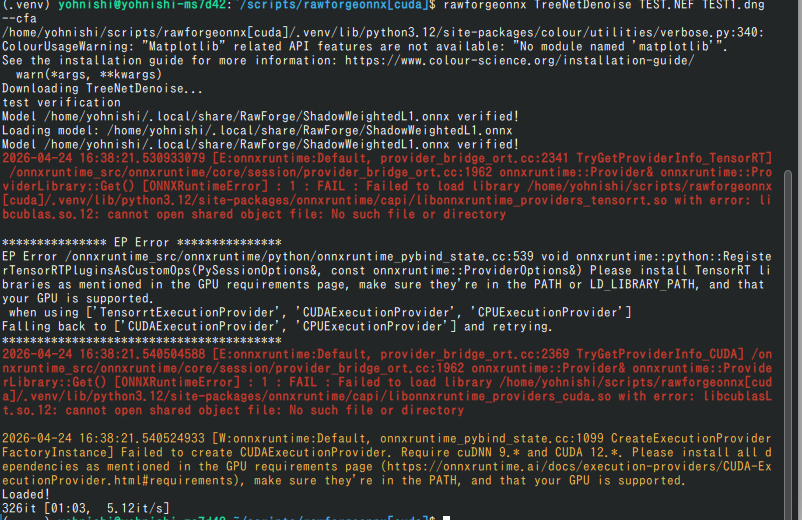
If you are an AMD user, I am particularly interested in finding a way to get it working for you. If on windows, let me know if the directml option works. If not on windows, let’s talk and try to find a solution.
1 Like
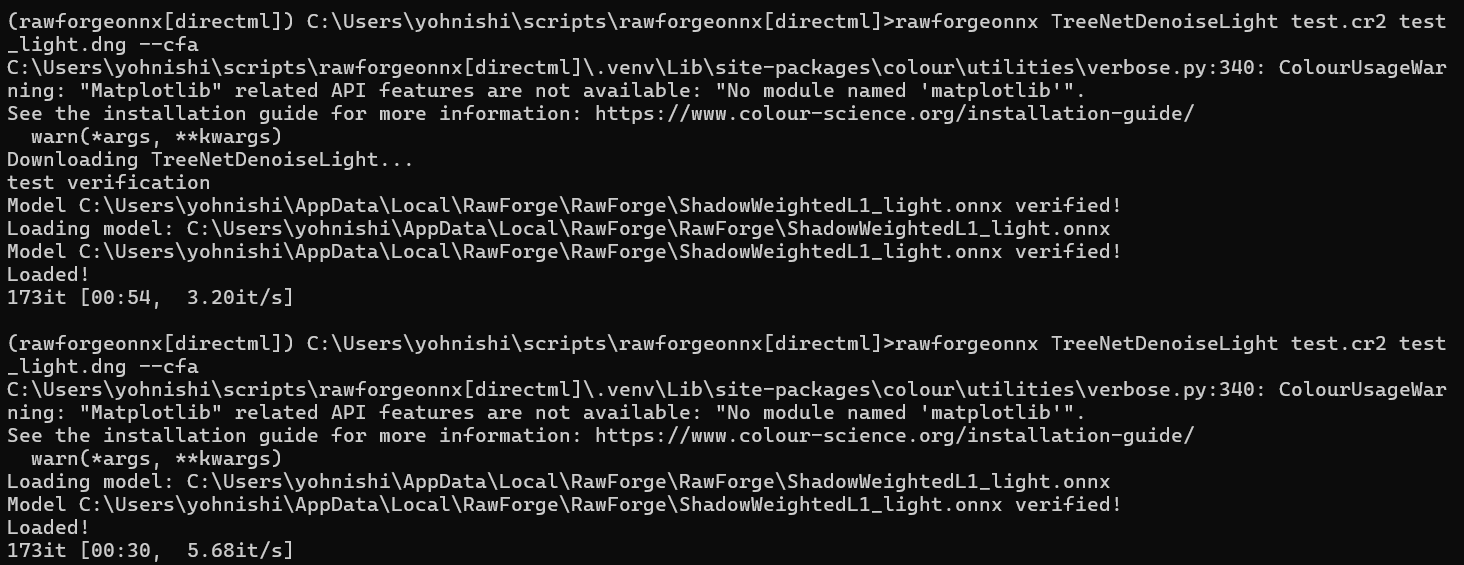
The warning can be avoided by running pip install matplotlib.
1 Like
@yasuo
Thanks for trying! The error messages are partly expected. I should probably focus on cleaning up the experience soon however.
Either way, I’m glad it’s base level working for you. If you’ve tried the torch backend version, can you compare the speed?
I am struggling with installation on macOS .
Pretty sure I am missing something …
There should be more to do than only run …" pip install rawforgeonnx " in a terminal , right ?
As i do get just a error message … "command not found pip "
You should have python installed. Try with
pip3 install rawforgeonnx
1 Like