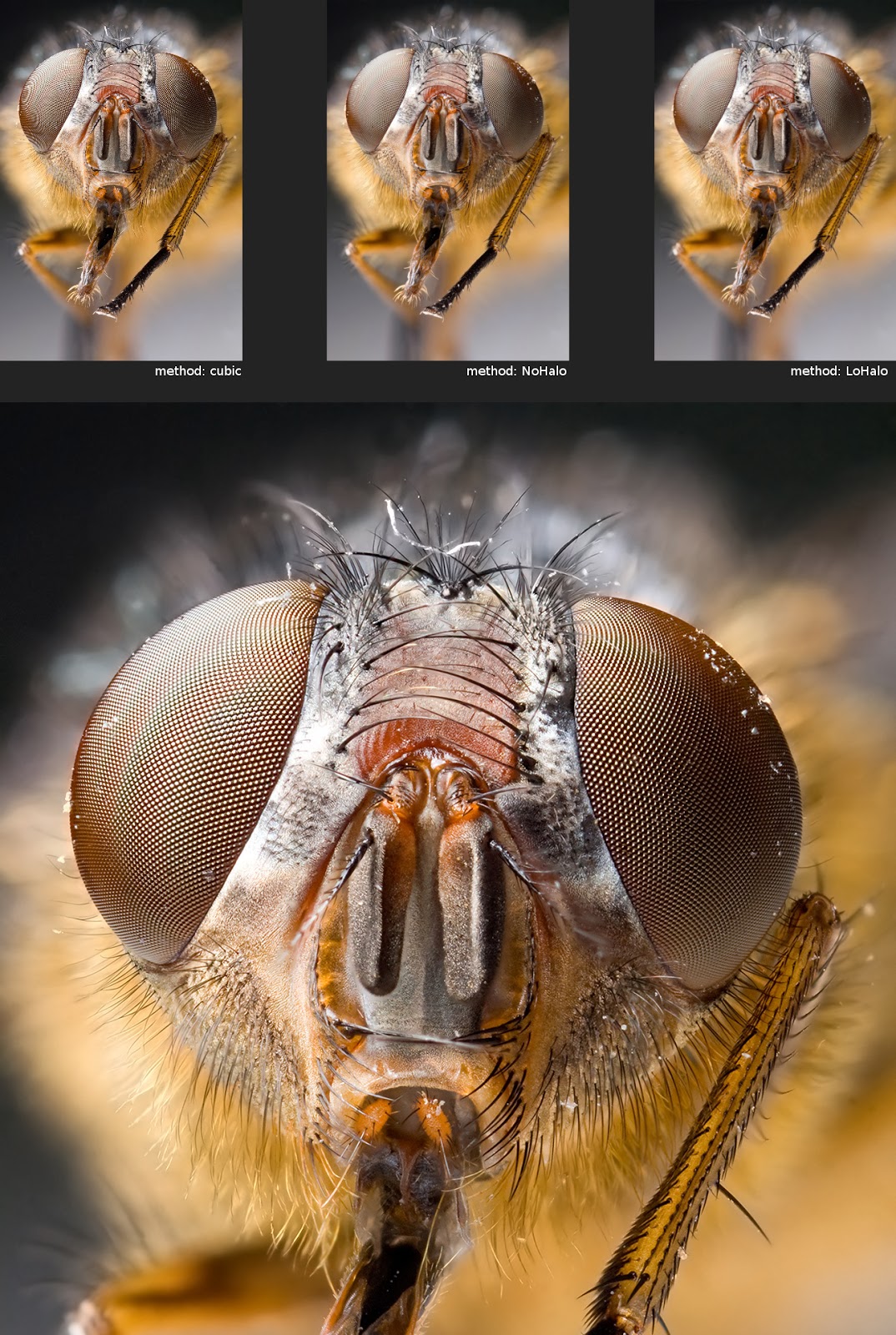
sorry if this question is stupid - I am just photographer, not photo editing geek … I’ve been always (in past N years) using LoHalo while resizing (downscaling) images because I believed that it preserves contrast and fine details better (sharpening) … I’ve noticed today (to my shock) that Cubic is after resizing sharper o.O … WtHeck is that
image above is just resized from 8120px (D850) to 2560px longer side …
My typical workflow is that I do all the tonal balance and colours processing in RAW processor (DT, RT) and all the contrast processing and retouching and local edits in GIMP … Two last steps before exporting to multiple jpegs are to resize (I was always as a rule of thumb using LoHalo) and then after resizing to apply a bit sharpening (in this case I’d use something like 0.85/0.65/0 radius/amount/threshold) …
Now it all falls apart … how it is so that actually LoHalo is less sharp than Cubic while I’ve read from many articles that LoHalo is preferred for a photography and especially when resizing “below” 70% ???
Links from reddit answer don’t work … is there a slight chance that you’ll gimme your take on the phenomenon I’ve described above (and provided an example of it) ?
I’ve been further consulting with Ai and Ai says that LoHalo is perceivably less sharp after resizing but with additional sharpening (unsharp mask) to desired level it will give a better result than resizing with cubic and sharpening to the same level despite the sharpening after cubic will be less intense …
so please what’s the right workflow ? Ai was suggesting something like
resizing up 70% - Cubic + sharpening
resizing to less than 70% - LoHalo with bit more aggressive sharpening than if resized with Cubic
Interpolation (estimating data from existing data) is an art as well as a science. An algorithm is a set of choices. Cubic is more aggressive but less nuanced, whereas LoHalo, as the name implies, takes a more delicate approach; hence, fewer artifacts around details.
If the plan is to do post-resize processing, a safer, more nuanced approach is in order because we can work with a resized result that has fewer ugly pixels. We have a more pliable image that we can restore after resizing.
To bring home this point, let me ask you a question: Which result in Pat’s post would you like to work with? Cubic, NoHalo or LoHalo?
Yes, cubic can work better… sometimes. But “LoHalo is less sharp than Cubic” is far from being a universal truth, and sharpness isn’t even the only thing that matters. For instance Cubic is much more prone to moiré effects (as in @patdavid’s sample) which come from spatial frequency aliasing, which is avoided by… blurring the picture before scaling. So you just chose your evil.
And, IIRC, Nicolas Robidoux recommends NoHalo by default, LoHalo being a bit better when upscaling.
I don’t know, this is why I ask … Ai told me yesterday that LoHalo + more sharpening will give a better result than Cubic + normal sharpening …
Point is that my workflow is to do all the edits in two stages - RT + GIMP and then I have on the top one layer “Visible final” (name is selfexplanatory) and I use this layer for to export the jpegs from it typically after sizing … so my last two steps in my photography workflow are
resize to desired size + apply final sharpening before exporting to jpeg
so my only question is what you other people do and what will gimme a better results ? can please somebody tell me the answer straight away if you know it ?
We have a rule on the forum not to rely on AI or mention it too much. Putting that aside, I believe we have given you enough advice to act. It is okay to be undecided.
In my opinion, NoHalo looks like the winner in Pat’s post. It has the cleanest appearance. Is it softer at first glance? Sure. But as I said earlier, it is more suitable for post-resize sharpening than Cubic. After all, last thing you would want to do is further emphasize the ugly moiré artifacts introduced by Cubic!
As for the specific “what to do”, we cannot tell you that. It depends on your images, your taste and your objectives. Start with NoHalo and find a good sharpening method. There are sharpening methods that do not brutalize the image. Choose wisely. Then test it on batches of similar images. If a certain combination works for a certain type of image, then take note of that configuration for reuse for that type of image.
thanks … so the answer is to go probably from LoHalo - which was my default method without thinking and it was wrong - to NoHalo and probably ditch using Cubic completely ?.
One more question … I am also restoring a bit more contrast (microcontrast) with high-pass layer in overlay mode … am I supposed to to that after resizing ? On high level my workflow looks like this
RT/DT - RAW processing, only luminosity (tone equalizer, curves) and colors here + eventually denoising
GIMP - everything else, mainly contrast, dodge/burn and local edits and my last two steps are always to create visible layer on the top after all edits, apply high-pass on it (I use 200/1) and set it to overlay and typically I set the the opacity for to tune the strength of the effect and eventually if I don’t want the contrast everywhere I use mask and paintbrush … This all is done on the original image size … after everything is done I just create a final “Visible” layer that I copy to new image and use it for exporting … I save and close the “original” image with edits at this point … no sharpering (unsharp mask) applied on it so far …
GIMP exporting step done with copy of Visible layer into new image … I am eventually resizing the imaging here (downscaling) and after every resizing I do apply the sharpening to fit it to my needs … So I am going to resize with NoHalo from now onwards
does please this workflow make a sense ? Shouldn’t I be applying that high-pass/overlay layer in step #3 before each export in desired size ? Is the high-pass/overlay before sharpening (with unsharp mask) the right order ?
To resize my full-res JPG to share/post on web, I’ve tested out Cubic, Nohalo, Lohalo a while back, and in the end decided to use ImageMagick’s Lanczos resampling after a lot of pixel-peeping. For example, resizing to 800px wide:
I found Lanczos excellent at keeping diagonal lines smooth (instead of jagged), and retaining details and clarity. You can also adjust its strength with the -unsharp param. I used it too frequently that I created a wrapper Python script:
I also just learned recently that Nohalo is a derivative of Lanczos. At least I did a blind test first
For darktable, I don’t apply sharpening, but use Richardson-Lucy deconvolution at the end as part of my nind-denoise workflow instead.
@sillyxone I recall Lanczos having diminishing returns for downsampling.
@sigsegv111 I concur with @Ofnuts. RT/dt are powerful. No need to continue in GIMP. When you export then import in GIMP, you may risk losing colour science integrity and colour management that modern raw processors tend to maintain before export.
Since you are using RT, consider using @jdc’s build, which contains all the bells and whistles, including local editing. Or try @agriggio’s fork ART, which streamlines RT features and also has it own unique features. I have not used either in a very long time, so I do not know how much they have evolved. Give them a try to see if their features benefit you.
Sorry, I have not followed your work. I am wondering if NoHalo + Unsharp would work just as well, although Unsharp is not subtle. Speaking of RL, have you considered Capture Sharpening or the like? RL is more effective at the beginning of the processing workflow.
hello, thanks for input … I have to remind that if you post on web it’s 8bit jpeg, if you export from RT/DT it’s 16bit tiff and you’ll make of it again 8bit jpeg in the end … there’s not hidden catch in that and for the purpose of exporting images to jpeg to publish them on the web or eventually for preparing them for a print (as 16bit tiffs) I wouldn’t say that GIMP’s 16bit precision + keeping the original color profile while working in GIMP is any limitation …
I am now totally confused … Can please somebody tell me if I should be sharpening (unsharp mask) before or after resizing ?
Typical scenario - I have a processed photo from D850 with 45mpx … I want it now export to 4K-size image from GIMP with shorter side to be 2160px (if longer < 3840px otherwise resizing by longer side)
What is the order of actions ? Should I sharpen it (with unsharp mask) before resizing and a bit after ? Does it matter how much do I resize it (ie original size is 8000px so should be my sharpening workflow before/after different if resizing to 3840 Vs 1920)
I noticed now how sharp are out-of-camera JPEGs and I use M-sized JPEGs … There’s some in-camera processing that does the sharpening really right and I am struggling with how to do it while I am normally processing from full-size raw …
OOC JPEGs have the advantage of manufacturer design. They know the inner workings of their camera more than we do and so can optimize in an insider sort of way. Does it mean that we cannot do better? No, but we would have to figure that out on our own.
Consider “capture sharpening”. That is, removing some of the blur (deconvolution) pre-/post-demosaicing, depending on the implementation. Early “sharpening” improves the image in a way later applications cannot. RT, dt and perhaps other raw processors have this feature.
Before, after or both. It depends on one’s preferences and opinions. General advice is to do it post-size-reduction only. The act of reduction will remove or enhance (perhaps in a bad way) any sharpening you performed beforehand. It requires tweaking of the parameters to ensure that the sharpened details survive and also do not cause problems (artifacts that arise from sharpen→resize). Also, when resizing, the algorithm uses pixel data to decide what to do. If you pre-sharpen the image, you may cause the algorithm to do things differently than it would otherwise, if that makes sense. In short, it is easier and computationally less expensive to resize then sharpen.
yeah, thanks … this what I was always doing and thinking … RT is doing this “capture sharpening” by default (and it always was like that - even old versions) … But does DT the same ? it seems to me it does because sharpening-wise I don’t see any huge difference between processing image in RT and exporting that without additional sharpening as 16bit tiff for continuing in GIMP Vs doing same with DT …
As outlined above - I sharpen at the end of my workflow just before exporting (after resizing) … I keep my images completely without additional sharpening as a project files
Have you tried just resizing them in DT when you export and then using with that the RL lua script to see what the results are compared to what you are doing…it would seem like you could make things very easy if that approach satisfied your tastes…
I think our friend here prefers to do it in GIMP. Perhaps, the reason is such that they can preview the results. In that case, I think it is possible for dt to position a module or two for that at the end of the pipeline, if that is something they would like to consider.
 … how it is so that actually LoHalo is less sharp than Cubic while I’ve read from many articles that LoHalo is preferred for a photography and especially when resizing “below” 70% ???