Could you please update to release 1.9.0?
You should have a warning message instead of a crash when copying EXIF data. If you can post here the warning message you get, I can give a further look.
Could you please update to release 1.9.0?
You should have a warning message instead of a crash when copying EXIF data. If you can post here the warning message you get, I can give a further look.
Hello Luca,
Now (version 1.9) works in that the process works fine (no exif bug)
Thanks a lot indeed!
I have succesfully stacked the fly’s head.
However, when I try to save my image (“save master only” option) all exif data are not present.
They are available in the first jpeg image (fly head, as usual).
This occurs both with the jpeg and tiff format.
In all truth, it is not a big problem for me…
With G’MIC, through the command line, every exif data is lost as well 
You need, for instance, ExifTool to restore them
I have also noticed that the folders are not deleted (_bunches, _stack_pyramids) even though I have checked to option (delete output at the end of the job) to delete them (as you suggested by clicking on the “stacking line”)
Additionaly, when I have closed the software, I clicked to discard all changes.
Again, this is not a big problem, though (I can delete them manually)
Silvio, thanks for reporting those issues.
Can you give me more information about the EXIF problem? I haven’t encountered this issue so far both on macOS and on Windows. Do you use the same fly images you sent me before?
The “discard all changes” dialog appears because the “new project” wizard creates a project that you could save in order to open it again with all settings if you need to reprocess your images.
Concerning folders not proeprly, I will try to fix it in next round. The current option only removes files within the folder.
At the moment, you can restore EXIF manyally via File > Import EXIF Data.
I will do more tests to ensure that in all case EXIF data are preserved, probably there is still some possibile situation I haven’t tested.
Hello Luca,
Do you use the same fly images you sent me before?
Yes. The jpeg images.
Windows 11. Shine Stacker Version 1.9
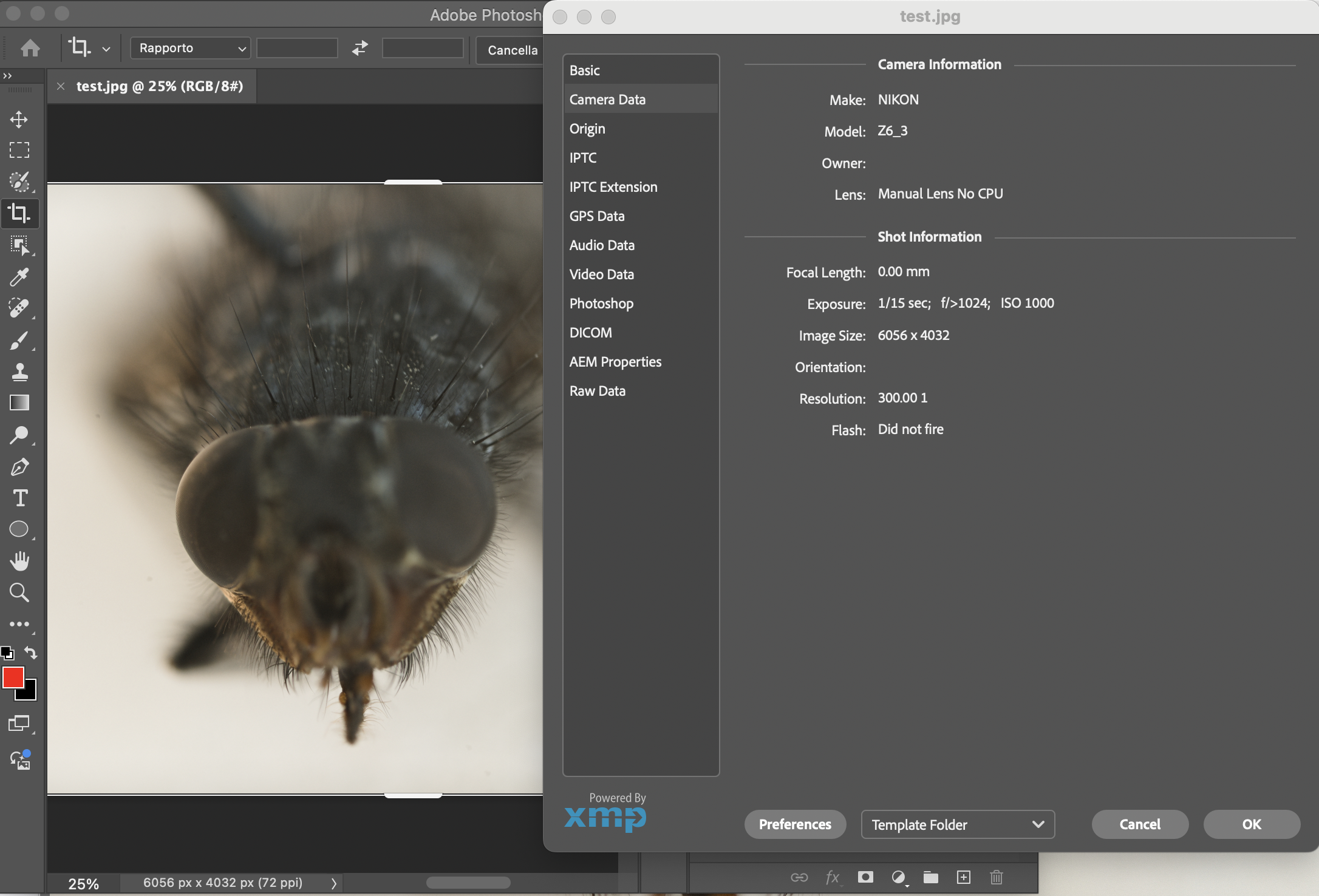
Comparing the Exif, after the stack, I have lost all data concerning the shot (Nikon brand, aperture, time etc)
Those are the information that I can recover from the same image on my computer.
Can you see any warning message in the log window, like “failed to copy EXIF data: XXX”? If you send me the message, I can try to understand more about why it fails.
Hello Luca,
I suppose you are on the right track to solve this issue
Here the last lines of the log:
INF] STACKING_MOSCA_CAPO_29-aprile-2025-focus-stack-pyramid: collapsing pyramid
[INF] STACKING_MOSCA_CAPO_29-aprile-2025-focus-stack-pyramid: copy exif data
[WAR] STACKING_MOSCA_CAPO_29-aprile-2025-focus-stack-pyramid: failed to copy EXIF data: path E:/STACKING\STACKING_MOSCA_CAPO_29-aprile-2025 does not contain image files.
[INF] STACKING_MOSCA_CAPO_29-aprile-2025-focus-stack-pyramid: elapsed time: 00:00:20.32s
[INF] STACKING_MOSCA_CAPO_29-aprile-2025-focus-stack-pyramid: completed
[INF] STACKING_MOSCA_CAPO_29-aprile-2025-stack-job: elapsed time: 00:07:31.22s
[INF] STACKING_MOSCA_CAPO_29-aprile-2025-stack-job: completed
Job ended successfully
BTW, the path (on Windows 11) where all the jpeg imags (fly head) are located is:
E:\STACKING\STACKING_MOSCA_CAPO_29-aprile-2025
Interesting! Could you try to change “Exif data path” double-clicking the focus stack module to the folder that contains the input files? It should be set automtically by the wizard (it is in my test), apparently it points to a folder with no images.
If you give a try to release 1.9.1, I fixed a number of issues related to Exif data in the retouch window:
In particular:
Hello Luca,
Just tried the new version 1.9.1
Windows 11 - Nikon Z6-III
RAWs (NEF) converted to TIFF 16 bit thanks to RawTherapee.
In short, It kind of works now as regards the exif parsing
Some relevant information are lost (e.g. shutter speed, iso), though.
Here is the exiftool result for the the TIFF of the first image of the stack (its size is larger):
https://www.dropbox.com/scl/fi/mynwol63nbm9wdertjrww/EXIF_FIRST_IMAGE_TIFF.txt?rlkey=1poaiz9exsgrs1drx786q1owt&dl=0
Here is the Exiftool result file (its size is smaller) for the TIFF exported through Shine Stacker:
https://www.dropbox.com/scl/fi/ypo0jfz7i76y3m894tpxg/EXIF_SHINESTACKER_STACK.txt?rlkey=im19i6os6g0wdibl211j8g9sl&dl=0
Hello Luca!
One bug I have just discovered while testing over and over the same stack (83 Tiff images - 16 bit):
Very strange indeed because I use the same basic settings for the 2 methods.
Only the initial method to select the images is different…
Here is the log for this bug:
https://www.dropbox.com/scl/fi/6e9az5qgus5pgynh9d2bf/BUG_SINGLE_IMAGES_STACKING.txt?rlkey=1b0mtz35gz0zcgv122hgq6yft&dl=0
Just 2 questions:
now the whole process is pretty fast. Nothing to complain…
However, just ouf of curiosity, since Helicon Focus is blazing fast compared to Shine Stacker (same stacks, of course…).
Is it because Helicon take advantage of the GPU whereas Shine Stacker uses “only” the CPU?
What occurs when you repeat, over and over, the same stack (for testing stuff) without deleting manually the previous folders (_process, _bunches)?
With the new stack these folders are overwritten automatically by the software?
Just curious…
Hello Luca!
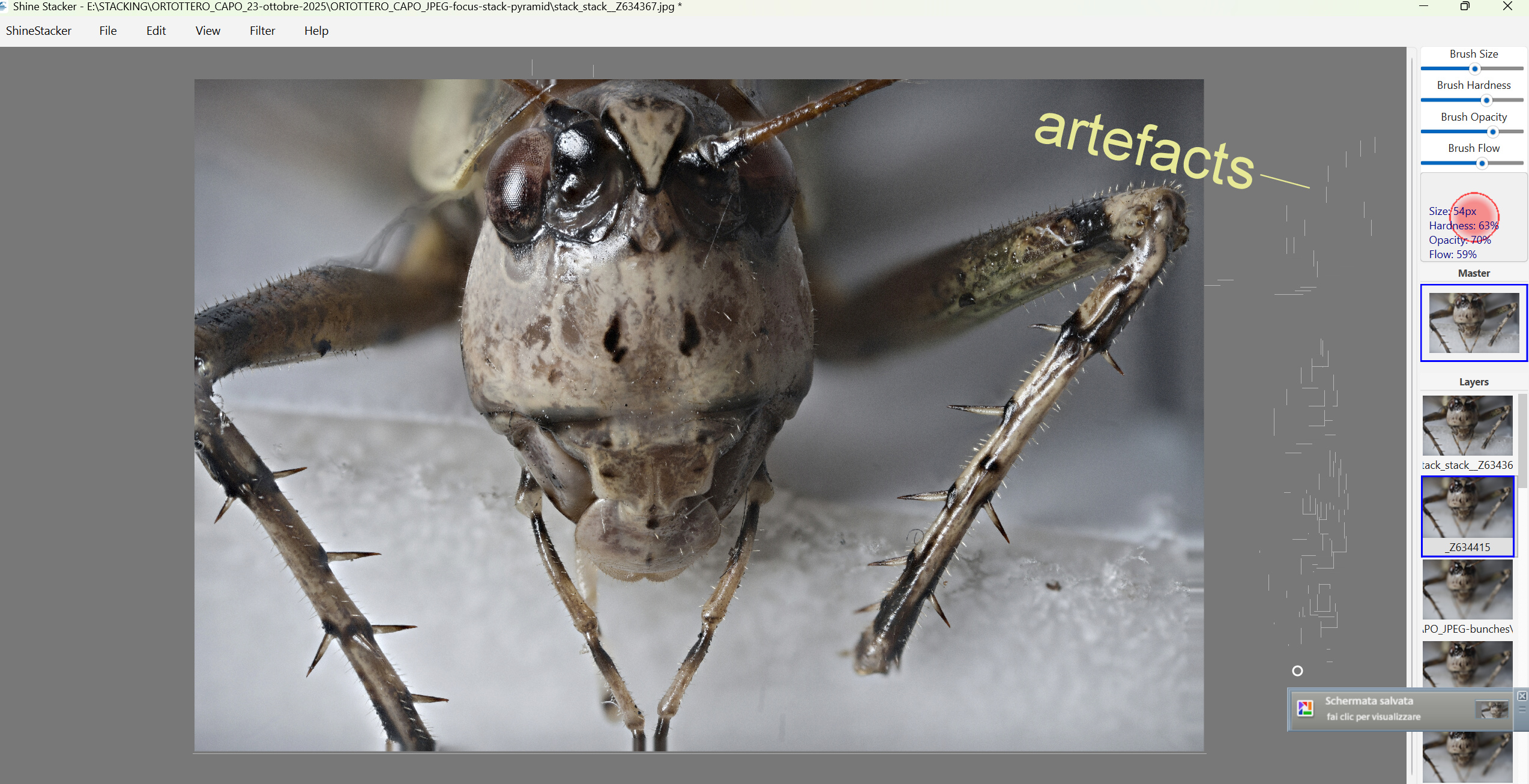
While working (version 1.9.1) with the brush, in the retouch options, I have nocited again a little glitch.
This “bug” has always been present in all versions I have been testing so far on Windows 11.
Some little artefatcs (grey lines) appear on the borders of the image whenever you move the brush on them.
I have never pointed out this problem because it is such a minor incovenience (it is even fun to watch) …
Thank you for reporting those new issues. I also found missing EXIF data (though I fixed some problems with the data format in 1.9.1), I am looking at it.
Concerning the ghost brush glitches, I have seen this on one Windows machine but on another, so I’m not able to always reproduce it.
Stay tuned for next bug-fix release.
Concerning the comparison with Helicon:
Nonetheless, when I used images with some issues (heavy vignetting, small focused areas) I had alignment problems with Helicon and Zerene, while Shine Stacker code (before I released it) worked adopting some customized alignment setting.
Cheers!
Hi All,
you may want to try release 1.9.2, which contains many fixes to EXIF data. I discovered a number of limitations in the available python libraries that manage EXIF, so there may still be some missing data, but I hope most of what is really needed is supported.
Please, let me know in case of more issues that may need support!
Hello Luca!
Just tried the new version 1.9.2 (on Windows 11 as usual)
The stacking result is extremely good: therefore I could indeed stop here my message but since you want much more information I will continue with my report
Just joking…
Stacking from tiff 16 bit files does not save some “important” EXIF data in the .TIFF file (I mean: ISO and shutter speed at least)
This same stack has the Exif ISO and shutter speed with Zerene and Helicon (just tested both of them to make sure this TIFF stack is intrinsical “fine”…)
Much worse… I have just discovered that whenever I save the stack as Jpeg the image is corrupted (only a few bit are saved…). In essence, it looks like you can save the final image as Tiff 16 bit but not as jpeg…
BTW, I have also tried my usual stack, that is the fly head (jpeg images).
Dropbox link abovementioned (previous posts).
In this stack (JPEGs images) the final EXIF is:
Probably I am missing something but I have retried again to automatically delete the folders (or at least their image within) through Shine Stacker 1.9.2 itself.
To do so, I have activated the option to (“delete job at the end output”) and I have clicked “discard” when I have closed the “project”.
Unfortunately, all the folders and the jpeg were still there and I am forced to manually delete them…
Tested with the fly’s head stack (to easily reproduce my tests…)
This weird nasty bug is always reproducible (same as previous versions), no matter the stack i try (jpeg, tiff); namely when you select the images (instead of the whole folder) the process always fail at the very end.
Here is the message:
Error
Job failed.
No valid image files found
BTW, If you prefer I can report any further bug on your github web-page since I have an account myself
Hello Luca,
Shine stacker 1.9.1 - Windows 11
Fly’s head (selected only a few jpeg images on purpose to speed up the bug…)
Here is a short video with all the steps to always reproduce the bug no matter the stack (single files selection not working at the very end):
Silvio, I tested the new EXIF code on macOS with a number of sets of files and it worked, so I have to investigate with your files.
I am busy for a few days, will give a look probably in the weekend or later.
If you can send me your tiffs (unless there is still the link in this thread) I will test on your images.
I found you JPEG images of the fly’s head, not the TIFF. If you send me those TIFFS I can run a test on your very same images, and see what happens.
I run standard tests, including EXIF I/O on the automatic CI GitHub test servers, and it passed, so it must be something fishy that I haven’t in my automatic tests and I haven’t tested manually.
Just a quick test. With you JPEG files I can:
I think I need to test using your origina TIFF files.
I just noted that the original file has f/0 which gets translated into f/>1024. I hope there is no issue with exceptional values, will investigate…