@anry I guess there is an intermediate pixel based raster mask created in the process. Is there a way this could be stored separately? Not in darktable, of course, but as a separate file.
Hey Andrii
it is indeed way faster now with the latest update .
Works well … with normal daily life objects like cars , buildings or products .
As soon as there are irregular outlines … it just fails for me . Regardless of which kind of feathering I do choose … the outline is just not matching subject . For me personally not useful in terms of portraits , animals or birds .
SAM 3 does deliver better results … but is slower to get the mask rendered .
But we all know that …
I think the base idea of AI masking in DT is very cool … and a leap forward , specially for the Anti Adobiists  .
.
For those who work with DT in conjunction with PS … it is better to go the route with PS to create the raster mask , perfect mask with perfect outlines … no further tweaking needed out of the box . And the way to PS and back into DT with the mask is not any longer from the time perspective .
Anyhow I still think you have done a great job … and stepping into the right direction by opening up DT for AI usage .
Andreas
SAM models we currently use in AI object mask is a good tool for a few-click object selection, but not ideal itself for producing accurate edge detection of objects. This is because internally mask generated by the model is just 256x256 pixels. It is further upscaled to the image dimensions. Couple different techniques can be used to improve edges. The simples one is guided filter, which we have in our tool. But it may not be enough for some cases. That’s the current limitation.
I will continue efforts to improve mask accuracy, but that would probably be beyond next release.
As for SAM3, it is conceptually different model. An overkill for our task. And it is not open-source, which is a complete blocker for consideration in DT.
4 Likes
THX Andrii … for the additional info , no wonder that the masks are not detailed with the small pixel dimensions .
No worries … as I have PS in my backhand to get precise masks .
I do know about the various methods of altering the mask in different ways of blurring and contrast method . But how to use the " guided filter " in conjunction with it ?
Ah I think you mean the " feathering guide " when you talk about the guided filter … well the help is really limited here 
No, feathering has nothing to do with it. Feather slider in object mask does not effect object selection at all. It is just applied to the resulting paths.
Guided filter is not a user-facing tool, but rather a classic edge-preserving smoothing algorithm used to improve mask quality.
Hi Andrii
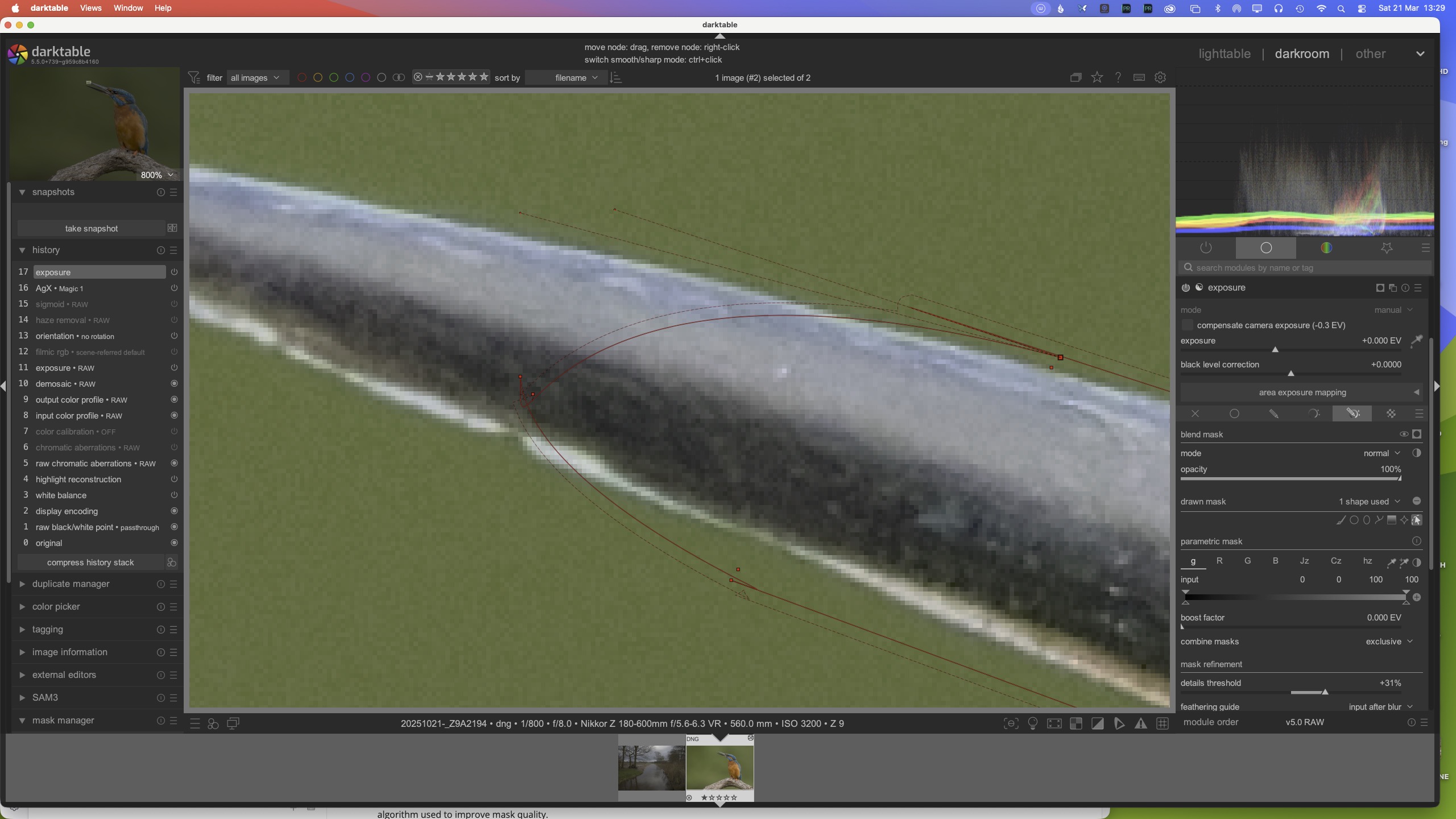
Is there any way that the vector path Bezier handles can be set to zero length by default?
The 'handles" are a real problem, as they distort the path really badly from the get-go.
You are doing a sterling job here though - congrats!
1 Like
OK … so I have no influence on it ?
I went looking for darktablerc. I found one in /usr/local/share/darktable, and it had the entry: plugins/ai/repository=darktable-org/darktable-ai. The darktablerc in ~./config/darktable did not. I put the missing line in the darktablerc ~/.config/darktable. I still got the message ‘no compatible ai model release found for darktable unknown-version.’
I did find models in Releases · darktable-org/darktable-ai · GitHub, so I can handle the problem manually.
You can also enable debug messages by adding -d ai to darktable executable. In the output you will see something like this:
0.1422 [ai_models] using repository: darktable-org/darktable-ai
That is path mask parameter. As far as I can see, it’s minimum value is 0.05%. Almost zero, but not exactly.
Yes, I found 0.0701 [ai_models] using repository: darktable-org/darktable-ai
In the debug info, I also found the following.
(org.darktable.darktable:18340): GLib-CRITICAL **: 12:44:43.973: Source ID 5239 was not found when attempting to remove it
120.5011 [ai_models] discovered local model: mask sam2.1 hiera base plus (mask-object-sam21-base-plus)
120.5011 [preferences_ai] refreshing model list, count=3
120.5011 [preferences_ai] adding model: mask-object-sam21-small
120.5011 [preferences_ai] adding model: mask-object-segnext-b2hq
120.5011 [preferences_ai] adding model: mask-object-sam21-base-plus
Download should work for you too. Unless you face GitHub API rate limits.
Thanks for your help. I’m good to go!
1 Like
No sliders for that. But there’s one trick you can use to improve selection: add more clicks (both add and subtract). In most cases it improves selection.
1 Like
Okidoki … thanks for the info and tip
1 Like
I was talking about the curvature handle length, not feathering.
The bezier curve handles/points/extensions cause the path to become distorted.
1 Like
Would this be easy to increase? Is the limit the model, or processing cost?
This is common practice for many Computer Vision models. There’s no practical way to increase it without.
Then are we able to do any optimisations, for example setting a bounding box and only running the selection within that area? A resolution that low dramatically reduces the value of an automated mask.