Just a thought …
would it be possible to save the master raster mask ( OMG what a wording ) as a png , along the or within the xmp file ?
The png is not that large in size ?!
Some of us can’t get it to work at all! 
Update… TV-Ad voice … Until we tried building using git
It is still in development, so thing might not be immediately available on all platforms or just change. Be patient and thank you for testing.
2 Likes
Patience Engaged. Thank you for your work 
2 Likes
Feather slider is added. Currently in the master, next nightly build will have it too.
I ran a few tests and it actually works like a charm. I have (in the sense I dont really get it)/had (In the sense in know how to get the result I want) some difficulty working out what the relation between the opacity in the AI masking and the actual mask is. Not sure if it’s something that needs to be simplified/clarified or that I need to be smartified…
Im working on a Macbook Air M3 and it takes about 15 seconds to analyze the image. The AI masking itself is beyond my expectation to be honest and I am really excited (because often I am too lazy to make a good selection myself).
I was wondering though… Would it be possible to, for instance, select two persons in one go? Or more generally speaking, two non-connected “items”?
Hope this makes sense… Thanks for the great work!
Just wondering… if anybody else in the thread is working with Linux, especially Ubuntu and variants?
Opacity is a common property of most masks. In AI object mask it translates into the opacity of resulting group of paths.
You will need to make two separate object masks and group them together for this.
I figured this would be the case. Thanks for the feedback.
I tested it on Arch and it worked fine, anything I can help with?
2 Likes
Did you build it or use the appimage?
I think I have to bite the bullet and build! Yeah, I know: people build dt at home every day without pain, but I somehow didn’t get far with previous attempts.
I built it yes. I encourage you to try, if you have any problems feel free to PM me, I’ll do what I can to help
1 Like
There are decent instruction for all OS on the GitHub repo in the packaging folder …
2 Likes
DT locally built on Fedora 43, AI masking worked well.
2 Likes
Updates in AI object mask
Simpler interaction: just click
The brush step has been removed. Now you just click on the object you want to select and get an instant mask. To refine:
- Click to include more areas
- Shift+click to exclude areas
- Ctrl+Shift+click to clear and start over
- Right-click to apply the mask
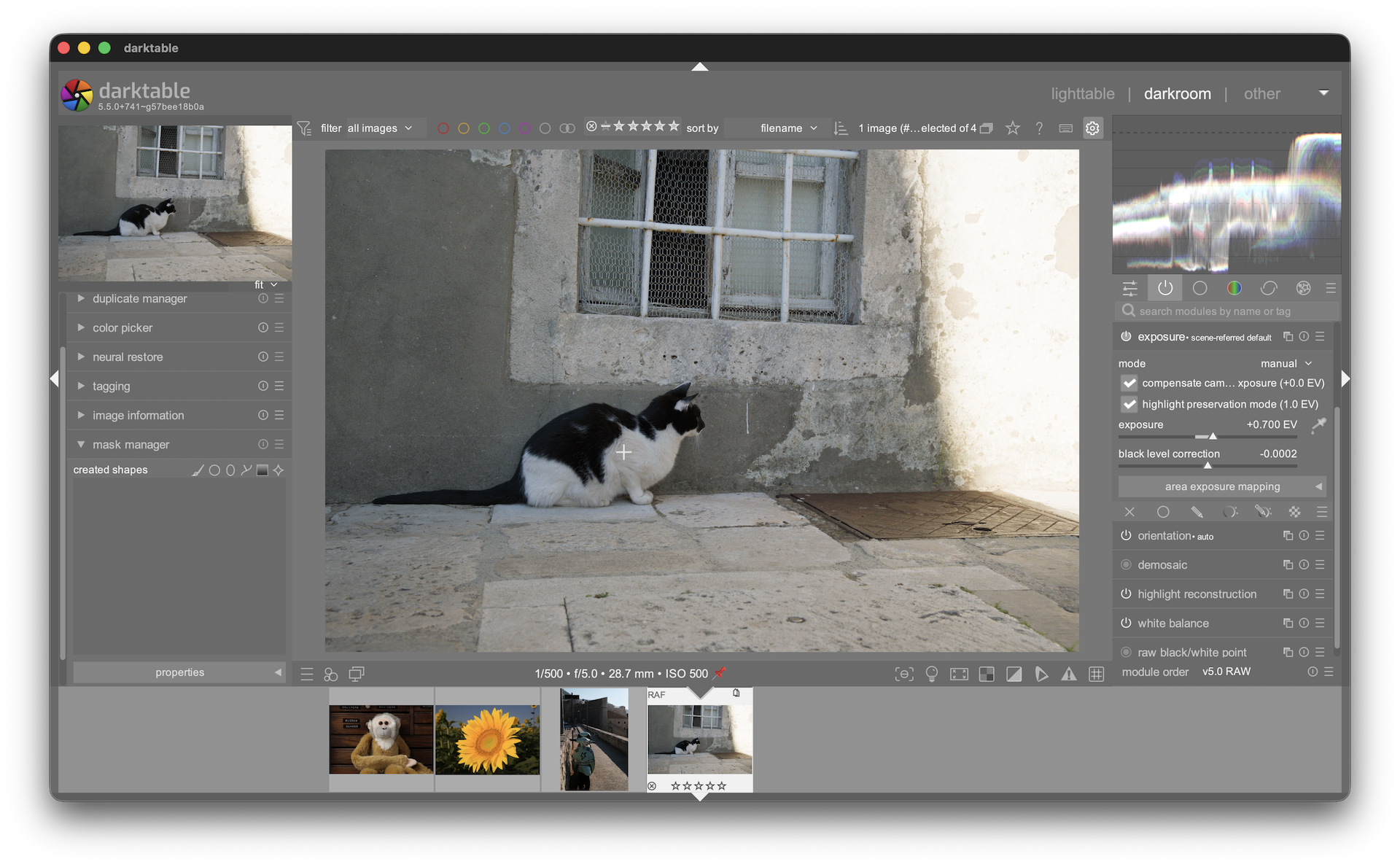
The brush approach often produced inconsistent results. A single click works much better with SAM2 and gives you a good mask right away.
Faster workflow
- Images you already analyzed are remembered. Coming back to the same image is instant – no waiting for the “analyzing image” step.
- The AI model stays loaded between masks, so creating a second mask on another image is much faster (skips the initial model loading).
- Crop, rotate, or perspective changes automatically trigger a fresh analysis. Color and exposure edits do not – they don’t affect the mask.
New control
- Feather slider in the mask properties panel: controls the softness of the mask edge (will be translated into path tool’s feather at the end).
Note for Linux users
- The clear shortcut was changed from Alt+click to Ctrl+Shift+click. Alt is grabbed by some desktop environments and didn’t work.
11 Likes
I’m building on linux with slackware current, and I’m using the latest pull from master. I’ve got things working, but I found some issues.
There were no models in ~/.local/share/darktable/models, so I downloaded and installed a model, and then darktable would use its AI mojo and select / mask nicely. Pretty neat!
When I try to install models, I get this:
- downloading: mask segnext vitb-sax2 hq
- A zero percent status bar
- and this line: 'not compatible ai model release found for darktable unknown-version.
Thanks for your work on this.
You’ve probably used earlier builds. Check repositoy config in darktablerc:
plugins/ai/repository=darktable-org/darktable-ai
Thank you! Using your script as my basis, along with a couple of other hints in the thread, I was able to use git, rather than tarball. And It worked!
Wonder of wonders… I did not have to chase a single dependency, or even open a single file of code.
As an aside, I’m glad I’ve overcome this hurdle, as, with the OBS builds not currently being updated, this, even without ai, has to be my upgrade routine.
These are great improvements and the speed improvement is very noticeable.
I am glad you changed the brush to the click selector. I kinda used the brush as such before, just clicking on a part of section I wanted to select.
I’m enjoying it. Visiting all sorts of old edits where I knew I should have made a mask , but I didn’t.
1 Like