DISCLAIMER: It is ok if you get nothing from this post. It is ok if your experience does not match up with mine. This post is primarily meant as an exercise for me to work through my own thoughts and revelations on AGX and how to use it. Note that this is not a play raw. These photos are just simple family/home photos, not meant to be “bangers”.
Intro
OK, everyone, I have been using AGX exclusively since early in the year, and I am loving it. But over time, my method for using it has changed as I understand it better. Below, I have laid out the various phases of my AGX usage over time. You might notice that this mirrors the Psychological Phases of Disaster… but don’t worry about that  I have included examples to make things more visual. For every example(“Results” sections), I am only making changes in AGX in order to isolate their effect.
Heroic Phase (aka “Is this… could this be… love?”)
Previously, I had been using Sigmoid for its simplicity, and honestly, never really opened it up (I just let Sigmoid do its thing).
When AGX came out, I simply switched my default pipeline to use it instead and used it the same way I had used Sigmoid: don’t touch it, use other modules to perform any necessary image tweaks.
Workflow
As long as you don’t open AGX, you will be following this workflow  . Do whatever you need to do in another modules.
Results
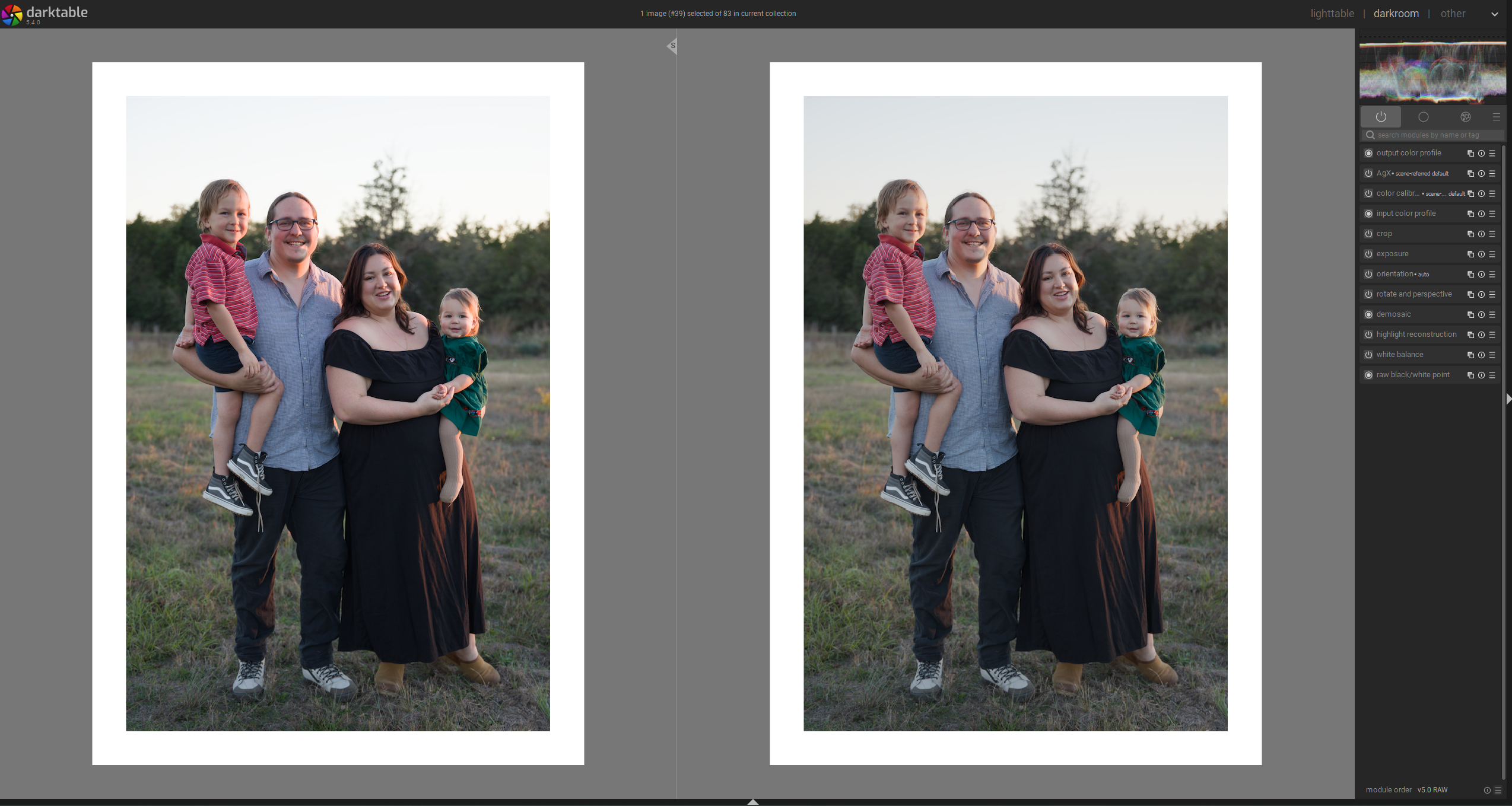
Great colors in highlights: stock AGX fixed a lot of “problem photos” with harsh highlight colors because of the primaries magic that come enabled by default. Yes, you can replicate this in Sigmoid by selecting the smooth preset, but that is a whole extra click  .
.
Left: Sigmoid default pipeline, Right: AGX Default Pipeline. No other editing except crop & rotation
Honeymoon Phase (aka “Auto Pickers, Contrast, and Toe/Shoulder Power, Oh My!”)
I watched some more YouTube and discovered the auto pickers for setting white/black relative exposure, the contrast slider that also increases saturation (come on, you know you love it sometimes), and the toe and shoulder power controls (heck yeah). Who needs other modules? Not this guy! AGX is my life.
Workflow
Set exposure in the exposure module, fix white balance in color calibration, open agx, click both auto-pickers for w/b relative exposure, adjust contrast, toe/shoulder power. Use Color Balance RGB for boosting colors/split toning, etc.
Results
Pretty awesome: punchiness with good colors, massively simplifying the number of modules I even think about. It is like it reads my mind and just does what I want!
Left: Sigmoid Default pipeline, Right: AGX Default Pipeline with adjustments to w/b rel. exposure, contrast, and t/sh power controls. No other edits.

Disillusionment Phase (aka “What… why don’t you work anymore?”, aka “There is no workflow now!”)
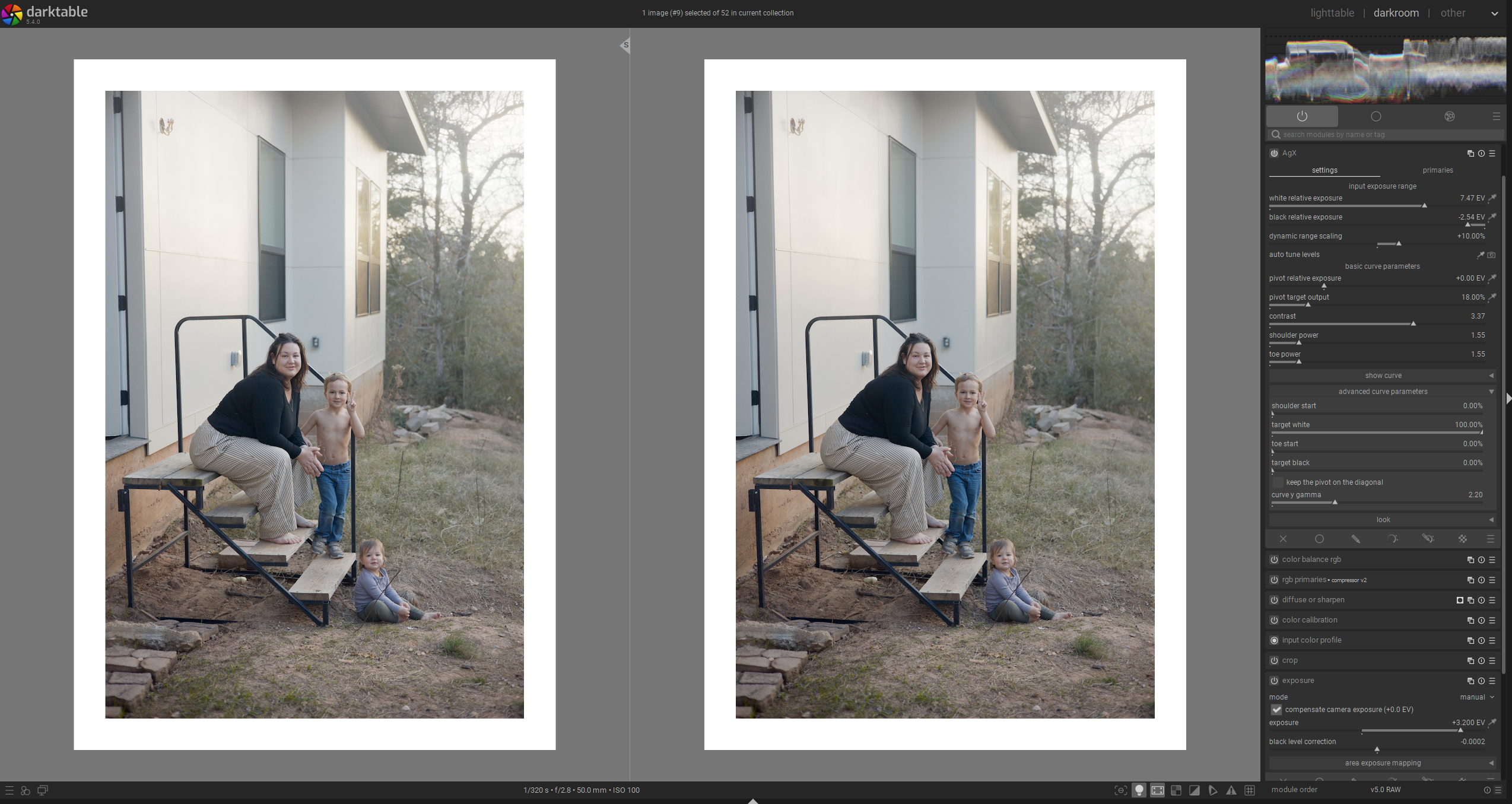
I had a photo that I thought was an easy one. I went through the “Honeymoon” workflow, and… it looks like trash. Why do the midtones have no contrast? why does the photo have too much contrast? How does the photo look washed out and rocky-levels-of-punchy at the same time?
Then… just for kicks… I reverted the white/black relative exposure sliders to their default, and it fixed the issue. Granted, it didn’t make the photo perfect, ready for shipping, but it did fix the contrast issue in the midtones. And that is when I realized… my universal method of getting good results was not universal, and sometimes made the photo worse.
Workflow
Under Construction
Results
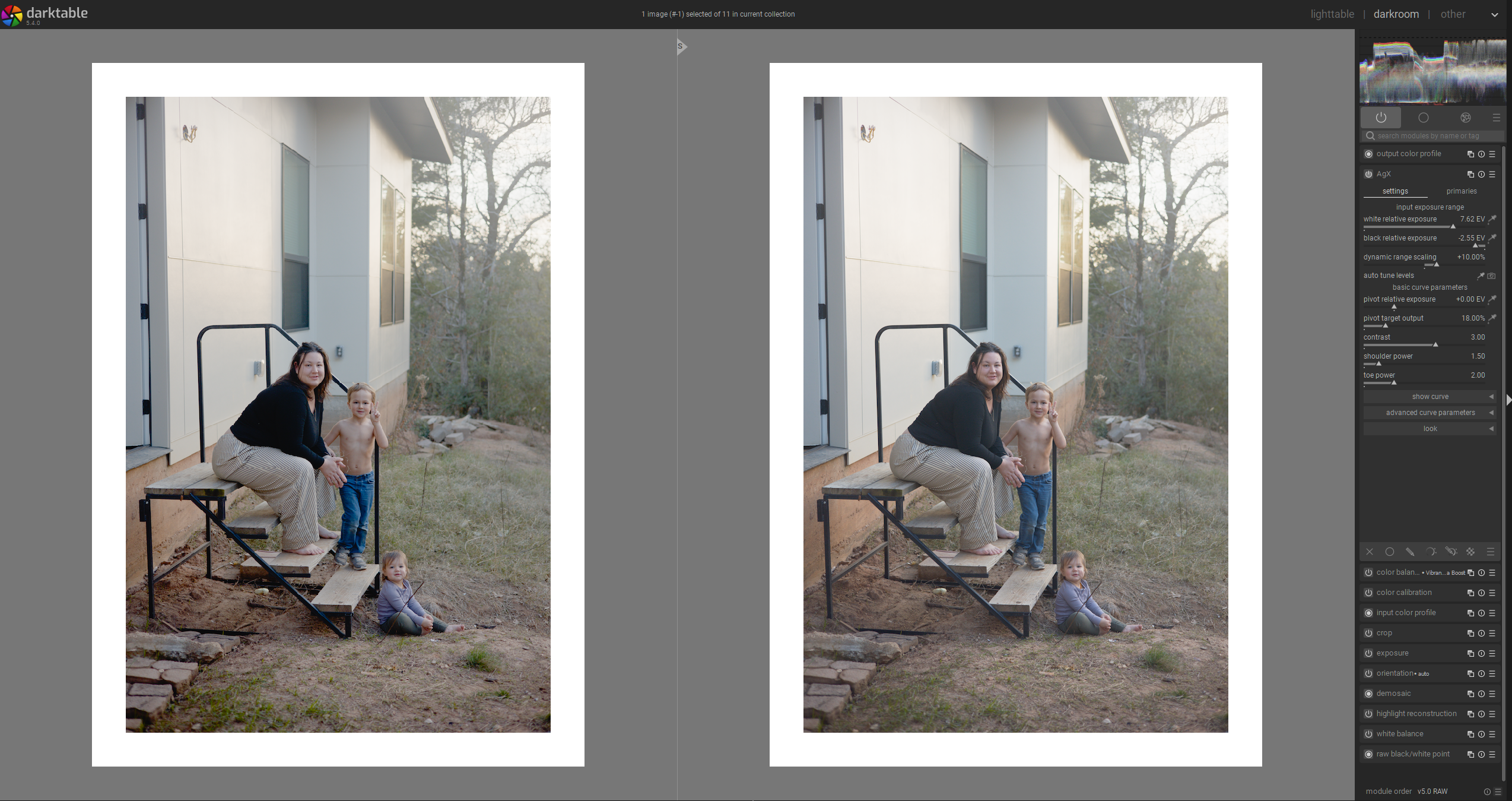
Let Me Show You how my usage of the W/B Relative Exposure Auto-pickers ruin this photo. Yes, I know there are other ways to fix this but I was stuck in my workflow.
Left: AGX with auto-pickers doing their thing, Right: Default w/b relative exposure
Reconstruction Phase (aka “What we have known all along”)
Nothing will work 100% of the time. As photographers and photo editors, we are required to do some problem-solving sometimes. There is no single set of buttons that, if you just click them in the right order, you will get the perfect edit for every photo. You won’t even get an acceptable edit that way.
AGX’s auto pickers is that they are trying to figure out what should roughly be 0% brightness and what should be roughly 100% brightness. As far as I know, it uses the min and max brightness levels from the photo to make this decision. For high contrast photos, I have found this to work more often than not. Even for photos taken under very nice, diffused light, I have found the auto-pickers to do a great job.
But sometimes, when there is something like a person with a fair complexion, in smooth lighting, with a black shirt on… it just messes everything up… (I’m being hyperbolic, it isn’t that bad).
So I went back to the drawing board… switched up my order of operations… and made some settings “optional” in my head. Just like Capture Sharpening isn’t always necessary, or the auto-picker for white balance, the W/B relative exposure auto-pickers in AGX are not necessary. I’m talking to myself here. I know you already know this.
Workflow
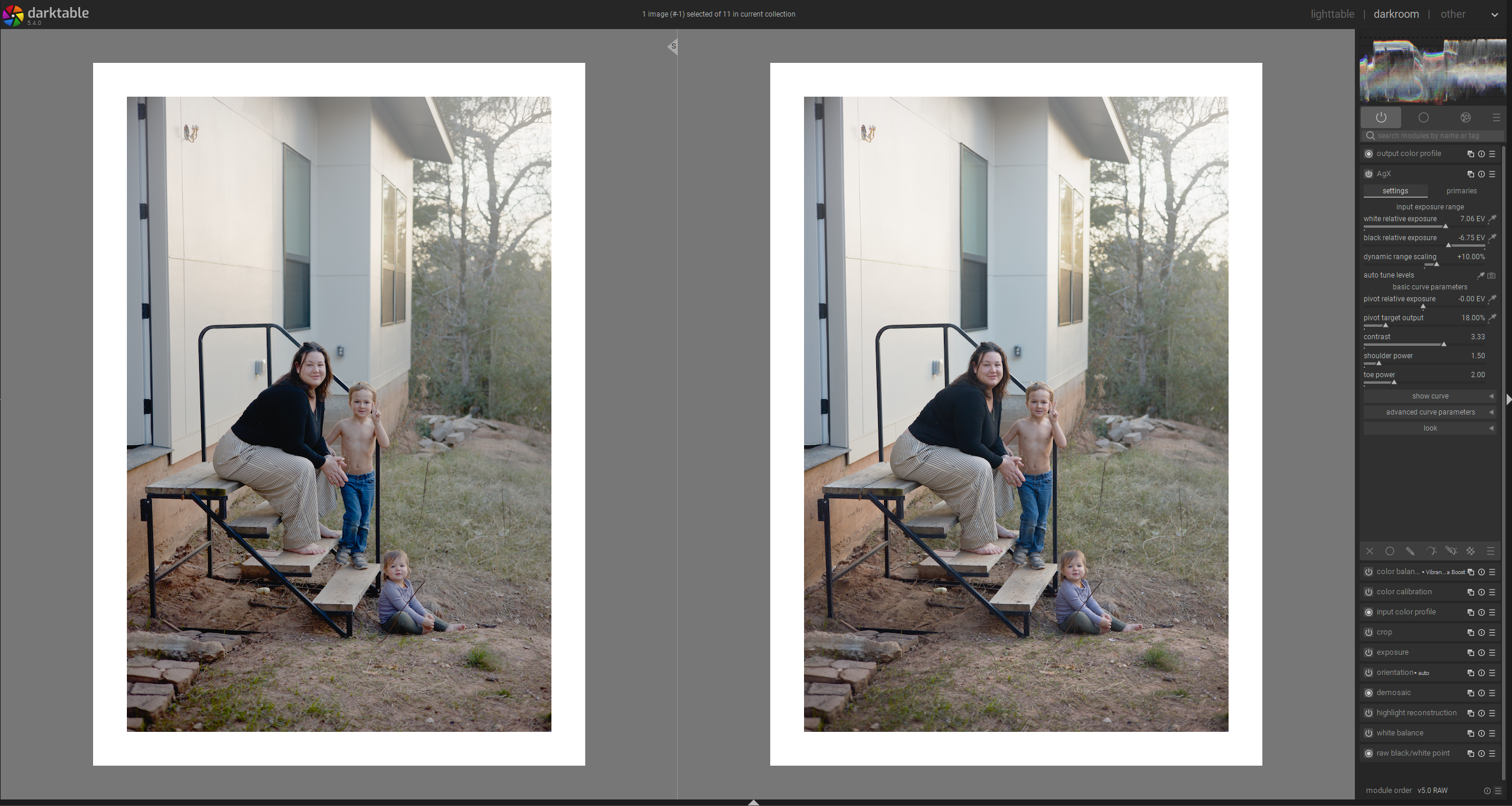
Set exposure, set whitebalance, adjust contrast in Color balance RGB or AGX until I like it, THEN see if turning on the auto-pickers helps or hurts the photo. They aren’t magic. They aren’t the sole arbiters of truth in the relative exposure universe. So just do what looks good. Move them manually, maybe.
Results
Better, more natural placement of shadows, more control, more thoughtfulness. A more flexible workflow that relies more on my artistic expression rather than my ability to follow instructions perfectly.
Left: AGX with W/B relative exposure Auto-pickers enabled, Right: AGX with workflow from above.
Conclusions
Getting too attached to one strict workflow usually causes me to feel like even if I don’t love the results I get, I still need to approve of the results, because otherwise my paradigm fails. But a little disillusionment once in a while can lead to some great breakthroughs. It can free us from a gilded cage.
I know this might seem like a weird topic. But I got something out of it at least  .The only way to get better at editing photos, to get faster at editing photos, is to edit more photos. There is no secret shortcut or method to get perfect results in every situation. Explore more, edit more. Don’t get stuck in a workflow that is too strict. Build systems and workflows that help you grow, rather than lull you into a false sense of ease.
What I want from You, the Reader.
There is a lot of depth to a discussion like this, and there are a lot of features that I haven’t even explored in AGX (like the other relative exposure/target exposure controls). I don’t want anyone to think that I am trying to produce some sort of “Absolute workflow of truth that cannot be challenged!” In fact, I would love to hear your workflows and tips, or about the periods of disillusionment you have walked through or are still walking through in the world of taking/editing pictures.

 .
.