Hey,
Why don’t we add things we love to have in ART here?
My opinion: I would love to have horizontal and vertical filter to have faster work flow since they have different crop and resize 
Hey,
Why don’t we add things we love to have in ART here?
My opinion: I would love to have horizontal and vertical filter to have faster work flow since they have different crop and resize
I’d like a more prominent horizontal lines for zero value in Local Contrast and Haze Removal. Current thin dark lines are almost invisible on my monitor.
Hi,
Thanks for the suggestions!
Can you give more details please?
I’m confident we can accommodate this.
BR
I want to filter out horizontal and vertical photos to have different editing style. So far there are only labels (color, stars), therefore I often have to click horizontal photos and label them first, and then label the rest.
If there’s a way to show only horizontal or vertical photos, it will be a big help. Most of the software I used before have this filter.
As long as we’re submitting ideas, a keystroke to toggle the selected layer in Local Edits / Color Correction would be great (actually, in any similar context, not just CC). Quite often I like to compare the changes I’m making to the unedited state by flipping back and forth. When the checkbox is out of sight a key would be great.
Thanks!
Talking about keyboard shortcuts - maybe add them to switch between snapshots? One shortcut to go from top to bottom, another to go in the opposite direction. And make movements circular when one of the ends is reached.
I agree. I think there are by now implicit default actions when dealing with any kind of cursor / pgup-pgdn / home / end key movement in any app. But not being a programmer I don’t know how much of that is available by default from GTK widgets vs. what has to be explicitly coded, per widget.
I’d like for the sliders to behave rationally. When moving a slider, the value changes by what seems to be varying and unpredictable amounts, and the things reset themselves at unexpected times. I find it is much easier to just type in the values than to try to use a slider. The reset behavior is fairly recent.
Hi,
These sound more like bugs than missing features. If you can provide more details, that would help to get them fixed.
Thanks!
To the other who replied: thanks for the suggestions, most of them are quite reasonable and sound useful. I’ll keep them in mind.
Hi,
my wishlist is short:
I would like an “auto” button in the exposure section together with the option to define the clipping point…similar to the solution in RT but without influencing the tone equalizer and the tone curve.
This avoids manual shifting of the blackpoint and the exposure and gives a good starting point and can afterwords when editing be adapted to taste. (btw: it is implemented that way in capture one).
BR
In my opinion ART is realy the best and easyest RAW-Konverter. I like realy to work with and it’s my standard workspace for imagefiles out from digkam Thank you Alberto for this an for your work on ART!!!
But there is a new challenge for me. My old cameras RAW work without problems but i have now a Gopro 12, which i use as a supplement for photography. The peculiarity of the Gopro is its almost square sensor (8:7) with the wide-angle lens you can create fast and easy documantary overview shots. The image quality with RAW and at daylight is amazingly good for such a smal sensor.
I would like to nativ open the GPR-files in ART. Til now the only App which can open these is Darktable (not possible to open in RT). But there are some quirks for me that i get not realy solved. The Usage with all these moduls seems to complicated and that makes no fun.
For example when i load a Gopro RAW with strong highlights like the sun, then there is a pink stain in the picture. If I control the lights down a bit, this stain disappears. But I then export as a 16-bit TIFF, then this spot in ART is loaded again directly in the TIFF. In Darktable, I’m ashamed of how I can make the picture a good result. With other pictures i can get it right so far.
I’d really be happy, I could simply (! in sense of using ART) open and edit my RAW from the Gopro in ART. That would be really great
I had already loaded a GPR on raw.pixls.us. So far, it does not appear in the list.
It seems that Adobe DNG Converter supports GPR files. So if you convert your GPR files to DNG with DNG Converter, you can process your files as RAW in ART.
Even you use Linux, DNG Converter works with WINE.
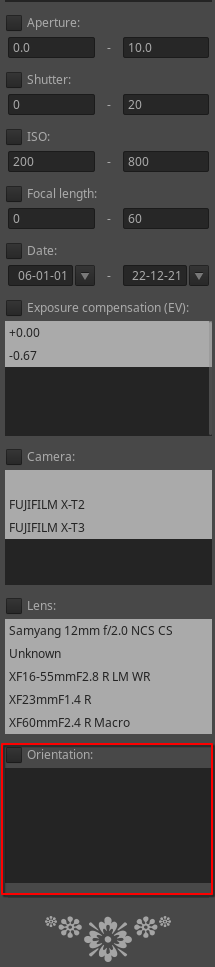
There’s an Orientation Exif tag which I think returns Horizontal (normal) for images in landscape orientation and Rotate 270 CW or Rotate 90 CW for images in portrait orientation. Maybe this could be added in the File Browser’s metadata filters?
Thanks for this tipp, but … „Things you want to improve in ART?“ 
This is blown channel usually green hence the pink…Have you tried the highlight recovery options…also check the exif data and be sure that ART is using the right value for raw white point…must a couple things to check
It works, but with a heavy price. I now have 2.6 Gb of installed data volume more on the hard drive (only for this DNG Converter! 1.7 Gb to download!), just to be able to use a file format in ART. Furthermore, the file size for the DNG increases almost twice compared to the GPR-RAW. I think that is not acceptable for larger number of images.
Loading the DNG in ART and processing were possible in very good quality. I will also try again the problematic image with the direct sun.
I’m staying here, a native GPR store in ART would be desired and preferred by me. It works directly and considerably more resource-friendly.
I worked in Darktable with the loaded GPR, please see my 1. posting above. This pink thing was than baked in a TIFF. I think in ART i had to retouch it. But thank you for your responce!!
NP if you share one with the pink here…you can see how to avoid it likely in DT…sorry I missed that is was not generated in art…
I’m pretty sure you just need the right settings for HLR and or raw white point so that the HLR can be correctly performed…
In DT depending on your version some modules will accentuate this if you don’t correct it…but it seems for you getting it directly in to ART is the priority…
EDIT
This tool looks like it could help you…
But if not two things you do get with DNG …
Yes
But I think DT doesn’t recognize the gainmap in the file and ART did using the embedded data flat-field selection and the native GRP doesn’t have an embedded jpg so the automatching tone curve doesn’t work but Adobe adds one so that it does…
You can try GitHub - dnglab/dnglab: Camera RAW to DNG file format converter for a native DNG conversion on Linux, but I don’t know if your GPR files are supported.
@agriggio I tried to add an Orientation filter to metadata filter. The field appears in the filter panel, but the list of orientations is empty. Any pointer? A list of the files to be modified would help me.
Here’s my list:
cheers,