Please do, thanks!
1 Like
Here is a sample, let me know, thank you in advance… SwissTransfer - Send large files securely and free of charge
That file has blown data…is it a good choice to evaluate the gainmaps with???
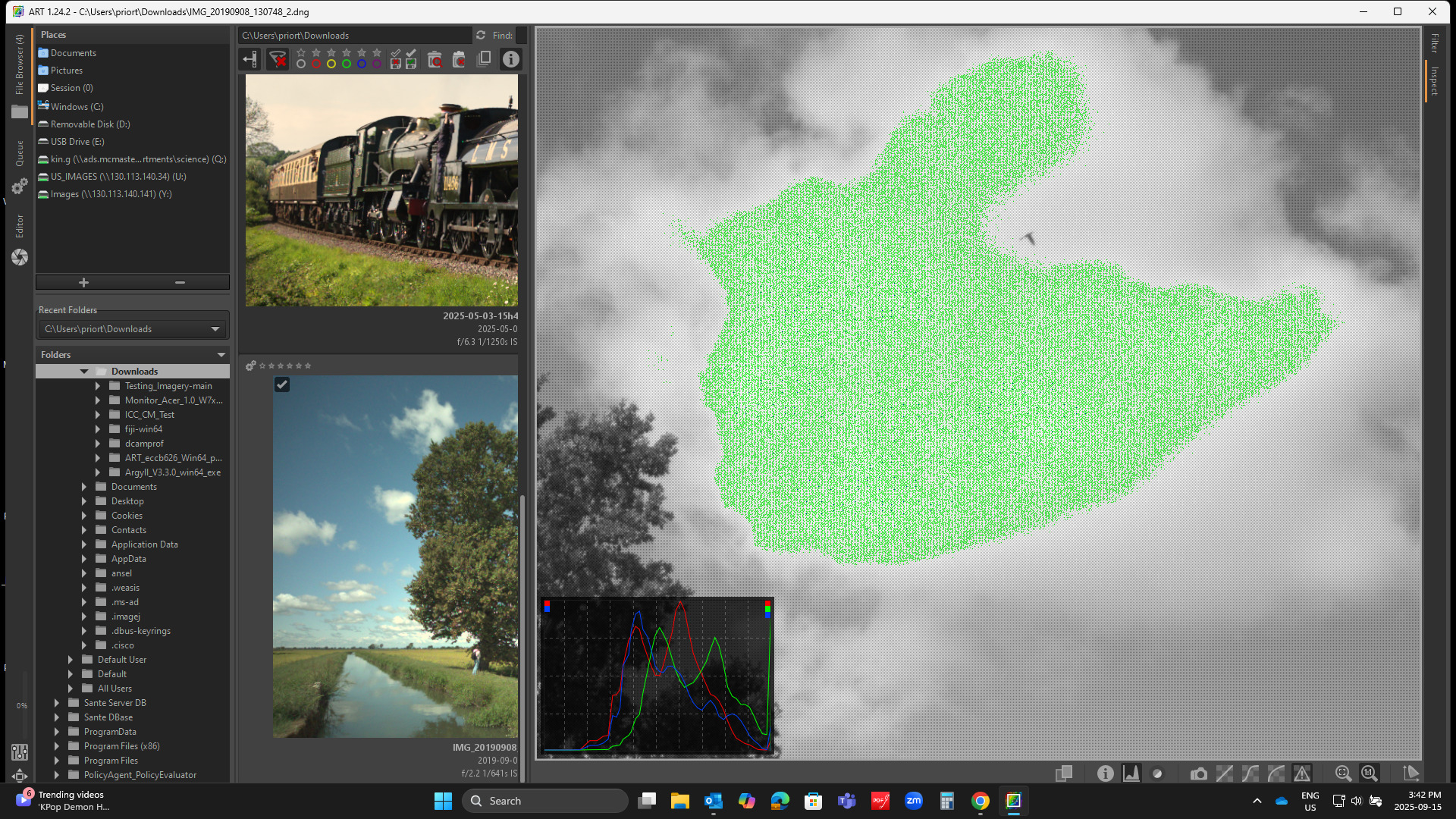
I also tried this against my google pixel images which have the very standard and visible vignette which is nicely corrected by the flat field here and in the similar application of the gainmap in DT but the image from your phone also seems to have a very strong effect… Maybe because the histogram is well right?? No idea… do you have another image where the exposure is better managed??
1 Like
Ok activating flat field correction even other clouds are unrecoverable.
Here is another image, after using flat field correction the right part of the sky looses detail.
https://www.swisstransfer.com/d/0b2b9af3-ae4a-4c0a-b247-16140f41d89a
What does it do with a centered histogram and not one shoved over…?? Sorry I dont have DT access at the moment to check…and also I think ART is just accepting the info provided in the file for the gain map so as I said above it seems quite strong in your phone file compared to what I see on a my pixel phones and I have had 3 of those and all worked as expected…I was just wondering and it’s likely better to see the DNR of the effect on something well exposed to assess the impact…
Hi,
Can you maybe attach the files here (with a proper license) rather than using a 3rd party website I know nothing about?
Thanks!
PXL_20250915_195505842.RAW-02.ORIGINAL.dng (14.5 MB)
Here is a throw away just from just sitting at my desk… if you let ART do default processing there is a little bit of clipping on one of the tape measures…But if you turn that off you can see that the flat field just removes the vignette and you can or could proceed to edit…
Your images are much higher DNR and the histograms are shifted but it does seem like you get much more of a correction applied to that phone than is applied to my images…
https://creativecommons.org/licenses/by/4.0/
EDIT if there is much more traction to this post maybe it should be moved to its own post??
I’ve changed the code to allow using the (already existing) “clip control” slider also with embedded gain maps. Here’s a demo:
Best
3 Likes
top, thank you! Yes i can surely post them here with a proper license, where? in play raw?
Just here would be fine, they might be useful for testing…
Thanks!
1 Like
IMG_20171028_155946.DNG (8.7 MB)
IMG_20190908_130748_2.dng.bz2 (10.5 MB)
Another suggestion: would it be easy to add a grid (like in Crop) when Rotate is enabled? Something similar to how it is done in Darktable.
Starting from 1.25.9 there’s a grid overlay that you can toggle on/off manually at all times. Would that be enough?
Yes, a manual way is good too. Is there a shortcut for this? I do not see any GUI controls. I use ART built from latest sources.

I’ve just added a shortcut: Ctrl+g
HTH
5 Likes
Very practical, thanks.
@agriggio Hi Alberto, have you figured out how to make borders in ART? It seems that Rawtherapee has this feature and they also implement a template file to it to. Is it possible that we can have this feature too? I’ll include a link to their guide
https://rawpedia.rawtherapee.com/Local_Adjustments#Add_a_border_to_an_image
It can be done it 2 ways.
- Using the
Color/Tone contrastmodule with a rectangular inverted mask andHighlights/Gainslider set to the minimum (black border) or maximum (white) :
frame.arp (2.0 KB)
or
- Using user commands (assuming you have Image Magick installed) :
- create a “border.sh” script file with this content:
#!/bin/bash

d=$(mktemp -d)

ART-cli --progress -f -s -Y -t -j -o "$d" -c "$@" 2>"$d/error" |
zenity --width=500 --progress --auto-close --text="Adding border..."

convert "$d/*.*" -bordercolor "rgb(0,0,0)" -border 40x40 jpeg:extent=2MB -set filename:f "/
DESTINATION/FOLDER/%t_border.%e" +adjoin "%[filename:f]"

rm -rf "$d"
(edit the path to your destination folder)
- create a file named “add-border.txt” with this content:
[ART UserCommand]

# the command label
Label=Add border

# the actual command to execute (which we define below)
Command=./add-border.sh
and place both files in your usercommands folder.
I’m not a pro on user commands, hopefully this basis can be improved upon.
2 Likes
Hi,
I haven’t checked this out yet, but I have no plans for such feature, sorry. If someone wants to contribute something similar, I might consider it though. In the meantime, method 2 suggested by @sguyader is what I would do.
HTH
1 Like
Salut Sébastien,
This approach works, but the border is on the photo instead of around the photo, so the border crops the photo a bit. A “real” border should be outside the image.
There are plenty solutions outside of ART to create borders, like Gimp (enlarge canvas and fill with black or white) or G’Mic or ImageMagick…
1 Like