@alicem and others
I’m going to take a quick detour through Rawtherapee’s history and compatibility.
Rawtherapee was developed in 2006 by Gabor Horwatz, and the apparent order of the modules dates from that time. For example, almost all RGB (non-Raw) actions are performed using ‘Tiles’ to reduce memory usage - this was useful 15 years ago, much less so now. This is a significant constraint that effectively excludes certain algorithms from this part of the code, for example, local contrast with wavelets.
Similarly, a significant body of code was created by Emil Martinec in 2010/2011. This is very good code, such as “Color Propagation,” which, in my opinion, is rarely found wanting. He also initiated the denoising module (wavelets + Fourier), the Wavelet Levels module (with Ilia Popov), as well as an ultra-simplified version of wavelet (based on the Haar method) which he called “Contrast by Detail levels”.
Partly in cooperation with Ingo Weirich (the author of Capture Sharpening) I have significantly improved the “denoise”, “Wavelets levels”, and “Contrast by detail Levels” modules. I have also created, with the help of Pierre Cabrera @Pandagrapher for the GUI, the “Selective Editing” part which contains many new modules (Tone mappers, denoise, etc.).
After this “detour” essential for understanding, we must ensure compatibility with old modules, which considerably complicates the code and the GUI interface. Hence my proposal to only display the essential and optional modules that are old, little used or a little obsolete. See Pull Request
PR
The “Local Contrast” module (Detail tab) generates artifacts in some cases… although it’s not always possible to remove them.
The “Contrast by Detail Levels” module, by design, is necessarily limited and can also generate artifacts. As I said, it’s an “ultra-simplified wavelet”, which has nothing to do with Wavelet Levels or Selective Editing > Wavelets. Here again, some users compare it (Wavelet levels) to Gimp, which is “simpler”, but we’re comparing fish and rabbits. Gimp decomposes and processes layers, Wavelet Levels does signal processing. You can’t have it all.
To answer your question indirectly, the “Contrast enhancement” module (which is 100% wavelet signal processing, with a simplified interface) should be suitable in most cases, on its own.
If you want another type of local contrast, which acts on the texture, choose “Tone Mapping” (Exposure Tab) or Selective Editing, with very soft settings.
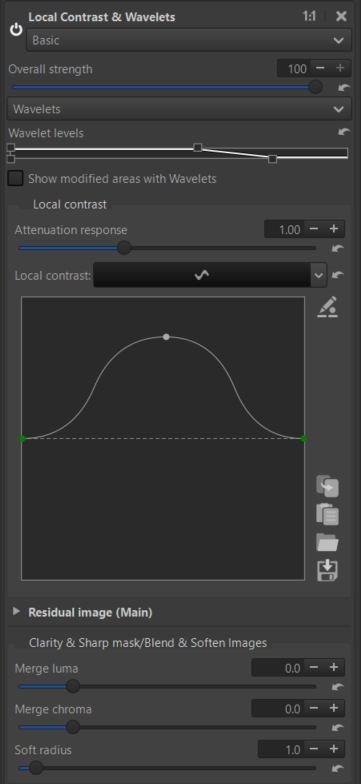
You also have the option to use it in Selective Editing > Local contrast & wavelet > Wavelets. This module is similar to Contrast enhancement (Color Tab) but more sophisticated.
This module has, instead of “Contrast profile” (Color Tab), a double slider “Wavelet levels” that allows you to choose the progressive extent of the wavelets’ action. In addition, this module contains the possibility of “Clarity” which roughly acts on the midtones.
Jacques
 Also, such “cross-modules dependencies” can make the tool a bit hard to use for newcomers.
  The same goes for:
 )
) ↓
↓

 To be perfectly transparent:
 (I suppose you generally use that in a global spot?)
