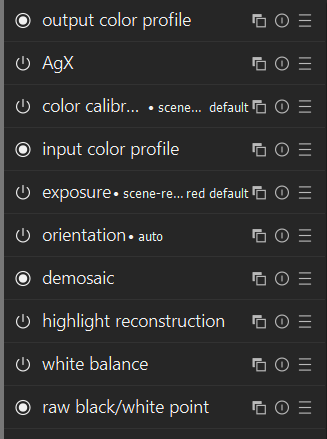
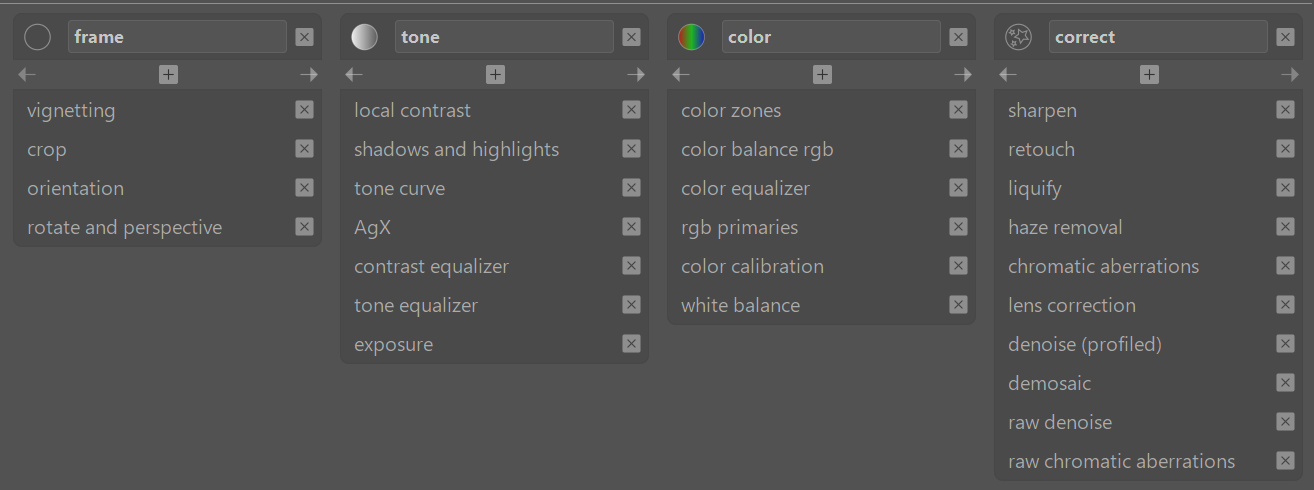
Then between input and tone mapper (if you use one)
Then between the tonemapper and output and
Finally after output…
Those are sort of zones in the pipeline and then sometimes within those zones you would order things in a certain fashion…
Further to your post above …the modules even when you create groups will appear in their relative pipeline order…so the example you noted for that tab was actually displayed in pipeline order…clicking in a group header a second time will bring up the full list of all DT modules in their order or execution in the pipeline…just in case you see that when you are experimenting…
I’m “wasting” the entire tab called frame because I almost never touch it
there is overlap between the tone and color tabs, especially because i use color balance rgb a lot for global brightness (ahem, brilliance - whatever the difference is) correction as well as dodge and burn with multiple masked instances of the module - so it should kinda belong to both tone and color tabs
in theory, I like the concept of working first on the tone tab with the histogram, then switching to color tab with vectorscope - but in practice I switch back and forth between tone and color a lot
i try to work left-to-right, but white balance and color calibration are on the 3rd tab, but I always “want” to touch it first to get the white balance correction out of the way (which almost always just means I turn off the weird colour calibration module since I don’t understand what it does)
in the correct tab, I almost always just turn on the denoise, lens correction, and sharpen (potentially sharpen has mask applied to only sharpen the main subject), and hardly ever touch anything else there
…but, all in all, I think it is a reasonable starting point setup.
I thought that the darktable processes modules from bottom to the top because demosaicing and modules with ‘raw’ in their name are shown at the bottom of the module list, and output color profile is at the top of the list. And I think in a way all of you are saying the ‘right’ order of using the modules is top to bottom? Or do I misunderstand?
It doesn’t matter whether it’s shown to the user top to bottom or bottom to top, as long as they’re in pipeline order one way or another.
Filmulator is top to bottom because that’s what made sense to me. But it could have been bottom to top with no significant usability downside.
I will say that maybe a subtle arrow indicating flow might be useful? Filmulator’s tooltips and mid-pipeline histogram updating work together to show the pipeline order.
I have my own set up that I wouldn’t recommend for general use because it’s tailored to my own peculiar workflow. For example I have color balance RGB in two tabs, first for color and again under a tab I labeled refine because I also us CB RGB as an all purpose local adjustment module.
I think it just comes down to the minimum set of modules that a new user should learn to successfully perform and edit, which is probably a very small group. They might be laid out in any number of different ways
Interesting discussion, thanks to all for your thoughts.
I’m a longtime fan and user of darktable, and think that starting with it was a bit of a hill to climb, but worth the effort in the results.
I’d say that coming to dt from LR would have been easier if I’d known earlier about working from the bottom up, having a better starting point (visually) for my edits, and knowing then what I know now. A lot of Youtubers really helped me, much more than the written doc’s did.
At this point, what I wish for is:
More knowledge on how to tweak the UI. I actually have found Andy Hutchisons tweaks to have been helpful. I don’t like the low contrast defaults, and yes, I know the intent, but at 73, it’s too much eye strain. I did a lot of fine art reproduction over the years, but don’t need that kind of interface anymore. I’d like to make more changes. If anyone can point me to information to help me understand how to do so, I’d be grateful.
I think that making a custom module set is a great help. I’ve done that many times, and find it makes a huge difference. I wish I had more icons to choose from to distinguish my created modules from the stock.
I recently took a look at the Zoner editor. It wasn’t for me, as I run Linux, not Windows, but the help system it had was very interesting. Worth a look if anyone cares to.
Thanks again for all the hard work that’s gone into darktable over the years.
See my post above, the prescribed default order of execution is bottom to top… I wouldn’t worry so much about the order of execution that you actually do in your edit …of course it makes sense to get wb and exposure sorted early and then have a go at tone and color…the other things like lens and denoising etc you might be able to autoapply with presets…
By default the tonemapper is on and it impacts the image quite a lot and its a later step in execution…I start with it off because I want to get a feel for the image before I decide what to do with it and I feel the TM can distort that but this is my own appoach…in the end your eyes see the output which is the sum of all the modules…there could be in some cases things you might do that would cause you to be fighting yourself in an edit but for the most part I really dont’ think its worth getting bothered with…
darktable.info has a few themes that you could look at and modify and there have been a few shared here on the forum… You have to sort of poke around and assign colors to find the right elements to modify…
ohh, that’s why the Filmulation dt plugin never looked quite right: the Filmulation tonemapping is designed to effectively apply the gamma curve and in dt that’s part of the output profile…
(I realized this when wondering what you meant by “no tonemapping”, it still has gamma otherwise the image would be unusably dark)
(in Filmulator the tonemapping is always on, but you adjust the scene-referred settings to make the default tonemapping work best, then adjust the tonemapping)
I think its a case of if you use the TM its not applied twice but its there in the output if you dont’ use it…
I’m never the expert but thats my understanding…
Edit
Some sources say that the output module behaves the same and just hard clips data if you don’t tone map it and you have values > 1 so I guess… just ignore me…
I often still use the tone eq so I am adjusting tone or maybe “tone mapping”. I have found that many image don’t need to be compressed the way the tonemappers do so not every image needs those modules by default, and using just the tone eq and some other modules I often get a more natural and detailed image without having to add other modules to get back things that the compression introduces…
For sure you hit a point with DNR that the tonemapping is needed and makes sense but for many other images and depending on how you edit them I find I can do better without it or at least look at the image first without to make some initial editing decisions…
That’s very interesting. I actually feel like it’s more than that as an emergent phenomenon. It’s just a guess but to me darktable feels like it as a cohesive philosophy of exposing lower-level concepts in tools that are more free-form and less goal-oriented - in a good way. This way, the user is free to map those concepts of various different modules onto their own mental space of image editing, rather than being forced down one single pathway as it’s done in other software.
The contrast equalizer is a great example. Instead of just having clarity and sharpness, it shows you an explicit graph that corresponds to different frequency levels. You then have to get a feel for how that works in terms of enhancing contrast. It’s a bit more work, but in the end it makes much more sense and offers an incredible amount of control. Compare that to lightroom - I’ve seen my colleague apply clarity to many photos and STILL I cannot explain what it’s doing.
To some people, that single, high-level approach is probably attractive, but it’s quite frustrating to me and that’s one of the key reasons why I use darktable, which is awesome.
Darktable is an opinionated software with strong design choices, and not everyone will find that natural, but I think its open-ended, lower-level style is the lynchpin of its attractiveness.
So… unhide it when wanting to see the masking tooltips.
That’s what I actually do. 90% of the time, that bar remains hidden.
These are not big issues.
We hear a lot about what can be done to help new users. But frankly, that is of very little importance, because after a week or a month or three, they are no longer new users. So a huge amount of talk and effort has been completely wasted!
Do manual transmission cars come with an auto transmission box for new drivers to use until they can change gear? No they do not.
There are lots of helpful things in DT. From the how to get started section in the manual to the quick access panel. I don’t know what that would look like on a fresh install: I’ve changed mine often. But I think it comes equipped with sliders for a beginner’s edit?
Others have also stated this, but it’s worth repeating:
modules appear in pipeline (execution) order; changing the order means changing processing. Some of that may not be immediately obvious (e.g. exposure may sit almost anywhere in the scene-referred part), so changing the order sometimes does not change the output (or not noticeably), but in other cases, it can have profound effects. So, building a custom “favourites” set in pipeline order does not mean much: there is no other order possible.
some modules cannot exist at any random position. For example, modules that require demosaiced data must come after demosaic, and vice versa, modules working on raw data cannot come after demosaic. If you try tragging raw chromatic aberrations above demosaic, it will snap back; if you try to drag color balance rgb below demosaic, the same will happen.
This is documented in the manual, and in many videos on YouTube. There is even a warning about changing the module order. Please do not expect that what you know from other software applies to darktable, just like one cannot take some darktable techniques and apply them in other software.
Everyone’s tired of complaints with no substance. “It sucks” (or whatever variation you prefer) is simply not productive and only serves to get people annoyed with you, because we get them so often.
Laying it out in detail is what you should have done in the first place, and, as it happens, I agree with a lot of it, but not everything.
Explaining the full pipeline seems a bit much, but a guided tour of the interface, using popups that point at the various modules would be a good idea. Any further explanations can be handled as links to the manual.
Conversely, “that’s how it’s always been done” and “industry standard”, with no further qualifications, also fall squarely under the sunk cost fallacy. Sure, there may be good reasons for the “traditional” method, but probably just as often it’s a shitty solution that no one had the courage to do anything about. Yes, if there are two equally good (or bad) options, go with whatever is familiar, but it should otherwise only be chosen because it’s actually better or we’ll forever be stuck in a swamp of mediocrity.
How often is that actually possible, though? Between modules that have no direct equivalent and concepts that other editors simply do not have, I really don’t think there’s much to be gained here. And I just checked where Lightroom and Capture One put the HSL sliders: In Color Mixer and Color Editor, respectively, so it’s not like there’s any particular agreement there anyway. I haven’t done a full tour of all the raw and video editors, but I have a suspicion that, in general, people overstate the existence of any real kind of industry standard, opting instead to project their own limited experience with one or two programs onto all the rest.
And going through the list of modules that are considered “modern” (part of the scene-referred modules preset), only Color Equalizer, Tone Equalizer and the tone mappers have names that might be a bit funky. The rest seem eminently sensible and descriptive to me.
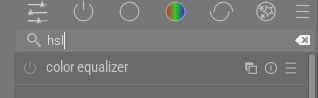
This already exists, and searching for hsl will in fact give you Color EQ.
If you find some modules that lack tags, it’s an easy fix that doesn’t requires any coding experience. As long as you can use a text editor and Git, you’ll be fine.
Can it be better? Sure, but so awful it can’t be recommended? Sorry, but I simply can’t agree with that. And it’s not like it’s really any worse than a lot of other software that no one seems to complain much about. I have been poking a bit at DaVinci Resolve lately and, let me assure you, finding anything there can be a challenge at first, while, coming from darktable, many parts of how the UI works also seem really clumsy.
I probably have missed some of the postings in this thread, but my perception is that this argument does not come often, if at all. As a user (with admittedly just minor contributions here and there) I would ask not to dismiss potentially valuable feedback so cheap.
Same comment like above. I think few (if any!), have argued this way. Or maybe my perception is completely off?
Do not get me wrong: I highly appreciate your tireless work for darktable, and it’s a riddle for me how you can do this besides your challenging day (and probably night) job - I really admire that! But feedback should be taken and considered, not objected.
If you chose to get more involved, you’d likely find your current perception to be incorrect.
The number of people who really put effort into supporting darktable are small, and once you fan out on to other platforms, it is pretty common sentiment that darktable should change itself to be like some other editor, but somehow keep all its powerful features.
I guess people can’t grasp that different things can exist in the same space and work differently.
Donatzsky was specifically addressing the person they responded to, who started out repeatedly using those exact phrases like “industry standard”, and were extremely pointed (insultingly so) with their distaste while being vague about what they specifically thought should change.
There wasn’t any feedback at all until they were asked to watch their tone and be more specific. I think most people in this thread have been extraordinarily accommodating. The devs aren’t just ignoring people, but separating the signal from the noise has been difficult.
I always think that darktable exists to be a different kind of animal. It was written not to offer a free alternative to something existing (which is often how it gets presented to new users), but one that does things in a way that a particular dev felt was not provided in existing options…to then ask it to become more standard to align with some thing that already existed sort of goes against the grain… just my opinion I guess
Of course at the same time you don’t set out to design something intentionally obtuse but if you are going to reveal so much about the software and provide access to so many of the settings so that control can happen on many levels…then there won’t be one contrast slider…there is the option to use a combination of the perceptual brilliance sliders in a module called rgb colorbalance to provide a perceptual contrast adjustment that has very fine control…though the module also has a contrast slider, which also has a fulcrum that probably few set that will let you target the contrast adjustment much like the pivot or fulcrum used elsewhere. And this is but one of a few ways to provide contrast in the image. These things like fulcurms and pivots are all nuances that support the scene referred editing as well… And you can repeat this theme for adjustments for color and sharpening and many other aspects of DT…
This is what it comes with and if you find that control and diversity to be a useful way to edit and a useful set of tools to use then it will appeal to you despite maybe some rough edges around some of the UI and user experience. If not then it will probably frustrate you… I don’t think wholesale changes to the UI are going to dramatically change this aspect of DT.