@europlatus
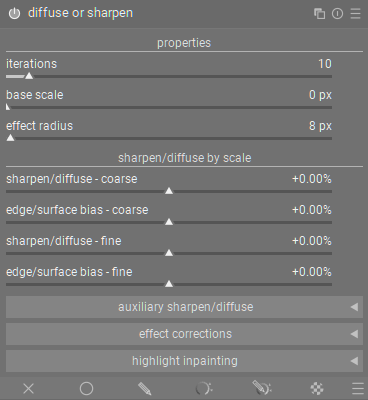
Just for a visual. This is what the latest V3 proposal looks like all expanded.

I think I was basing my original comments on the video you posted. Anyway, no problem, I wasn’t really commenting on the word “behavior” but rather the word order. So, based on your updated terms, I would still go with:
Sharpen/diffuse - coarse
Edge/surface bias - coarse
Sharpen/diffuse - fine
Edge/surface bias - fine
This only increases the size of your suggestions by a couple of characters, and I think the separation is important. Otherwise there’s the potential for misreading, such as “coarse sharpen”, “fine edge or surface bias” - and these are not the pairings we want to convey.
1 Like
I’m sorry I misunderstood. Yes, that makes sense. Let me update that.
Let me begin my saying how happy I am that this discussion takes place. I’ve complained about the terminology used in DorS more than once in this forum. I hope I’m witnessing the birth of a new darktable UX group taking place. 
Couldn’t agree more. To me it’s a question of whether darktable should be a tool for mathematicians/programmers or a tool for photographers and mathematicians/programmers. I very well understand that mathematicians and programmers may also be photographers and hopefully they will still get a hint of what the sliders do with this new visual terminology. The inverse is not true. I know no photographers (that are not mathematicians or programmers) that are know what anisotropy is.
Here are some initial reflections:
I think the “Left Right Arrow” unicode character (U+2194) could be useful in these slider names. It gives a better hint of which direction of the slider does what. Example:
Sharpen ↔ diffuse
Iterations is a bit vague for those not initiated. Something like Base strength or Global strength and Global scale (for Base scale) are ideas.
It’s a bit strange to me that the “sharpen/diffuse by scale” section contains “sharpen/diffuse” in the sliders again. I see it’s to differentiate between the “edge/surface bias” sliders. But is the right place for “edge/surface bias” necessarily in this section? If they weren’t placed in this section the section title could be “sharpen or diffuse by scale” or “sharpen ↔ diffuse by scale” and the sliders could be named just “coarse” and “fine” etc.
Another nitpick is that the name of the module is “diffuse or sharpen” and then in all the sliders it’s the inverse (sharpen/diffuse).
I’ll have to think this through more, but these are my first gut instincts.
2 Likes
I don’t think your terms are quite accurate or there is a typo… 1st and 2nd order are applied to the LF layer…in the case of 1st order guided by the LF layer and in the second order guided by the HF gradient layer. DIdn’t you put 1 and 3 together for broad and fine and this is a typo… you put 2 and 4 in the auxillary… or am I missing something…
There is a problem of sorts with this layout…it does attempt to alter and simplify the slider layout…but many presets and use of the module use the push and pull of 1 vs 2 and 3 vs 4 to achieve the effect… so as to attenuate or fine tune the adjustment…sticking the even ordered sliders means that you would have to open this or if you have applied a preset some sliders could be hidden eg Not sure how that might be operationally…I guess wait for feedback…
Dehaze
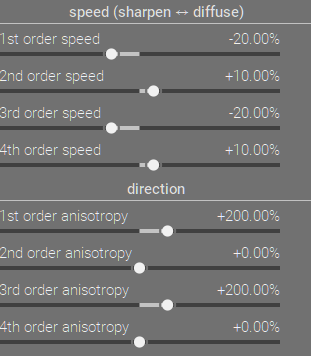
local contrast can use 1st and 4th
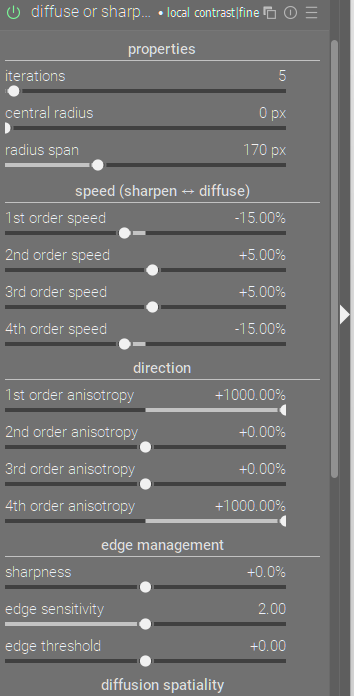
Debluring
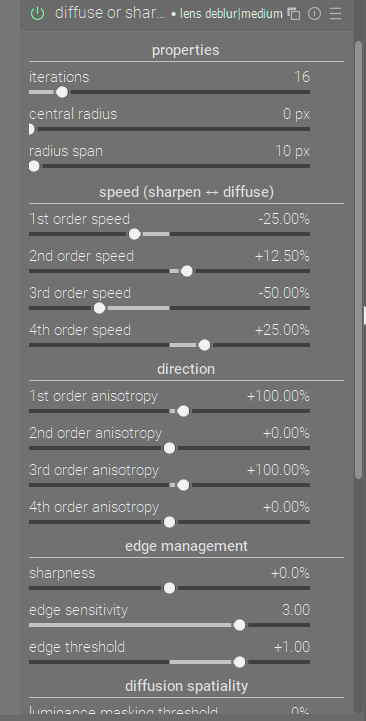
You are right, it was a typo. The primary sharpen/diffuse controls are using 1st and 3rd order controls. Auxiliary sharpen/diffuse controls use 2nd and 4th order controls.
This is definitely something to think about. I feel like people are not generally fine tuning the sharpen/dehaze controls when using presets though, so I am not sure if this would affect anyone too much.
Also, if someone does fine tune the sharpen/dehaze controls, they should be able to figure it out… Maybe 
I feel like the benefit of hiding generally unnecessary controls is greater than the benefit of people seeing those controls… But yeah let’s wait to see what other people think I guess.
1 Like
I have been following the discussion, wondering where this might go.
Reducing the number of sliders that are presented would make it more inviting to push around individual sliders. I think we all would agree that the abundance of choice in this module can be daunting.
The top section (“Global” above) is based on the wavelet model used in the contrast equalizer, and Nicholas showed in his video. Concepts are easier to understand looking at that module. If you want to visualize the wavelet scales look at the retouch module.
To Todd’s point, the motivation for push/pull on some presets (e.g. “deblur hard”) is as an alternating filter used to avoid or reduce artifacts. If this functionality is still present but hidden (except in an advanced view), I could live with that, personally.
The amount of diffusion depends on speed (various sliders) and time (number of iterations). As a general rule, for a more “accurate” result, one would choose lower speeds and more iterations. But this is computationally intensive and not always useful. If it helps the term “iterations” could be replaced with “diffusion steps” or maybe just “steps.” I prefer “iterations.”
There are supposed to be differences between 1st (\nabla I) and 2nd order (\nabla^2 I) and between 3rd and 4th order, but in practice I haven’t noticed a difference. This has puzzled me since I started learning the module around 8 months ago. For some reason, I can’t shake the idea that something is a bit off. It’s probably just me. 
Anyway, I’m still interested to see how things go with this recommendation. Perhaps changes will help some users. But for me, unfortunately, I doubt this would provide better intuition for using the module.
Also, FYI such a change would require a change to the manual, and it would make some existing tutorials out of date.
1 Like
I’ll see if I can show it but for example both are applied to the LF layer of the image…if direction is zero even though one is “guided” differently its not going to make any difference but when you add direction adjustments away from zero then you can see it… A long time ago I believe I demonstrated it with snapshots and using the difference blending mode…
If I can recreate that I will and edit this post…
1 Like
I dont agree with me being the crux of the matter. Your personal attack does not make anything better.
You asked for feedback and I provided feedback. Overall I dont agree with your recommendations or approach and hope they dont get merged. The author of the module (AP) knew what he was doing and came up with the best descriptions to the sliders based on his deep knowledge of the module and the math. Per your statements, you dont care about the math. Per your video, you just came up with names mostly based on how you feel/see when you move a slider. To me I prefer a technically correct term that the author of the module used vs a vibe/feeling modification to the module. If you want to provide folks with a tutorial on how they could use the slider, great. Renaming the module sliders is a no-go for me (others will have a different opinion). Moving the anisotropic sliders above each of the speed slider does make sense. Hiding the sliders doesnt make sense to me.
I think this is correct. I will try and work this into the next iteration.
1 Like
The only problem with switching to something like “Base Strength” is that the difference between “1” and “2” iterations is 100% more diffusion/sharpening. and moving up to something like 100 might just turn your computer into a potato 
I will try and improve this! thank you for the feedback
Unfortunately I don’t know if changing the name of the module would ever be allowed or feasible, but I will look into it.
Yes, I plan to do what I can to help with those additional changes/maintenance if we get to that point.
Fwiw I don’t think iteration needs changed…If understanding that term is a barrier to using the module no amount of tweaking and massaging will help
2 Likes
I wasn’t saying you are the crux of the matter. I meant that you not finding this discussion productive to you, is the crux of the matter (the matter of you not being willing to provide useful feedback).
I was not making up a personal attack. I reiterated your statement as to why you were leaving the discussion.
Telling someone their suggestions are wrong is not helpful feedback.
You are welcome to that opinion.
I think “AP” did a fantastic job on the internals of this module and the other he developed. I don’t think he specialized in UIs. I have read writings of his, and his stance seemed to be antithetical to good UX. I’m not saying he isn’t a good dev, just that he doesn’t seem like his focus is on good UIs.
I don’t care about the math, becuase, I don’t need to. My specialty/foces is not the math, but the UI/UX. The only real thing that matters for the UI is that it is user-friendly and that control names accurately describe the effect of each control on the module output.
You are welcome to that opinion, but technical parameter names derived from algorithms are generally not what you want to expose to users. It is fine if you enjoy them, but that doesn’t mean it is a good UX principle.
I like the idea of creating content/tutorials for darktable, but tutorials are not a good substitute for good UI design.
I understand. I appreciate the clarity.
Thank you for the clear feedback. I really do appreciate it.
2 Likes
The issue with changing it is that I genuinely cannot find a good synonym that is more commonly understood.
2 Likes
Before I share my thoughts, I would like to remind everyone to focus on the topic and refrain from nonconstructive behaviour toward anyone in the community. This is a shared space. Be civil to one another. How we communicate disagreement matters. See FAQ - discuss.pixls.us for our guidelines.
In general, I am reluctant to contribute to threads where there is passionate typing. Hard to track the discussion and get a hold of the differences of opinion.
Now, concerning the module naming, if I were to copy edit the diction independently of this thread, I would surface the issues below. Before doing so, I would like to mention that I do not use dt nor am I planning to, so I may not have full knowledge of the module and its place in users’ workflows, and do not have a stake in this discussion. Merely sharing my thoughts; if they are helpful, then great!
I am going by your screenshots for reference. I will go by the sequence of the subheadings and parameters to avoid jumping around. I will skip those for which I have no comment. Again, I may be uninformed because I do not use dt or the module.
- Subheading:
propertiesdoes not have any semantic value to me. It is in the same category as terms likeconfigurationorsettings, which are redundant because every parameter control sets a property. - Parameter:
central radiusdoes not reveal the purpose of the parameter. The manual indicates that it influences the detail scale on which the module focuses. In my mind, that is overthinking it. My instinct tells me that it is no more than a glorified radius size. - Parameter:
radius spanis an interesting one. Again, after parsing the manual, my instinct tells me that it should be called something like radius band or propagation, since it is indicating how much beyond our preferred radius, or detail scale, we want to propagate our effect.
- Subheading: There are two issues with
speed (sharpen <-> diffuse). One is that I disagree with the use of speed. Without going into detail, I would have gone withmagnitudeor another synonym. Two is the fact that the module is calleddiffuse or sharpen. Why are we inconsistent with the diction order here? At first glance, it should bediffuse <-> sharpen. Is this related to the controls below? Are we indicating that sharpen is toward the left and diffuse to the right? In any case, the name of the module should be consistent with the subheading and controls. - Parameters: I have no issue with nth order diction, though granularity or frequency related terms may be suitable for the masses. I mostly disagree with the word
speedin part because it is not the term of choice and it does not make semantic sense when we refer to different orders of speed - it hurts to be pedantic!
- Subsection: No issue with this subsection besides the previous discussion on order. Not a priority candidate for consideration. While anisotropy may be an esoteric term for some, it is a common term in image processing and should be part of one’s education.
- Subheading:
edge managementis an okay title. If we wanted to be minimalist and consistent with the other titles, we could drop management. - Parameter:
edge sensitivitydoes not characterize the function of this parameter, which seems to be regularization. If that is an uncomfortable term, then use something likeedge recoveryoredge control.
- Subheading: If anything here is a word-salad,
diffusion spatialitywould be the ideal gobbledegook candidate. It should be called something likehighlight recoveryorhighlight inpainting, which is diction that would light up like a star for a typical user.
4 Likes
And running something 5 times is likely not the same as saying 5 is 5 x the effect of a single iteration…
1 Like