I have no idea if this idea will be accepted, but it is maybe worth noting there are typically two major releases per year (June as well as December).
2 Likes
For me, it’s a wonderful challenge!
The two approaches, “Pyramidal mode” and “Multi-scale Expert mode,” have been merged into a single file, contrast_rgb.c.
Thanks to the algorithm developed by @wilecoyote, whom I would like to thank, and a slightly crazy idea, I tried to come up with a proposal that complies with darktable standards (linear pipeline).
Here is a summary of the latest developments:
Fusion of approaches: Two processing logics in a single module allowing you to switch between a simplified (Pyramidal) approach and an advanced technical (Multi-scale) approach.
Optimization of the “fused” code for greater responsiveness.
Dual interface: Creation of two separate displays that adapt dynamically according to the selected mode.
Contrast refinement and dark area protection:
Noise Threshold: Implementation of intelligent protection in linear mode to avoid amplifying noise in deep shadows.
Visual adaptation (CSF): Integration of human eye sensitivity, hidden in Expert mode to give the user full technical control.
Here is an example comparing the previous version and the new version with dark area protection of a photo taken from a playraw
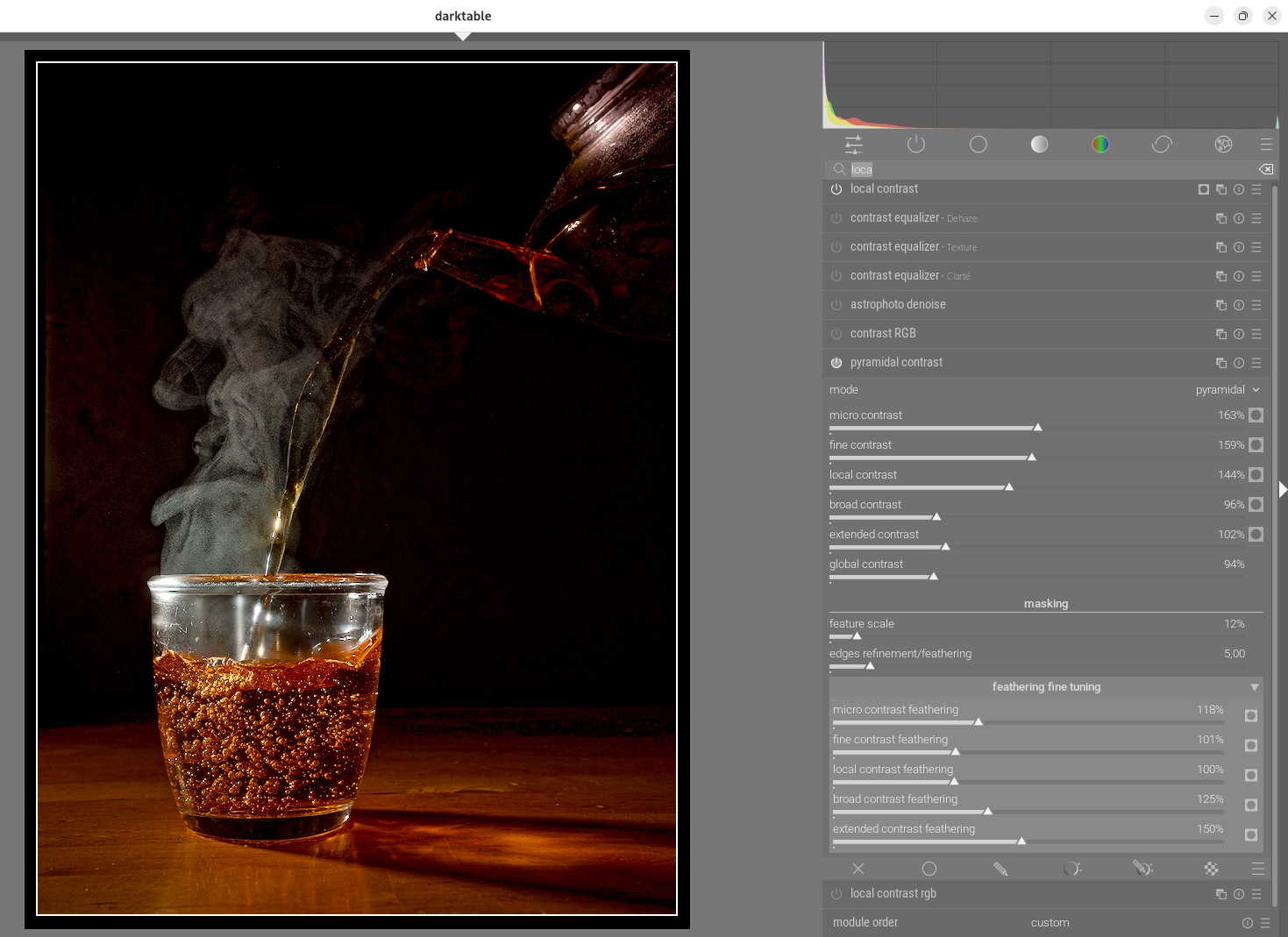
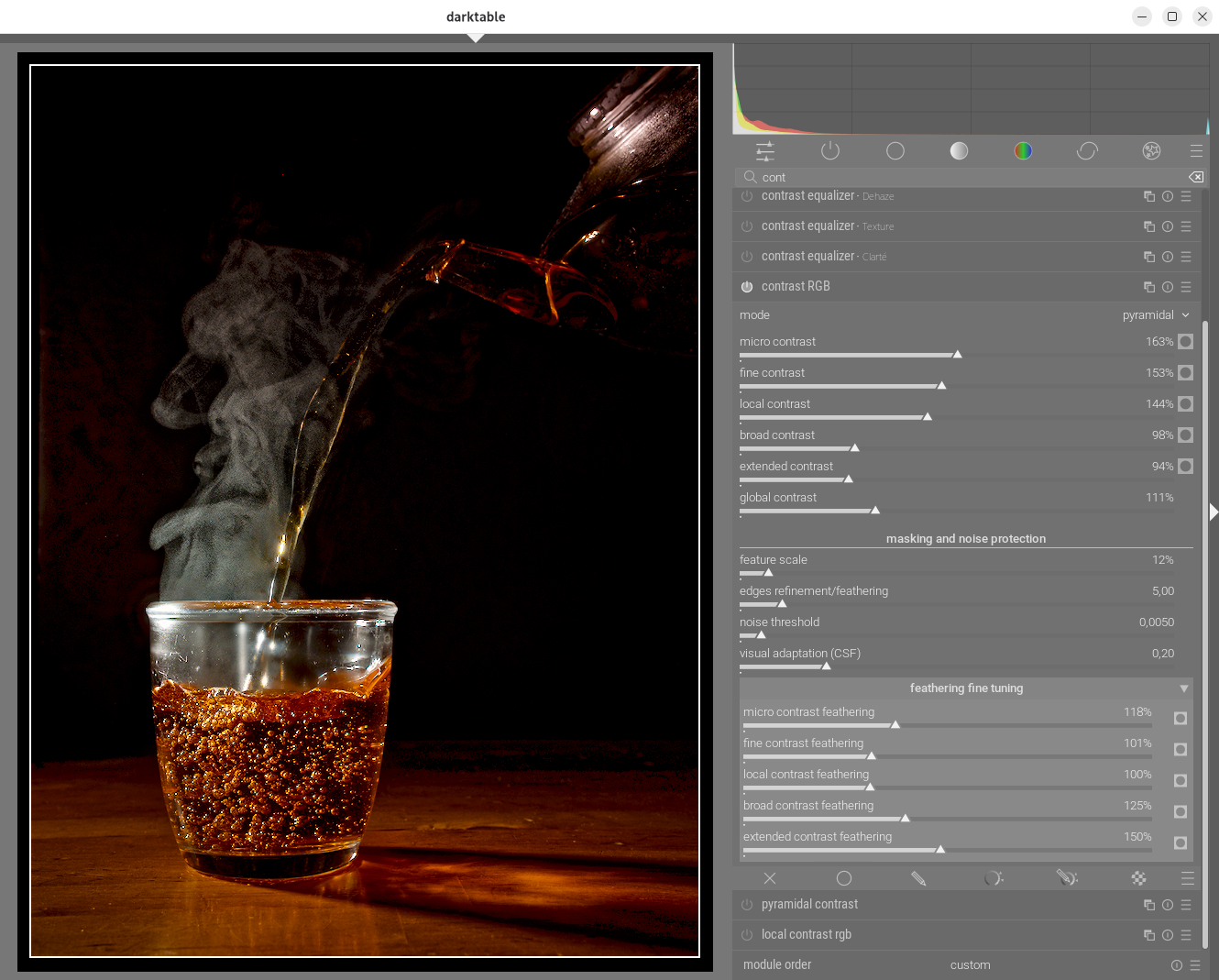
For comparison purposes, this appimage contains the previous “pyramidal contrast” version as well as the latest “RGB contrast” version.
You can also test @Wilecoyote & @Jandren s channelwise proposal; this interesting approach deserves a separate module. A true surgical scalpel.
Next step.
@Wilecoyote @Pascal_Obry : What do you think? I would like to hear your opinion before continuing with the possible development of this proposal.
Here is the latest appimage, thank you for testing it.
https://drive.google.com/drive/folders/1zahcvlAyaN03L1VmX5esOOyhBkO8jiko?usp=sharing
The code can be found on LC-test branch GitHub - Christian-Bouhon/darktable at LC-test
8 Likes
Oh well big hands from my side to all the devs of the three different versions that are floating around here …
I wanna thank you oh so much , for making this possible in the future … hoping you all do find a great solution to getting this into DT master build.
I do see great use of the new stuff …
I do hope, that I do get the last stuff implemented into the next mac dev built …
Cheers Andreas
2 Likes
Would you mind elaborating on these two things?
As they change the underlying method I think it would be good to understand what your addition does 
As for merging something of this, I think there has to be really good arguments for why its worth the multiple internal filter instances instead of just one.
- Does it improve the results by doing the filtering in parallel?
- Does it reduce the number of clicks for the user enough to make it worth it?
- Anything else?
My personal belief is that the best way forward is to figure out the simplest possible module that gives good control, get that accepted and merged by the maintainers and then improve and extend upon that core with the feedback that will come with more users testing it. (Note that I’m not a dt maintainer, just talking from my working experience here)
5 Likes
When building via nix (which was working for all the previous versions) I get the following compilation error for commit 2e5591d664 (current LC-test):
/build/4qd2ras6smp6qf6w8kpnr1yp0506958j-source/src/iop/contrast_rgb.c: In function 'pyr_apply_local_contrast':
/build/4qd2ras6smp6qf6w8kpnr1yp0506958j-source/src/iop/contrast_rgb.c:541:65: error: implicit declaration of function 'dt_fast_powf'; did you mean 'dt_fast_expf'? [-Wimplicit-function-declaration]
  541 |     const float multiplier = (fabsf(exponent) < 1e-6f) ? 1.0f : dt_fast_powf(ratio, exponent);
      |                                                                 ^~~~~~~~~~~~
      |                                                                 dt_fast_expf
Is that a problem on my end, or is something missing?
1 Like
[quote=“ktxux, post:329, topic:55402, full:true”]
When building via nix (which was working for all the previous versions) I get the following compilation error for commit 2e5591d664 (current LC-test):
/build/4qd2ras6smp6qf6w8kpnr1yp0506958j-source/src/iop/contrast_rgb.c: In function 'pyr_apply_local_contrast':
/build/4qd2ras6smp6qf6w8kpnr1yp0506958j-source/src/iop/contrast_rgb.c:541:65: error: implicit declaration of function 'dt_fast_powf'; did you mean 'dt_fast_expf'? [-Wimplicit-function-declaration]
  541 |     const float multiplier = (fabsf(exponent) < 1e-6f) ? 1.0f : dt_fast_powf(ratio, exponent);
      |                                                                 ^~~~~~~~~~~~
      |                                                                 dt_fast_expf
Thanks for the information, I’ll correct it right away.
This error indicates that the compiler cannot find the declaration of the dt_fast_powf function.
Edit : done
2 Likes
Thanks for the very quick reaction. We have another issue now:
build/bdczp44lnfidh18b0cfhzcf49xjs7n0b-source/src/iop/contrast_rgb.c:59:10: fatal error: common/fast_pow.h: No such file or directory
   59 | #include "common/fast_pow.h"
      |          ^~~~~~~~~~~~~~~~~~~
That file doesn’t seem to be part of the tree.
1 Like
That’s right, I just synchronized it.
You’re faster than me.
The test is OK at
1 Like
The Noise Threshold slider acts as intelligent protection for your shadows. The goal is to analyze the light in each area: the deeper you go into the blacks (where the signal is weak and digital noise is present), the more the processing gradually fades away.
This approach allows for a natural and “organic” transition: the module enhances texture and relief where the light is clean, but becomes completely neutral in areas that are too dark to be processed.
CSF (Visual Sensitivity) filtering allows the module to reproduce the natural perception of the human eye. Our vision does not perceive contrast in the same way depending on the fineness of the details: we are very sensitive to medium structures, but much less so to extremely fine details or very large flat areas.
The module intelligently weights the accentuation of each scale (micro, fine, medium, large). CSF favors areas where the human eye naturally seeks relief.
This combination of the two approaches was designed to satisfy all user profiles and respond to the various comments posted on this topic. The simplified Pyramid interface is sufficient in most cases to achieve a natural and fast rendering. Expert mode remains available for those who want surgical control over each contrast scale.
Personally, the Pyramid interface is sufficient for me, and for greater precision I would use your channelwise proposal; the two approaches can be complementary.
I strongly encourage you to test this version and send me your feedback! All opinions are essential to continue refining the module and making it as efficient as possible.
greetings from Brussels
Christian
3 Likes
Thanks, works like a charm now.
The noise threshold and the visual adaption read like something interesting, but I need some time to get an intuition for them. W.r.t. visual adaption, what kind of difference should or can I expect compared to a feathered mask on Jz, for instance? I’ll try this out anyway, but maybe you already have an explanation in mind.
ETA: I see you partially answered this question already, but I’m still not sure whether I should expect masking to be able to do the same thing.
I’ve not tested the noise threshold, but is that something that could be a parametric filter for all modules?
JzAzBz is excellent for color and brightness perception. Here, the goal is to achieve interaction between CSF and Noise Threshold to create intelligent two-level filtering:
- CSF selects the “right” detail size: It prepares the ground by balancing the scales so that the relief is pleasing to the eye without being aggressive (frequency management).
- The Noise Threshold validates the “area” of application: It intervenes immediately afterwards to check whether the area is bright enough. If the CSF has decided to boost a fine detail, but that detail is in a deep, noisy shadow, the Noise Threshold will “calm” the intervention.
2 Likes
FYI, following the above feedback, I have made some minor changes and synchronized.
I hate being the person to ask this kind of question, but were these new features vibe-coded or did an AI come up with them?
I don’t find this question necessary to ask. The source including the development history is out in the open: Comparing darktable-org:master...Christian-Bouhon:LC-test · darktable-org/darktable · GitHub
Which parts of the changes do you think are questionable at this point of development?
I just tried the “DT Performance Analyzer,” but I’m not very familiar with it.
The command builder doesn’t really help me either…
For example, I execute the following command in “CMD”:
“C:\Program Files\darktable\bin\darktable-cli.exe” DSCF0001.RAF DSCF0001.RAF.xmp test.jpg --core -d opencl -d tiling -d perf -d pipe > GT950XT.txt 2>&1
The image is located at “V:- Photo Test -\Fuji X-E5”
The command line then takes a few seconds, but I have no idea where the resulting files are saved and cannot find them with the search function.
Or, as we would say… I’m as dumb as a piece of bread :-o
But anyway: in the current test version, darktable is so slow that every function becomes extremely slow. For example, depending on the image, it takes about 10 to 20 seconds just to open it, and the overall operation is slow and extremely delayed
Translated with DeepL.com (free version)
The commits at Commits · Christian-Bouhon/darktable · GitHub are exactly why I am asking this question, e.g. this one (note the comment at the top that reads like an instruction, including the curly quotation marks that are typical for AI output!). But I’m not certain, which is why I asked the question
I don’t think that using an LLM is inherently bad, but I do believe that it’s important to disclose its usage because LLM output has to be scrutinized with more care than that of a competent human engineer, and this is only reasonably possible after disclosure. This is especially true when we aren’t simply translating code or letting an LLM implement something that is super well understood, but letting it design new concepts.
If asking for disclosure of LLM use isn’t welcome here, I’m happy to disappear from this forum again.
Hey, I don’t know neither you nor @ktxux, but come on, they just asked a question, which is normal during a conversation. They were not rude or anything. Threatening to leave because of that seems a bit over the top.
On the merit of your inquiry, I and possibly many others think that it’s a very legitimate question to ask.
Makes a lot of sense to me.
5 Likes
I can guarantee that the commits are not generated by AI. It’s not very professional, I know, but for me, commits are just a reminder to go back if necessary.
As mentioned at the beginning, I am not a developer. I trained as a baker and pastry chef. If you are interested in my professional background, here is my link: https://be.linkedin.com/in/christian-bouhon-14011018. I am self-taught and have always been passionate about photography and IT. In terms of IT, here is my main source of information, which has helped me progress https://www.developpez.com/
I worked for 30 years in R&D/NPD, and my principle is that at the beginning of development, you should not set limits for yourself. This is the best way to learn and be innovative, and making mistakes with full knowledge of the facts is always beneficial. If an idea is bad, you eliminate it and go back to the drawing board.
To the question of whether I use AI, the answer is YES. It is natively present in vscode, and I am not going to start a debate on AI. I consider AI to be a tool that helps us save time. As long as humans are in control, I don’t see a problem with it. Regarding the point you raise, for example, for noise reduction, AI helped me find a luminance ratio approach to prevent the image from darkening. It’s also a valuable aid for debugging, when it doesn’t create another problem?
PS. All my comments are translated into English by AI, Deepl. And I hope I’m not making things worse by making corrections 
Greetings from Brussels,
Christian
13 Likes