New interface in darktable 2.7 (dev)

I really don’t want to take that the way it sounds… but what else could it mean.
Here’s a diff, you can try it yourself.
imageop.c.txt (3.4 KB)
(updated link due to minor bug)

I’m happy to share I just don’t know anything about PR’s, gits, etc.

Yeah, when the theming matures, I’d see a theme having it’s own folder (maybe a .zip) with css file, img folder, theme file for other info. But at the moment switching them on and off nicely needs a little more tweaking than posted in that diff.

It looks like I have another issue, I don’t have icons at all
Selection_033

There’s something not quite right in Windows, sorry.
I unistalled Roboto to see if darktable-elegant.css falls back on Segoe UI as you said. And it doesn’t.
I get a whole lot of messages like the following:

(darktable.exe:3852): Pango-WARNING **: 18:59:42.910: couldn't load font "Roboto Light, Ultra-Light 9", falling back to "Sans Ultra-Light 9", expect ugly output.

(darktable.exe:3852): Pango-WARNING **: 18:59:43.047: couldn't load font "Roboto Condensed, Condensed Not-Rotated 9.71875", falling back to "Sans Condensed Not-Rotated 9.71875", expect ugly output.

(darktable.exe:3852): Pango-WARNING **: 18:59:43.047: couldn't load font "Sans Condensed Not-Rotated 9.71875", falling back to "Sans Not-Rotated 9.71875", expect ugly output.

(darktable.exe:3852): Pango-WARNING **: 18:59:43.051: couldn't load font "Roboto Medium, Medium Not-Rotated 9", falling back to "Sans Medium Not-Rotated 9", expect ugly output.

(darktable.exe:3852): Pango-WARNING **: 18:59:43.063: couldn't load font "Roboto Light, Ultra-Light Not-Rotated 13.5", falling back to "Sans Ultra-Light Not-Rotated 13.5", expect ugly output.

(darktable.exe:3852): Pango-WARNING **: 18:59:43.064: couldn't load font "Roboto Light, Ultra-Light 13.5", falling back to "Sans Ultra-Light 13.5", expect ugly output.

(darktable.exe:3852): Pango-WARNING **: 18:59:43.151: couldn't load font "Roboto Light, Bold Not-Rotated 107px", falling back to "Sans Bold Not-Rotated 107px", expect ugly output.

It seems that gtk under Windows does not follow the fall back list of fonts. It looks for Roboto and, if it’s not there, it falls back directly on Sans.
So I guess your screenshot is not Segoe UI, it’s Sans.
This is my screenshot:
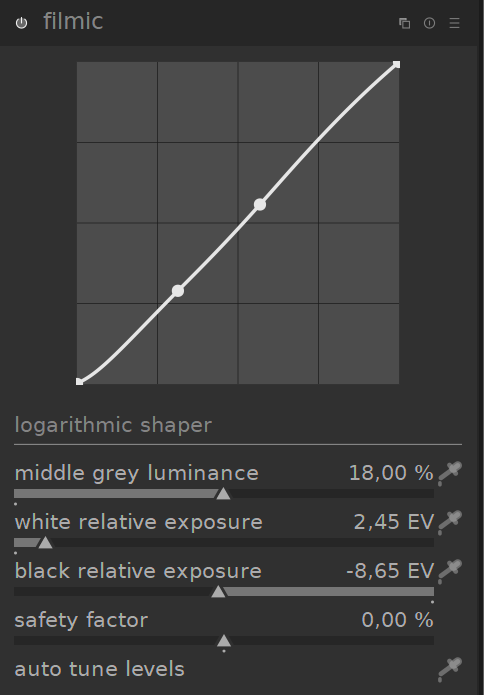
immagine

I also did another test: I manually removed all calls to Roboto in the css file, leaving Segoe UI as first of the font list.
Now I don’t get the messages (except for the condensed typeface, which I don’t have installed), but the result is very different (and pretty ugly IMHO):
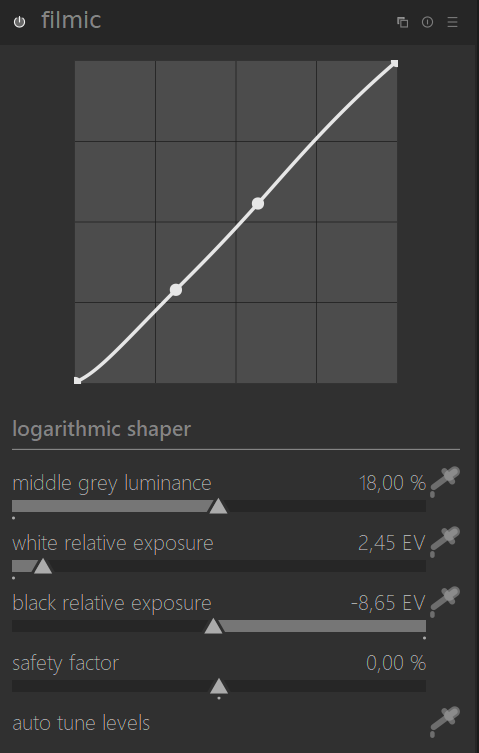
immagine

This is Segoe UI, actually.
If the fallback to Segoe UI doesn’t work, then I vote for Roboto to be installed in Windows and to be packaged with DT.
We can’t use that as it forces icons.

Anyway, I have added a new theme named “darktable-icons” and the necessary Gtk support to show icons for those wanting that.

3 Likes

@MarcoNex Is that Segoe UI Light or Segoe UI Regular? Regular performs better than light at smaller sizes.

It wasn’t to use, it was just proof of concept.

immagine

I replaced Segoe UI Light with segoe UI Regular. Much better, actually.
However the problem seems to me that the same css behaves differently in Windows that in Linux.

dt isn’t developed in a pure Windows environment to begin with. Cross-development has its challenges, which is why dt didn’t have a Windows build for the longest time.

1 Like

Wow, that,s some css… 500 lines.
I think I’d have just put an option in darktablerc and an if in the code.

I acknowledge that, but perhaps there are ways to work around.
Before, the GUI aspect was hardcoded and that in a way secured consistency across different OS’s.
Now with css styles, the consistency could be broken if (as it is now) the GUI aspect is left to the fancy behaviour of gtk and their ports, or to the fonts that each user might, or might not have installed.
If my findings are correct (@peterbud, can you do additional tests ?) the solution can be only to ship DT with all the fonts needed to secure the same aspect everywhere.
That way the font fallback list is not even needed and css is simplified a bit.

What proof of concept? The code was there in 2.6.x and we all know that it is possible to have icons since it has been like this since many years :slight_smile:

???

@MarcoNex I don’t see any consistency problem here.

Let me underline once again:

  • CSS font fallback DOES work as you have also seen recently, I don’t see any fancy behaviour
  • Segoe UI Light is fine, and it is supported on all Windows out of the box
  • If somebody wants to use fonts which are not installed - no problem, anybody can install additional font and change the CSS themese as they see fit

For the warnings which I see bothers you very much: my current assumption is that the root cause is this:

As I see the code queries the default font from the current stylesheet, and assigns it to a variable, which is used in a few places in the code subsequently with hardcoded font sizes and settings. My guess is that gtk_style_context_get is not too smart to handle multiple font-face definitions which we have now in the CSS, and gives back the first font, which is Roboto currently, which does not exist on Windows, hence the warnings.

Finally, I still do not support packaging fonts into dt installer, it won’t solve the problem just would mask it.

TBH if the whole UI on win will use that new standard gui font from MS that should be good imho.

I had this issue with gtk 3.18. You should upgrade to gtk 3.22 if you are in the same case

Thanks, I will try

I’m not sure I was able to explain, let me try again.
The point is that in all the css statements like

font-family: “Roboto Light”, “Segoe UI Light”, “SF Pro Display Light”, “Ubuntu Light”, “Cantarell”, sans-serif;

and similar, the second, third, fourth, etc. choices are NEVER displayed. The program looks for Roboto, the first option, and if it doesn’t find it, then it falls back on the default “sans-serif”.
To prove it, try to put a fancy font that you have installed (in order to easily recognize it) as a second choice in the css: you will never see it on the screen. While if you put it as a first choice, then you will.

So for all the supporters of Segoe UI, the problem is that Segoe UI will never be used with the current css themes.
I don’t know if this is a bug of DT or gtk, but it almost defeats the whole purpose of the css styling.

This on Windows, although at this point I’m curious if the fallback actually works on Linux.

I guess we need to find out why that is the case for you.

You mean for you it is different ?

Despite my chattiness, I don’t have the time to explore dt 2.7. I was referring to what @peterbud said.