Nobody’s being penalised. I just think it’s far more intuitive to use the mouse wheel for the same purpose you use it for 99% of the time. This is why I, and others, keep messing up settings when instinctively trying to scroll.
1 Like
Can I just remind users, that to use the scroll bar, the cursor doesn’t have to be on the scroll bar, it can be on the area to the right of the scroll bar, against the side of the screen.
My opinion is the most used feature (sliders setting in this case) should get the shorter control keys combination. I don’t know which one is the most intuitive, I have used dt for too long, but I sure think it’s the most ergonomic way (being a carpal tunnel syndrome guy spending 14h/day on a computer).
This is a valid difference of opinion. The mouse wheel is great for fine movements of sliders…way more accurate than trying to slide the sliders. It’s also easy to mess up when switching from another app to dt and mistakenly use the mouse wheel with the intent of scrolling. Is there potentially a way to allow a user to set a preference as to which action should require a modifier key?
There is virtually a way to bypass every dt’s defaults in the prefs… But, at the rate we are adding options in the preferences, it won’t be long before users ask for less options because they have backfired and they ended up with dozens of pages of them (Autodesk style).
@anon41087856 @Marctwo Arrow keys work the sliders so for me if I need precise control of a slider I would use them or right click and use the wisker…not sure the correct name for that clever tool…I don’t think I will ever stop messing up sliders thinking I am scrolling the module…Just my thoughts
2 Likes
@anon41087856 @Marctwo In the end I would just like to be able to turn off that action for sliders to avoid actually changing settings inadvertently …I am actually fine with having to use the scrollbar to scroll a window or dialogue and I think that would be an easier fix than switching it around entirely?. Having said that when mousing on websites all day long and using the scroll wheel to “scroll” down its hard to even remember to use it for something like the sliders and far more natural for me and I stress me not for everyone to want to use the wheel in that way…just my 2 cents…I believe the current action in RT uses a shift key to toggle this so in their mind it must have been something worth considering…thanks as always to everyone that works on this project we all benefit immensely…
2 Likes
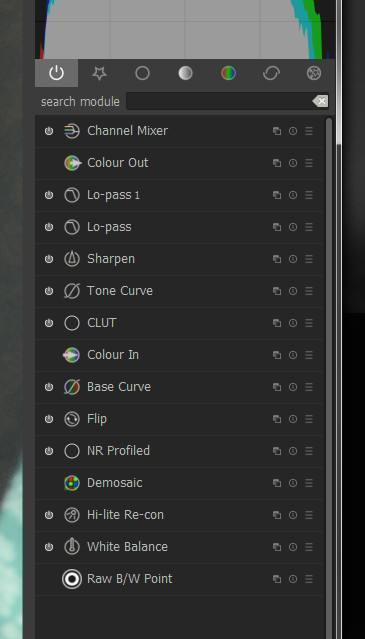
Well, I got the icons back…
2 Likes
So I have built latest dt master on Windows with the theming in place. It just works fine.
@MarcoNex @anon41087856 and others who are interested my view on the “Roboto or not Roboto” discussion:
-
I like the new UI very much and thanks for completing this huge work!
-
Windows specifics: Roboto is NOT installed by default on Windows. It’s a free font and theoretically it could be packaged with dt, but IMHO this would be not necessary
-
I see that the second font option in the CSS is “Segoe UI Light” which is available on all Windows since Windows 7 (see Font List Windows 7 - Typography | Microsoft Docs) The only problem it does not have condensed type face version.
-
Also pls note that the default Windows sans serif font (“MS Sans Serif”) does not have condensed version either installed by default
-
I see the same GTK error message in the log as @MarcoNex, but even with the old “classic” theme I see the following messages:
(darktable.exe:6888): Pango-WARNING **: 20:47:30.403: couldn’t load font “sans-serif Condensed Not-Rotated 9.71875”, falling back to “Sans Condensed Not-Rotated 9.71875”, expect ugly output.
(darktable.exe:6888): Pango-WARNING **: 20:47:30.403: couldn’t load font “Sans Condensed Not-Rotated 9.71875”, falling back to “Sans Not-Rotated 9.71875”, expect ugly output.
I checked and it is caused by this line: https://github.com/darktable-org/darktable/blob/master/data/darktable.css#L512
- So I think we should not waste time and energy on installing Roboto font on Windows, but rather follow the simple rule that on Windows Segoe UI Light is the default font for the elegant theme, and make it work - currently the only limitation is that it does not have Condensed type face version installed by default
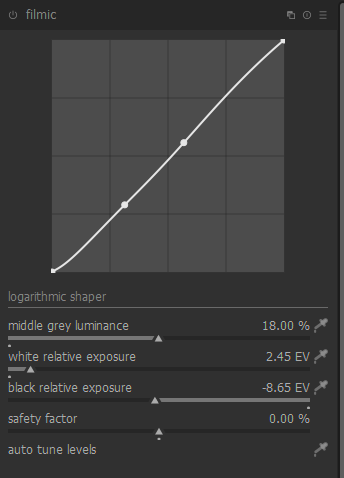
BTW this is how it looks like with Segoe UI Light - is there anything which is very different to UX versions?
2 Likes
looks good. The purpose of the condensed version is to limit the spreading of the modules name. It seems unnecessary here.
I remained silent on most issues but briefly raised the typographical one because it matters. I vote Segoe as well. It is well designed for its purpose and readily available.
Thanks for doing this…I am not a programmer but with good information I can modify scripts etc and this really helps to know what elements are what…Thanks
Waiting for the PR !
1 Like
I have added some contrast for them to be more readable.
Can you explain how? I have problem with icons on my Ubuntu machine
In principle it’s bad practice to override system font theme in app themes. For complex software, such as darktable, it can be necessary but the “cost” is not negligible. Having to make a custom theme to reset to a carefully chosen system font isn’t ideal.
The new interface looks great though! Very nice polish going on.
Sorry, I’m a fish out of water here… But I’ll look into it.
Although, as mentioned earlier, given that the dev’s have already discussed it and decided that the icons are no longer wanted, I’m surprised at your interest.
To get the icons in 2.7.0 you just have to copy the stuff that was deleted from 2.6.2 and tweak it a bit. Pretty simple.
I don’t know anything about the dt code or the librarys used but there’re plenty around here who know everything.  So if you can be more specific about the nature of your problem, I’m sure someone will be able to help.
@Marctwo frankly speaking I will gladly welcome your PR too. It’s about having a choice. Having the ability to change the UI it’s reasonable to have the ability to add icons. From time to time I need to focus to much on a module list to find a module that I want. Icons helps here.
You’re surprise?, so I am ! Why claim you have the icons back if nobody can get this ? OpenSource is about sharing.
I’m against having them back by default, but I’m not against having a specific theme which display them. So, user’s have choice.
2 Likes