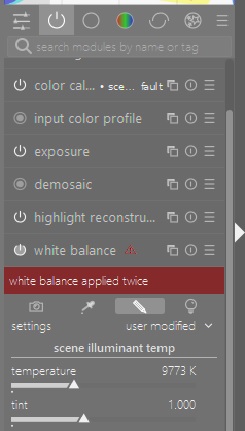
I’ve been using Darktable (DT) for quite a while now. I don’t consider myself a real knowledgeable photography and there are lots of camera capabilities that I simply do not understand. However, I do like to take pictures of natural scenes and wildlife which is normally done in normal daylight. I do realize that there is something called white balance that pertains to digital color representation. I think 6500 Kelvin or thereabouts is what applies to my normal daylight. The DT “white balance” module typically shows a similar number when I’m editing my pictures. However, the automatically included “color calibration” module shows values that are extremely different. For example below 4000 Kelvin. Furthermore DT seems to insist that you can only use one or the other of those modules. In that, trying to use both is said to conflict and prevented.
It also happens that, for my images, I can usually improve the displayed image significantly by turning off the “color calibration” module. While that is easy to do and, in my case, is always something that needs to be tried I certainly can not explain why the module is automatically included in the pipeline.
Don’t worry about those numbers. Darktable’s internal pipeline uses D50, not D65, so it maps temperatures relative to those white points. 6500 K is mapped to 5000 K, 6000 K to something like 4600, and so on. The CCT values you see in color calibration are the mapped (adapted) values, while you see the original ones in white balance.
No, that’s wrong, you need both, and darktable does not say such a thing. However, you need to set white balance either to camera reference or as shot to reference.
Some cameras have wrong values in the colour matrix, and that does break color calibration. The workaround is described in the manual.
That implies to me that you are not supposed to do it. Rather only use color calibration module for adjusting white balance.
It would be true that the numbers do not matter much to me but I often do like to adjust the color and that is often where something a bit artificial makes the picture look better from my perspective. As best I can tell the white balance module does something I want to do whereas there is nothing else in the color calibration that I want to do and depending on the image file it does not even portray white balance but rather something else, that I don’t remember at the moment, which is meaningless to me. Then how am I supposed to change white balance. My answer is deactivate the color calibration module.
In conclusion, I think color calibration is quite complex and I certainly don’t understand everything it might allow me to do but as yet I haven’t seen any reason to.
If I am not mistaken, you can set a legacy wb workflow (I.e., just using white balance and not color calibration rgb) independently from the scene- vs. display-referred workflow in the settings.
The comment from @kofa is correct. And I agree it’s “Some cameras…” I do not recommend trying to go back to an older workflow.
The manual discusses this topic, but it’s quite technical.
Recommended practice is to leave the white balance module alone and make any adjustments in color calibration. Personally, I start with illuminant to “as shot in camera,” and judge whether any further changes are needed. I might then change to another illuminant (usually either Daylight or Custom), but only when necessary.
Color calibration is a complex module that includes a color channel mixer. Boris has a nice video or two on the topic, if you are interested. I would suggest a 2nd instance of color calibration for any channel mixing.
Edit: corrected wording to indicate white balance.
Using CC sometimes might not give you a pleasing “WB” infact its not a WB but a perceptual CAT on the pixel data instead of simple r,g,b coefficients applied equally to all the data. So items that are neutral or white or indeed hopefully, most of the colors will look similar when viewed under the editing conditions as they would have in the scene…
If you start to think in terms of the scene illuminant rather than temperature it becomes a little easier to understand…
THe manual does a pretty good job of explaining the implementation.
Aurelien has done an nice overview that is perhaps better and added it to his Ansel documentation…
Another good reference, keeping in mind there is some math, but you can read between the lines to understand how and why the CAT is applied.
Well, you can still use only the “white balance” module, and disable color calibration (that’s what we did for years before “color calibration” came along).
But if you use “color calibration”, you have to use “white balance” as well: some modules between those two (in pixel pipe order) need to get input that’s at least approximately white balanced (e.g. “demosaic”)*. And to make sure “color calibration” has a reliable starting point, you should set “white balance” to either ‘camera reference’ or ‘as shot to reference’. The full reasoning is explained in the thread introducing “color calibration”
I suppose you mean to leave “white balance” alone (but enabled)? Color balance is not a module for white balancing at all, but its use is recommended when using filmic to increase chroma/saturation to taste. Sigmoid and AgX seem to rely less on color balance for color grading (I rarely use those tone mappers).
I have a pull request that will allow exact white balancing via white balance, and leave only the adaptation to color calibration, but it’s not high prio.
This probably surprises me and leaves me wondering what settings are then used in the white balance (WB) module itself?
I have previously found that with WB I can simply disable the color calibration (CC) module and use the options from the drop down menu in WB module. That works fine in my view. The real advantage for me with the CC is that I can do masking and I can use multiple instances. With the WB module no masking and only one instance.
However, by default the CC module is now determining the equivalent white balance (called illuminant) based on ‘as shot in camera’ and this works well for most of my images as the camera has done a good WB when capturing the image. Turning off CC module and setting WB module to as shot in camera appears to give the same result to my eyes.
What I like about the WB module is that it usually offers options like direct sun, cloudy, shade, tungsten and other WB settings found in the camera, but the CC module is limited in its options and I wished it offered more choices.
If you prefer the WB module instead of the CC module then create a style that deactivates the CC module and sets the WB module initially to as shot in the camera would be my recommendation.
I hope you find the answer you are seeking from the posts here.
This will allow you to select whatever multipliers you want in white balance (including the presets), and use color calibration to actually perform chromatic adaptation. white balance simply scales the RGB channels (it’s an approximation that works with neutral shades, setting R=G=B to produce grey, but not with colours); color calibration remaps colours taking human vision into account (‘if it was this colour under tungsten light, it has to be represented by that other colour once tungsten is shifted to the pipeline’s illuminant’) .
Thanks @kofa for this excellent and succinct explanation of the intention of the CC module. Despite having watched AP’s explanation of why he created this new CC module it wasn’t clear to me why the CC module was better except he told me it was.
Your PR sounds very promising. It sounds like a small but good improvement. Thanks for all your efforts.
If you have not looked at the link I shared above you might want to consider it… AP prepared it for is Ansel fork site…its a very good wb/cc overview esp as it would pertain to DT …
I can absolutely understand why the OP would think you can only use one of WB or CC. The error message “white balance applied twice” provides no clues that the problem lies in the settings in the two modules as opposed to the simple act of having both modules active.
You can get “trapped” into the white balance applied twice scenario if you start an edit with auto-apply pixel workflow defaults set to none. With this setting, the WB module defaults to as shot. Subsequently turning on the CC module will generate the error message.
You are right, that’s a confusing message. It means that color calibration is enabled with chromatic adaptation active (so it expects ‘camera-reference’ data, to be adapted (‘white balanced’) by the module), but white balance is not in one of the ‘reference’ modes (camera reference, as shot to reference).
I resisted using CC for as long as I could, but eventually noticed that it produced images with more clarity and sparkle than I could achieve with WB alone. I have absolutely no idea why that would be the case.
it’s not an error message - it’s a warning.
There might be reasons why you need to use manual settings for white balance e.g. if the internal predefined values aren’t proper for your camera - but unless you measured your cameras sensor that doesn’t make sense.
It’s a “you need to knwo what you are doing here” flag …