[French-reading people needed] RawTherapee usage process review and discussion + raw vulgarization

(:fr: Traduction française plus bas.)

Hi there! I could have sworn there was a French section on this site but could not for the life of me find it. I probably mixed things up with another Discuss-based site.

Here’s the thing: I recently created a couple of documents in French via the nice GitHub Pages feature – it is hosted here Notes photographie – with two purposes in mind:

  1. Explain to my friends and family what raw pictures are and why the hell I need to spend entire evenings in front of my computer before publishing tiny slideshows.
  2. Clearly outline the way I use RawTherapee, as a way to get feedback, exchange tips, provide some kind of pseudo-tutorial, and make sure I can get a quick refresher if I stop processing stuff for a long time and forget how I was doing things.

I post here in case you want to:

  1. Double check that my raw-related explanations are not outrageously wrong. I’m no expert and may have gone astray in some parts.
  2. Read my RawTherapee notes to exchange pieces of advice, point out stuff that I may be doing horribly wrongly for whatever reason, direct me toward tools that I currently overlook, etc.

… or more generally if you like to read stuff about photography.

I have no idea how machine-translatable these pages are – I often use weird phrases – but maybe non-French readers can give it a try too. :woman_shrugging: I won’t force anyone, though.

:fr: Traduction

Bonjour ! J’aurais juré qu’il y avait une section française sur ce site, mais impossible de la retrouver. Je confonds peut-être avec un autre site basé sur Discuss.

En gros : j’ai récemment créé deux documents écrits en français et publiés via la fonctionnalité GitHub Pages – c’est hébergé ici Notes photographie – avec deux buts en tête :

  1. Expliquer à mon entourage ce que sont les raws et pourquoi j’ai besoin de passer autant de temps devant mon ordi avant de pouvoir publier mes petits diaporamas.
  2. Mettre au propre les étapes de mon processus d’utilisation de RawTherapee, à la fois pour avoir une base sur laquelle échanger des astuces et conseils, pour prendre du recul, pour avoir un moyen de me rattraper si je glande trop longtemps et oublie tout… Etc.

Je poste ici au cas où vous voudriez :

  1. Vérifier que je ne dis pas des trucs outrageusement faux dans ma pagre de vulgarisation sur les raws. Je ne suis pas un expert, donc ce n’est peut-être pas toujours bien fou.
  2. Voir mes notes sur RawTherapee pour échanger des astuces, ou pointer du doigt des choses que je ferais horriblement mal, ou faire la pub d’outils que j’ignore pour le moment, etc.

… ou plus généralement si vous aimez lire des trucs sur la photo.

Je préviens juste que mon langage a tendance a osciller sans prévenir entre le soutenu et le très familier – je sais qu’il y en a que ça rebute.

Voilà ; bonne journée à tous en tout cas.
Have a good day, everyone.
:bowing_woman:

Bonjour @alicem ,
peut-être s’agit du forum ART francophone ? On est quelques-uns à être inscrits aux deux forums.
Merci pour les articles.

Hi @alicem,
maybe it’s the forum ART francophone ? There are a few of us registered to both forums.

Thanks for the articles.

Bonjour, l’autre forum français pourrait être le forum d’Another Rawtherapee comme l’a dit @clinart (je crois que j’y ai croisé Jacque expliquant le GHS). Certaines personnes parlent français ici, je sais qu’un des développeurs, Jacque, peut le faire, mais il n’est pas en bonne forme, donc ne peut probablement pas lire beaucoup. Je suggère le document officiel de Rawtherapee : RawPedia (Main Page/fr - RawPedia) comme source pour vérifier votre contenu. J’espère que d’autres personnes vous aideront également !

Edit: Désolé, j’ai oublié de dire la partie « si vous n’avez pas lu Rawpedia » et vous l’avez certainement lu. Je suis en train de lire votre page avec la traduction automatique et j’espère pouvoir vous aider.


Hello, the other French forum might be Another Rawtherapee’s forum as @clinart said (I believe I came across Jacque explaining GHS there). Some people do speak French here, I know one of the developer, Jacque, can, but he is not in good shape, so probably can’t read a lot. I suggest Rawtherapee’s official document: RawPedia (Main Page/fr - RawPedia) as a source to double check your contents. Hopefully you will receive help from other people too!

Edit: sorry, I forgot to say the “if you haven’t read Rawpedia” part and you definitely have read it. I’m going through your page with machine translation and hopefully could be of help.

Haha, nope, I think my mistake involved the not-photography-related https://community.e.foundation/ website, unfortunately. And I don’t use ART, just the “original” RT, but thanks.

I actually used RawPedia to fine-tune some aspects of what I wrote, but it’s often quite verbose and technical (which is to be expected from documentation in general, I guess); one of my aims was to provide newbies (well… people that are even more newbies than I am) with a more laid-back and straight-to-the-point procedure.


Haha, non, je pense que ma confusion était avec https://community.e.foundation/, qui n’a rien à voir avec la photographie, en fait. Et je n’utilise pas ART, juste le RawTherapee « original », (HS : C’est moi ou ça remplace mes espaces insécables avec des espaces basiques à l’affichage du post ?) mais merci.

Concernant RawPedia, oui, je l’ai pas mal consultée pour ajuster certains aspects de ce que j’ai écrit, mais je trouve que c’est souvent assez verbeux et technique (ce qui est plutôt normal pour ce genre de documentation, en soi) ; l’un de mes objectifs était de fournir aux débutants (enfin… aux gens qui le sont encore plus que moi, quoi, on va dire) un support et une procédure plus informelle et directe.

I’ve had a quick read through the “pré-courbe” part of the RawTherapee notes. It’s not an easy task to document guidelines like these because every image is different and there are so many ways to do things in RawTherapee but these notes provide a structured approach and a lot of helpful comments. I’m sure they will be a useful and welcome addition to anyone starting out with RawTherapee. For what it’s worth, I’ve made several attempts to do something similar for personal use over the last few years but I keep changing my mind about the best way to go about it and I’m never really sure whether I’m making optimal use of the various tools. EDIT: The process is similar to the one you outlined with a few variations.
RT Processing Notes.zip (182.9 KB)

Thanks! I’ll go through your document and try to organize my comments in sections.

Exposure basics

whites turning grey in the case of the “Highlight compression” slider

I guess you second my notes about not pushing this particular slider too far, then. If I gather all the highlight compression values from the stuff I put on my website and sort them numerically, it quickly falls below 30, with the bulk of the values being in 5–20.
Edit: Wow, later you seem to say that you allow values up to 100.

I still fail to see the point of the associated “highlight compression threshold” slider. It just seems to make the compression result weird or suboptimal to me. I think the only time I used this was when I desperately tried to make the sun “look good” without ruining everything else, or something like that. Overall, that slider always seemed to be a rather niche feature to me.

From your notes, I see that it was probably right of me to avoid using the Exposure slider too much. The “auto levels” feature tends to go crazy with it, while I personally prefer to leave the heavy-lifting work to other sliders and tools. Hence the fact that I basically tell people, in my own notes, to use the Exposure slider while focusing on the highlights and clipping. Hmmm, I notice that my notes were somewhat lacking in that part. I’ll edit it a bit. Need to tell readers to avoid extreme values.

making small adjustments with several tools

I often get the feeling that my processing is a sum of nearly unnoticeable changes, haha. Sometimes the difference between some of my snapshots is absurdly subtle.

Selective Editing (using a Global spot)

I never used global spots – it sounds so counter-intuitive, in a “selective editing” tool, haha. I see that, oddly enough, there is both a “global” mode and a “full image” mode. I’ll need to check the docs about this.

Color Appearance (CAM16 & JzCzHz)

I never used this either, mostly for stupid reasons I guess. It has a creepy name, and I think I read stuff somewhere like there were two competing implementation of that stuff living in different Git branches of the project. I don’t remember exactly, but basically it gave me the impression that using this tool would be a threat to backward compatibility. Last but not least, most of the sliders within sound cryptic as hell to me. I guess I’d need to do quite a bit of RawPedia reading on that.

I gave it a quick try and was surprised by how fast the computations are – it barely slows down the preview – with respect to good old Tone Mapping. What kind of dark magic is that, haha?

Camera profiles

Yep, after creating [Questions] How to choose a DCP profile (if at all), I ended up using a neutral-ish profile (Canon EOS R6 Mark II Camera Neutral.dcp) basically systematically. If I want to exaggerate anything later, I can still do so via the various tools.

Dynamic range

I used to make an obsession of making the histogram touch both ends, but now I honestly do what “feels” and “looks” right, paying more attention to the preview itself. I don’t necessarily want my highlights to feel needlessly “brutal”. If an image “looks flat and lacks contrast”, as you point out, we’re generally able to notice that issue anyway, to some extent.

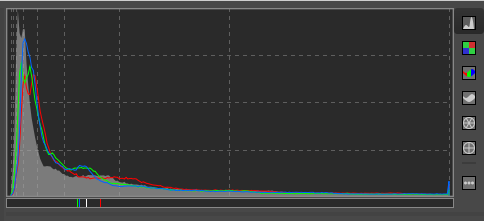
Plus, some histograms are “naturally ugly and weird”, especially on pictures meant to be dark, and I find it hard, then, to decide what “touching both ends” even means:


(This is the final histogram of https://www.alicem.net/photos/2025-figs/pics/G79A1769.jpg, on which some blown highlights drove me half-insane.)

Similarly, years ago, I used to use the black point and white point trick on the curve (the points that create flat areas on both ends, as you show on your screenshots), but now I rarely do that – or just a little. But… well… my curve is often nearly flat on both ends, so I get something that looks similar, I guess. I just like to remain able to slightly adjust stuff, even if it’s just for very few pixels. And it gives a less “extreme look”, as I mentioned earlier.

Well, despite what I say, other tools like Local Contrast or Tone Mapping often end up stretching the final histogram regardless, haha. But keeping some “headroom”, as you put it, for such tools at this step instead of going all out is a good idea IMHO.

set Method to Color Propagation

Whaaaaaat?! I always kept the default. I think it used to be “Blend”, and now it’s “Inpaint Opposed”. But I honestly don’t see much of a difference. I guess it’s more visible on extreme cases.

Dynamic Range Compression tool and set the Amount slider to around 20 or less if possible

I agree about the “20 or less”. As I say in my notes, some pictures even manage to get surprising benefits from this with a strength of 1 or 2, haha.

Perceptual […] but you can change it to any of the other modes later on if you wish

While I don’t absolutely forbid myself from changing the curve mode midway through, I try to avoid it if I can: I noticed that my favorite curve shape varies depending on the mode. Sure, the changes are not radical, but still. If I ever change the mode, I make sure to go through all my points and adjust them according to my tastes – except perhaps the leftmost ones, if I’m being lazy.

As pointed out in my own notes, I basically go for 1) film-like for an average look 2) standard for a lively, exaggerated look and 3) perceptual for a subdued, melancholy or dreamy look. And I try to decide on this early on if I can. Or at least on a “draft” of a curve, before going all out to make it as perfect as I can.

If the shadows become oversaturated you can switch from the default RGB color space to the L*a*b* colour space

Interesting. Never did that. Indeed it gives a more “perceptual” look. But I guess it’s more noticeable for extreme slider values. While you seem to be OK with Shadows values up to 80, I honestly rarely go past 50. If this, plus range compression and whatnot, is not enough to save some dark parts of the picture, I cowardly let those parts die, haha. Mostly for fear of generating weird artifacts or making these parts feel unnatural.

Tonal contrast

Tone Equalizer

I always got the impression that the effect of this tool could be emulated with the ones I already use (especially the tone curve), so I never used it. Maybe I’m wrong. Not sure how to decide whether something warrants its use. But I seem to add significantly more points to the curve than you do – maybe that’s why.

Abstract Profile

I never used that. Sounded too esoteric to me, and I thought it was screen-calibration-related or something. I tried to fiddle with it right now and it seems quite hard to master.

I think the user interface also made me overlook that tool: when it is folded back on itself, it looks like it’s just a tiny tool made of the “Output Profile” part.

Fine-tuning

last step […] using the Tone Equalizer and the L*a*b* Adjustments tools

If the histogram displayed in the background of the tone curve is to be trusted, I think the Tone Equalizer is applied before the tone curve, in the rendering pipeline: the curve-histogram jiggles when you change Tone Equalizer settings.
Therefore, I would advise against fiddling with Tone Equalizer after having drawn the curve, unless it’s for really minor changes (especially for the sliders dedicated to the darkest or lightest tones). L*a*b* Adjustments does not seem to have this issue, which is one of the reasons why this is one of the very last tools I adjust.

it can be useful sometimes to use the LC curve

That one sounds interesting. I was always afraid of those L*a*b* Adjustments curves. I was like “What the hell? Nine curves? Are they trying to kill me? I already need ages to be satisfied with the basic tone curve!” but I guess some of those curves are more popular or useful than others? And do you generally tick the checkbox that asks to restrict the effect of that curve to reds and skin tones?

the luminance (L*) curve

I don’t quite understand what this specific curve adds to the usual tone curve. I guess it is color-friendlier?

subtle adjustments to the hue, chromaticity and lightness of individual colours

Oh, indeed. I gave it a quick try right now. Looks fun, and more straightforward than the RGB curves from the Colors tab (I mean, you don’t have to perform mental color-computations from red, green and blue to target specific hues). But I fear that if I try playing with this there will be no end to it, haha.

What about…

  • I’m kinda surprise you did not mention the Color Toning tool in those exposure-focused notes of yours. In “Color correction regions” mode, the Slope, Offset and Power sliders provide ways to make fine adjustments without too much hassle. (But I generally do that fairly late in my process.)
  • Do you ever use Haze Removal? I find it quite hard to compensate for its darkening effect, and it seems to invalidate many of the choices I make in the Exposure tab. The fact that it uses lots of processing power makes this even worse.
  • I recently started experimenting with HDR mode (I used to think it was redundant or even impossible to toggle on when shooting in raw…) and it seems to help a bit, during capture, to avoid clipping in the first place. You then have all the room you need during processing (except in very extreme pictures, of course). It can make it harder to decide which shot has the best potential, though, due to how dull it makes things look while still unprocessed. I circumvent that by generating JPGs using a fairly simple profile that applies automatic exposure and stuff.

“Meta” aspects of the topic

I’ve made several attempts to do something similar for personal use over the last few years but I keep changing my mind

I think it’s pretty normal for stuff like that to evolve over time, and it’s part of the deal, so to speak. One interesting thing about my notes being on GitHub is that this provides me with a built-in, hassle-free history of my changes. Random commit as an example.

But of course, this is mostly interesting with text-based, non-WYSIWYG formats. The AsciiDoc tool I used to that end is pretty nice to quickly take notes that can be rendered fairly prettily. It allows to focus on content without struggling with formatting consistency and so on (by the way, the sections in your notes seem to jump from 4 to 6 – perhaps you deleted one at some point?). It even has a set of “UI” macros (that I made heavy use of) to typeset menu paths, keystrokes and interface button labels. And you can define custom “attributes” that are reusable at will; for example, I can just type {lab} and get “L*a*b*”.

Thanks for the comments.

I put in some guidelines for slider values for a couple of family members bearing in mind that they are highly image dependent. In some cases you can get away with higher values but I agree it’s better not to if you can avoid it. Using it in conjunction with the Whites slider in the tone equalizer can be a better option in many cases.

As indicated in RawPedia, I use it to limit the point where the highlight compression slider starts the compression. It can be useful if you need to use higher values of compression.

The full-image mode allows you to make use of the DeltaE detection whereas the Global mode sets the Scope to 100 making the tool act like any of the global tools in the main RawTherappee menu.

Most of that section comes from RawPedia although I did put a caveat in further down:

Again, keep an eye on the clipping indicator but remember it is only a guide. The exact setting should be a matter of taste.

Since I drafted the notes, I’ve been using the Tone Equalizer a lot more to get the dynamic range under control before using the curves.

But I do use it particularly with the masking when I want to desaturate the highlights,

Frequently :slight_smile:

Thanks for the clarifications.

But how do you deal with it, then? I personally bite the bullet of high computational costs, activating Haze Removal early on, then adjusting most exposition-related sliders and the curve, even if it means struggling with a slow preview. I hate that, but it can be worth the trouble for landscapes…

It can be temporarily deactivated later on, while setting up sharpening tools and stuff, but apart from that… :woman_shrugging:

It doesn’t seem to be an issue on my setup (Ubuntu 24.04 - i5 with Intel graphics -16Gb ram), not that I’ve noticed anyway. I haven’t tried it on a Windows machine.

This module is my “go-to” for anything where the dynamic range can’t be easily sorted with the Exposure tab. The combination of CIECAM with the tone-mapping options allows you to get good results most of the time. Don’t ask me to explain it though - @jdc is the man for that.

Bonjour à tous

Le problème de la documentation, et en particulier celle écrite dans une langue différente de l’angliche est un problème plus que complexe.

Je ne dis pas que coder en C++ est simple (je suis mauvais), mais le système est rodé, nous sommes plusieurs à concevoir des algorithmes, développer du code, contrôler tout cela avec Github. On peut critiquer la lenteur (mais il faut bien que quelqu’un d’autre valide ce qui a été fait), l’interface graphique, les algorithmes curieux, etc. mais globalement cela fonctionne.

La documentation est de mon point de vue plus complexe:

  • les développeurs ne sont pas les mieux placés car ils ont une vision souvent technique des choses, ce qui ne veut pas dire qu’ils ne doivent pas faire de la documentation.
  • le problème de la langue d’origine (même si il y a de bons traducteurs et si IA permet encore d’améliorer) est un problème de fond - certaines nuances, certains ‘jeux de mots’ sont intraduisibles. D’autre part qui va faire (homme ou machine…) les traductions dans toutes les langues.
  • le contenu lui même est problématique doit on faire du texte simple, du texte avec des schémas, des didacticiels, des vidéos et comment rendre le système adapté aux souhaits et compétences de chacun. Quelle part donner à la ‘pratique’, aux algorithmes, aux mathématiques ? Pas simple
  • le support informatique (lieu et maintenance, le logiciel WEB - Hugo par exemple), ainsi que les clefs de recherche sont des aspects fondamentaux.

Maintenant parlons de ce qui existe et de ma participation et de l’existant:

  • Rawpedia a été utilisé, mais il est maintenant obsolète. Nous avons reçu des conseils de ne plus s’en servir…remplacé par Hugo. Mais manifestement (je n’ai pas de droit d’accès), c’est plus complexe qu’il n’en à l’air, rien que pour passer de Rawpedia à Hugo… Donc aujourd’hui je ne sais pas quoi faire ? Dois-je continuer à utiliser Rawpedia ? Comment utiliser Hugo… je n’ai pas de réponses… @paperdigits
  • Jusque fin 2021, nous avions avec Wayne @Wayne_Sutton réalisé un duo que je qualifie de performant. J’écrivais une documentation en français et Wayne non seulement proposait une traduction, mais et surtout une critique objective. Ceci a permis de réaliser en anglais une documentation de qualité. La version anglaise étant meilleure que la française d’origine…que je n’ai pas toujours corrigé a posteriori…Certaines parties sont même absentes…
  • A partir de 2022, la maladie (et l’âge, je vais avoir 78 ans) m’a rongé la santé et m’a beaucoup affaibli. Le code est devenu une manière d’oublier, mais peu à peu la documentation est devenu un sujet non prioritaire…Aujourd’hui depuis quelques semaines je sens une lente amélioration.
  • Que faut-il faire aujourd’hui, comment améliorer la documentation en anglais, en français, en allemand, espagnol, neerlandais, etc. Je ne sais pas ?
  • mais dans tous les cas c’est un travail considérable qui implique une coordination (autre que Github), en quelque sorte un vrai chef de projet.

Revenons à quelques points

  • merci à Wayne pour sa contribution dans ce post, mais aussi depuis plusieurs années pour améliorer la chose.
  • Rawtherapee a ouvert (sous mon initiative dans une majorité de cas) des voies nouvelles qui peuvent perturber l’utilisateur : Wavelets (qui n’a pas grand chose à voir avec Gimp), CIECAM qui n’est pas un gadget, Selective Editing qui fait plus que remplacer les masques : de mon point de vue les masques dans RT - que j’ai conçu - ne servent quasiment à rien…Il vaut mieux utiliser les multi spot, les 'excluding spots", etc. Et récemment des outils novateurs de mon cru ou non comme TRC, Abstract profile, White balance auto, Log encoding, Sigmoid, GHS. Une parenthèse pour montrer l’incidence de la renommée: regardez le nombre de posts dans Darktable à propos de AVG et le nombre relatifs à GHS dans RT… énorme la différence, alors que les produits sont assez semblables…
  • Pourquoi le mode Global ?(qui n’est autre que Full image sans deltaE), car cela ajoute des fonctions à RT (comme celles de main) d’une manière simple sans aller bricoler dans “Settings”, mais en permettant l’utilisation en multipsot (Excluding spots, Graduated filter, changements locaux, etc.)
  • Pourquoi associer des outils Tone-mapping avec CIECAM…(j’aurais pu faire pareil avec GHS, mais Selective Editing permet d’ajouter des outils et/ou des Spots) ? C’est simple au plus près de l’image linéaire (Scene reffered en langage Darktable), on fait les modifications de Dynamic Range, de relevage des ombres, etc. Puis on applique ‘le ROI’ des CAM (Color Appearance Model) qui permet de prendre en compte les aspects physiologiques et pas seulement mathématiques. je pense que RT est le seul software à prendre en compte CIECAM (at aussi JzCzHz)…

Je reste ouvert à toutes questions

Jacques

1 Like

Well, I gave it another try right now and it’s indeed OK (Xubuntu with i7 32 GB), even with all sliders to the max. So either this was significantly improved in RT 5.11, or I once stumbled on a particular combination of tools that made it slow, or I’m just imagining things. :woman_shrugging: Either way, I should edit my documents to stop saying that it’s constraining. Done. Thanks for allowing me to notice that. :bowing_woman:

There’s still that need for compensation (a quick dirty test shows that for a strength of 20 and a depth of 5, I need about +7 lightness and -5 contrast is L*a*b* adjustments), but it’s less of a bother if the preview is responsive.

By the way, I rarely need large depth values. It seems strange to me. :thinking:


J’espère que ni mon post ici ni mes documents n’ont été mal pris ! Je souligne le fait que la documentation n’est pas complète et parfois technique, mais c’est « normal » vu la profondeur de l’outil. RawTherapee est une des choses technologiques les plus incroyables que j’ai croisées, et si j’arrive à y convertir ne serait-ce qu’une personne, je serais déjà ravi.

Ah, il me semblait qu’il y avait une histoire de ce genre, d’où le fait que je dis « je crois qu’ils aimeraient changer » dans mon document.

Je pense que même si des tutoriels plus « personnels » peuvent sembler redondants, ils ont le mérite de fournir une offre avec des modes d’expression variés, et augmentent les chances que chacun puisse trouver « chaussure à son pied », avec un « interlocuteur » qui lui convient et le motive. En plus, bien sûr, des langues diverses.

Pour les exemples et les schémas, j’ai un peu opté pour du « mieux vaut mettre un truc pas parfait que rien du tout ». Si je me mettais à fouiner dans mon disque externe à la recherche du cas parfait, ça aurait été chronophage et je me serais peut-être découragé.

Désolé pour ton état de santé ; j’espère que la « lente amélioration » continuera.

Cela correspond-il simplement au fait de placer plusieurs zones avec le Selective Editing (comme quand je fais œil gauche puis œil droit séparément), ou y a-t-il un concept qui m’échappe ?
:us: Does “multi-spot” simply mean “several different spots in the Selective Editing tool”, or is there some concept that I missed?

Est-ce une hérésie d’utiliser à la fois le Tone Mapping de Exposure et le Color Appearance en global spot, ou bien sont-ils complémentaires ?
:us: Is it absurd to combine the Tone Mapping tool from the Exposure tab with a global spot-based Color Appearance filter, or are they complementary?

Je regarderai à l’occasion RawPedia sur ça car tous les termes à base de JzCzHz me dépassent complètement, et je ne veux pas vous demander de paraphraser la doc ici non plus, quoi.

Merci pour la réponse en tout cas.

(Je culpabilise car j’aurais probablement les moyens d’aider à droite à gauche pour la traduction ou autre, mais entre les photos en retard à traiter, celles à prendre tout court, et d’autres trucs persos hors photo, c’est un peu mort là je pense. Je ne mets déjà plus assez le nez dehors. :sweat_smile:)

@alicem

Aucun problème sur tes commentaires, mon terme est générique. Car il faut bien reconnaître objectivement que nos mises à jours sont assez lentes. A une époque quelqu’un sur ce forum avait dit “Avec Adobe les mises à jour sont plus fréquentes et rapides”, Ingo (un des grands développeurs il y a quelques années) avait répondu à l’époque “Peut être mais ils sont plus de 1000 développeurs et nous ne sommes que quatre”. Mais si on veut s’assurer de la pérennité du code il est indispensable de faire une revue par quelqu’un d’autres, d’où le temps à y passer.

La remarque que tu fais sur “Muli spot” est très pertinente et permet de faire le point sur ce que sont les RT-spots (bien sûr c’est dans la documentation). On est dans un concept différent des masques… même si derrière il y a des points communs. Je dois admettre avoir été un peu ‘provocateur’ en imaginant ces ‘machins’ en 2014. Ceci suppose de remettre en cause ses pratiques, ses habitudes…:

    1. Chaque Rt-spot peut être de 4 types : local, excluding, full image, global.
    1. Chaque Rt-spot peut utiliser un ou plusieurs des outils (Tools) repris dans la liste : Color & light, Wavelets, Color Appearance, Tone mapping, etc.
    1. Tu peux ouvrir autant de Rt-spot que tu veux, aux endroits que tu veux et combiner les types et les outils .

Tout cela bien sûr dans les limites de la mémoire de la machine avec les conséquences sur les temps de traitement (par exemple Denoise et Wavelets sont énormément consommateur de mémoire…) .

Non ce n’est pas une hérésie, tu peux mélanger ce que tu veux…:

  • Tone mapping va surtout jouer sur la texture (et un peu sur la dynamique)
  • Color Appearance (Cam16 & JzcZhz) va agir selon les réglages que tu choisis, sur la dynamique Range, les highlights, les shadows et permettra de prendre en compte les aspects physiologiques, comme par exemple le contraste simultané… Pour moi aucun interdit…

Ne culpabilise pas, au contraire. Un post comme celui-ci fait progresser la connaissance et permet d’expliquer et d’échanger… Même si c’est en français (je suis nettement plus à l’aise que en angliche).

Merci à toi

Jacques

Today I started using the “Sticky keys” (« Touches rémanentes » in French) feature while working on the curves, especially the tone curve. I dunno if I’m the only RT user who almost always holds Ctrl while moving the curve points around for more precise placements, but basically my left-hand fingers were really starting to complain about that. Now I just have to hit and release Ctrl before moving each point and the OS behaves as if I were holding it. I feel a bit silly for not thinking about it sooner.

(:thought_balloon: I think it would be a great feature for RT to have something like a toggle near the curve, allowing to set the default moving method to the fine-grained movements, basically reversing the role of Ctrl.)